WWW.FOSCAM.COM FI8608W User Manual
For example, use strings http://cyjun321.Dyndns.org:8090 to login the camera. Here
cyjun321.Dyndns.org is the DDNS Host, 8090 is the camera’s port.
Note: Make sure you have enabled the UPnP Port Forwarding. The camera’s software will be
configured port forwarding. We recommend you configure port forwarding manually on your
router. (for more details:see Quick Installation Guide)
3.6 Email Settings
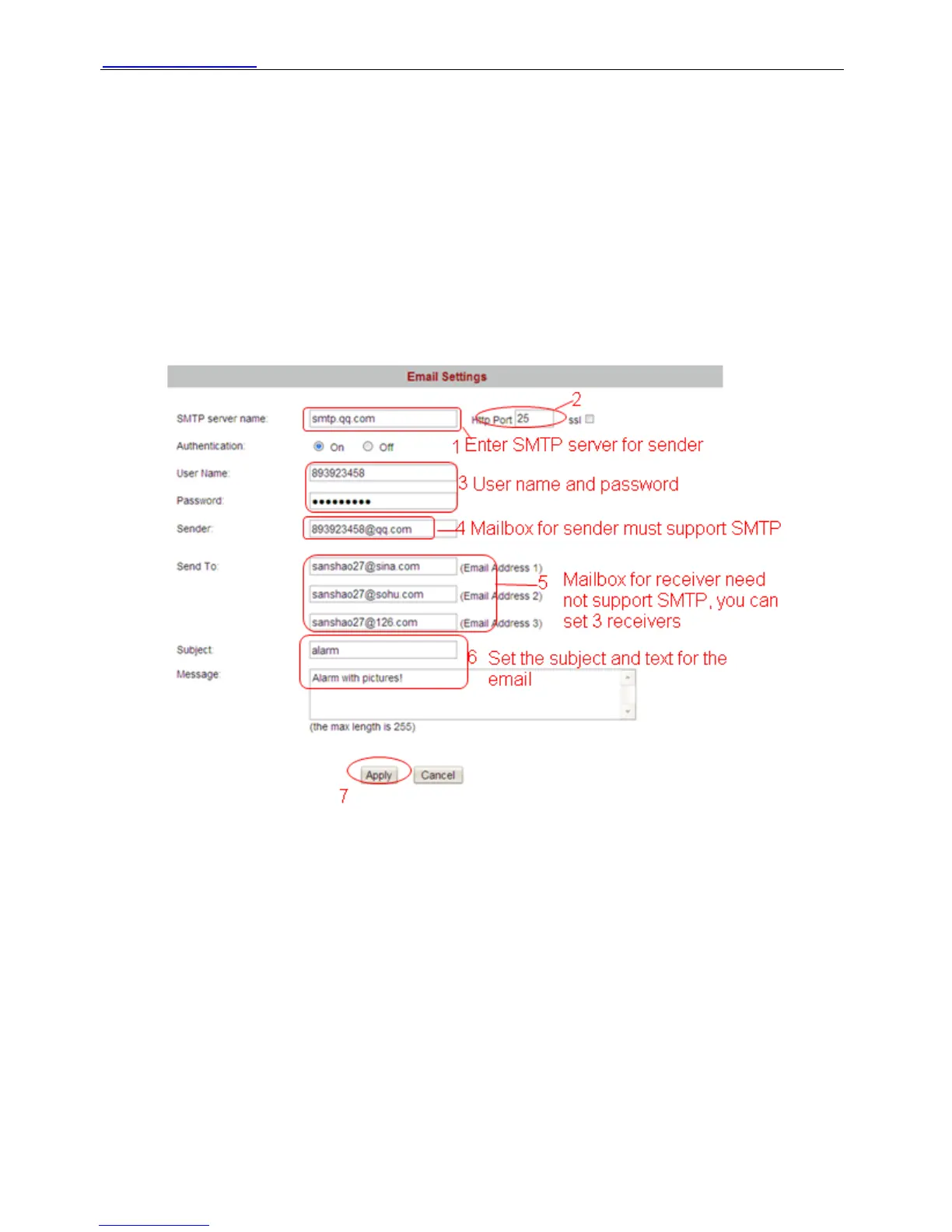
If you want the camera to send emails when motion has been activated, Email Settings will
need to be configured.
.
Figure 3.26
Make sure your mailbox for sender supports SMTP. Three recipients can be added to receive
images. SMTP port is usually set as 25. If SMTP server supports SSI, you should choose it. The
subject and message can not be chinese characters.
3.7 FTP Settings
If you want to upload images to your FTP server, you can set FTP Settings.
Shenzhen Foscam Intelligent Technology Co., Limited
Tel: 86 755 2674 5668 Fax: 86 755 2674 5168
35



 To Next Page