WWW.FOSCAM.COM FI8918/FI8918W User Manual
you upgrade Web UI. Make sure IP camera tool on your computer could find your camera’s IP
before you choose upgrade in browser.
For Web UI only can be upgraded by IP camera tool after upgrade system firmware.
Click Browse, choose the correct bin file and then click Submit to upgrade.
Don’t shut down the power during upgrade until the IP camera tool finds the camera again.
3.15 Backup & Restore Settings
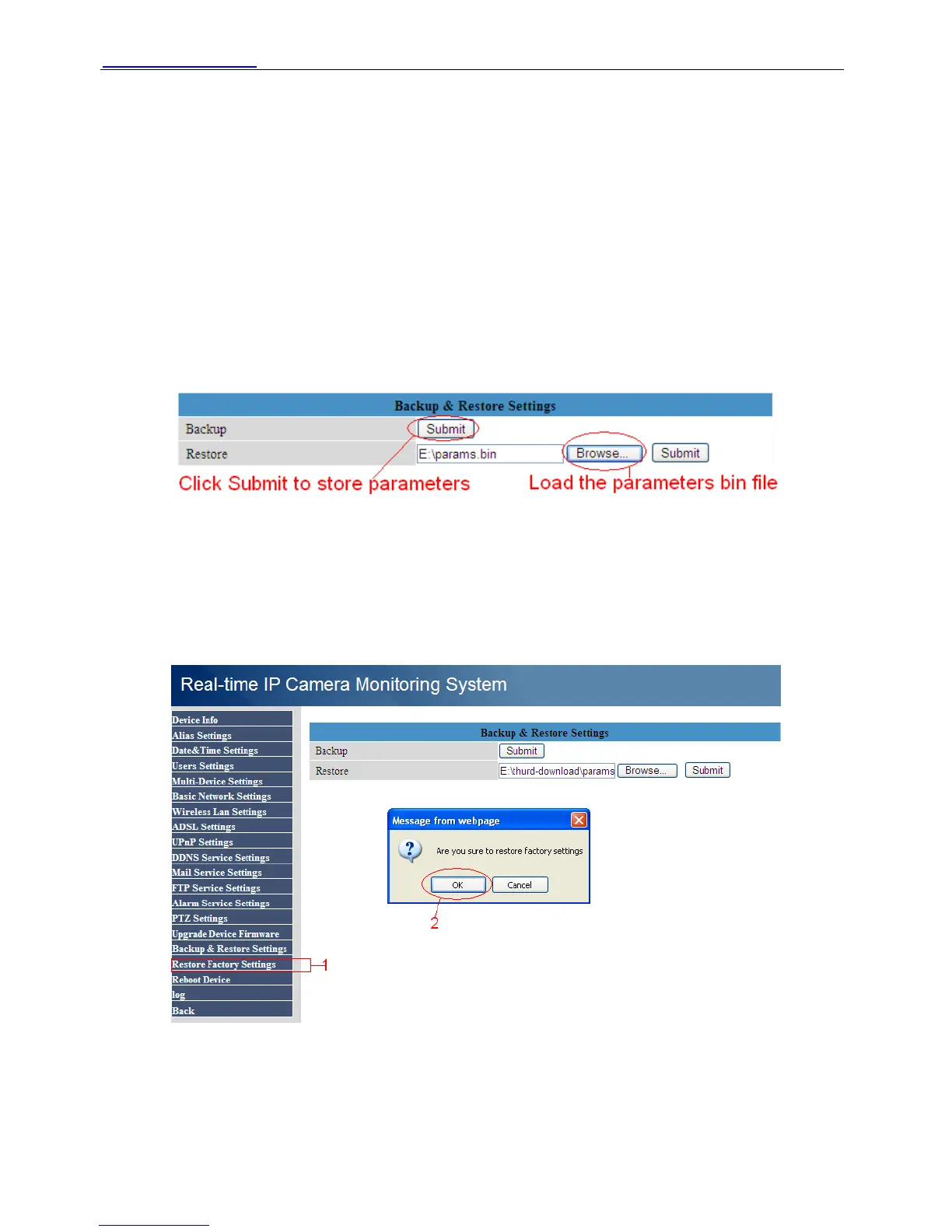
If you set don’t want to set all parameters that you’ve set already. You can click Submit and all
the parameters you set will store as a parameters bin file.
You only need choose Browse to load the bin file next time you login the camera and need not
set parameters again you have ever set.
Figure 3.31
3.16 Restore Factory Settings
If you choose restore factory setting. All parameters will return to factory settings.
Figure 3.32
Shenzhen Foscam Intelligent Technology Co., Limited
Tel: 86 755 2674 5668 Fax: 86 755 2674 5168
33



 To Next Page