www
www
.foscam.co
.foscam.co
m
m
Shenzhen
Shenzhen
Foscam
Foscam
Intelligent
Intelligent
Technology
Technology
Co.,
Co.,
Limited
Limited
Tel:
Tel:
86
86
755
755
2674
2674
5668
5668
Fax:
Fax:
86
86
755
755
2674
2674
5168
5168
FTP Mode: Here supports two modes: PORT and PASV.
Username/password: The FTP account and password.
Click Save to take effect.
Click Test to see if FTP has been successfully configured.
4.4 Video
This section allows you to configure Video stream settings, On screen display and Snapshot settings.
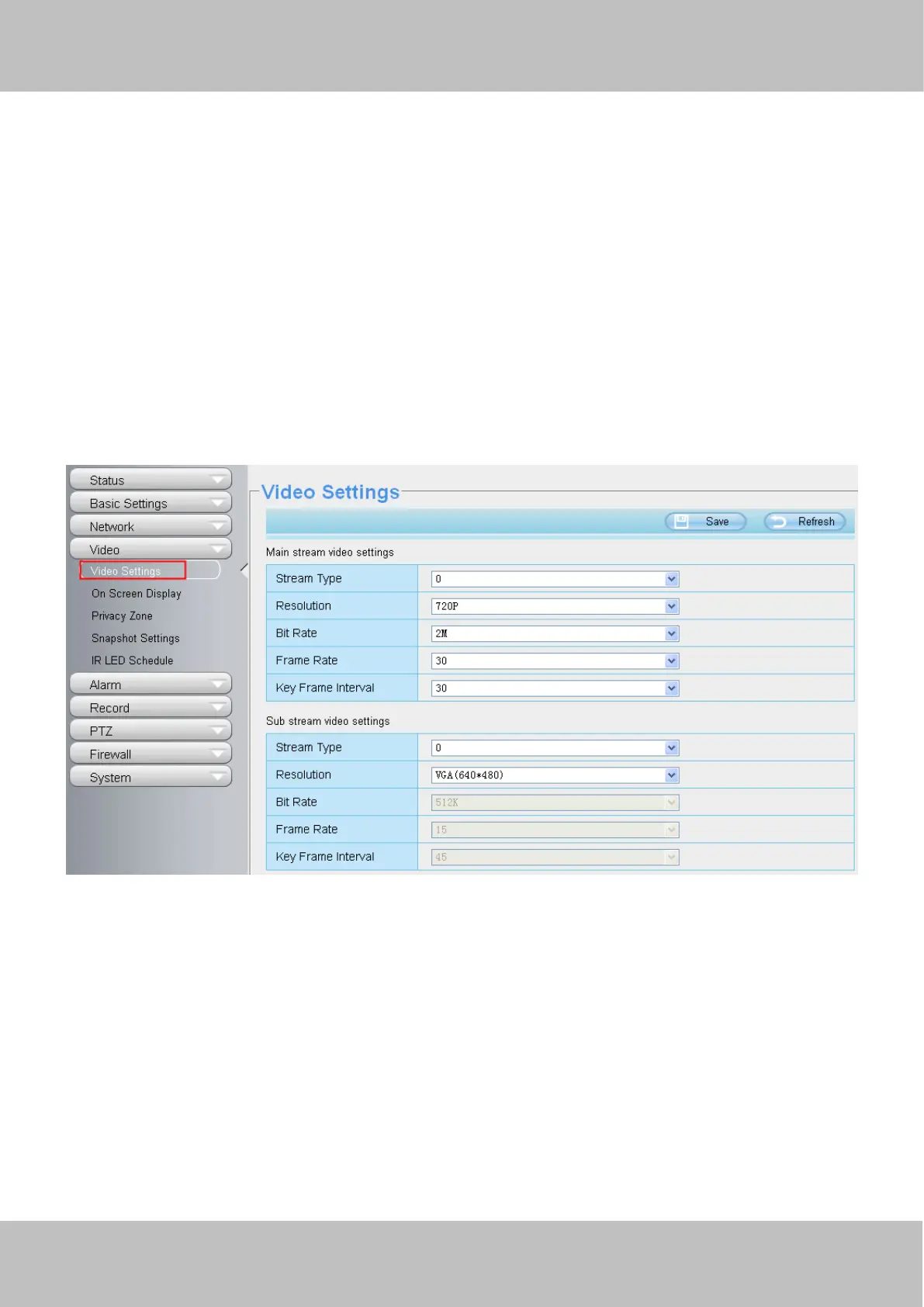
4.4.1 Video Settings
There are two ways to set the stream video settings. They are main stream video settings and sub stream
video settings.
Stream type: There are four types to identify different streams you have set.
Resolution: The camera supports two types: 960P, 720P, VGA. The higher the resolution is, the clearer video
will become. But the code flux will become larger too, and it will take up more bandwidth.
Bit rate: Generally speaking, the larger the bit rate is, the clearer video will become. But the bit rate
configuration should combine well with the network bandwidth. When the bandwidth is very narrow, and bit
rate is large, that will lead to video can not play well.
Frame rate: Note that a larger frame size takes up more bandwidth. When the video format is 50Hz, the
maximum frame rate is 25 fps. When the video format is 60Hz, the maximum frame rate is 30 fps. You should
lower frame rate when the bandwidth is limited. Normally, when the frame rate above 15, you can achieve
fluently video.
Key Frame Interval: The time between last key frame and next key frame. The shorter the duration, the more



 To Next Page