EasyManua.ls Logo

Foscam FI9803 - 6.2 Modify Camera Name and Time

Foscam FI9803
90 pages
Print Icon
To Next Page IconTo Next Page
To Previous Page IconTo Previous Page
Loading...
www
www
.foscam.co
.foscam.co
m
m
Shenzhen
Shenzhen
Foscam
Foscam
Intelligent
Intelligent
Technology
Technology
Co.,
Co.,
Limited
Limited
Tel:
Tel:
86
86
755
755
2674
2674
5668
5668
Fax:
Fax:
86
86
755
755
2674
2674
5168
5168
71
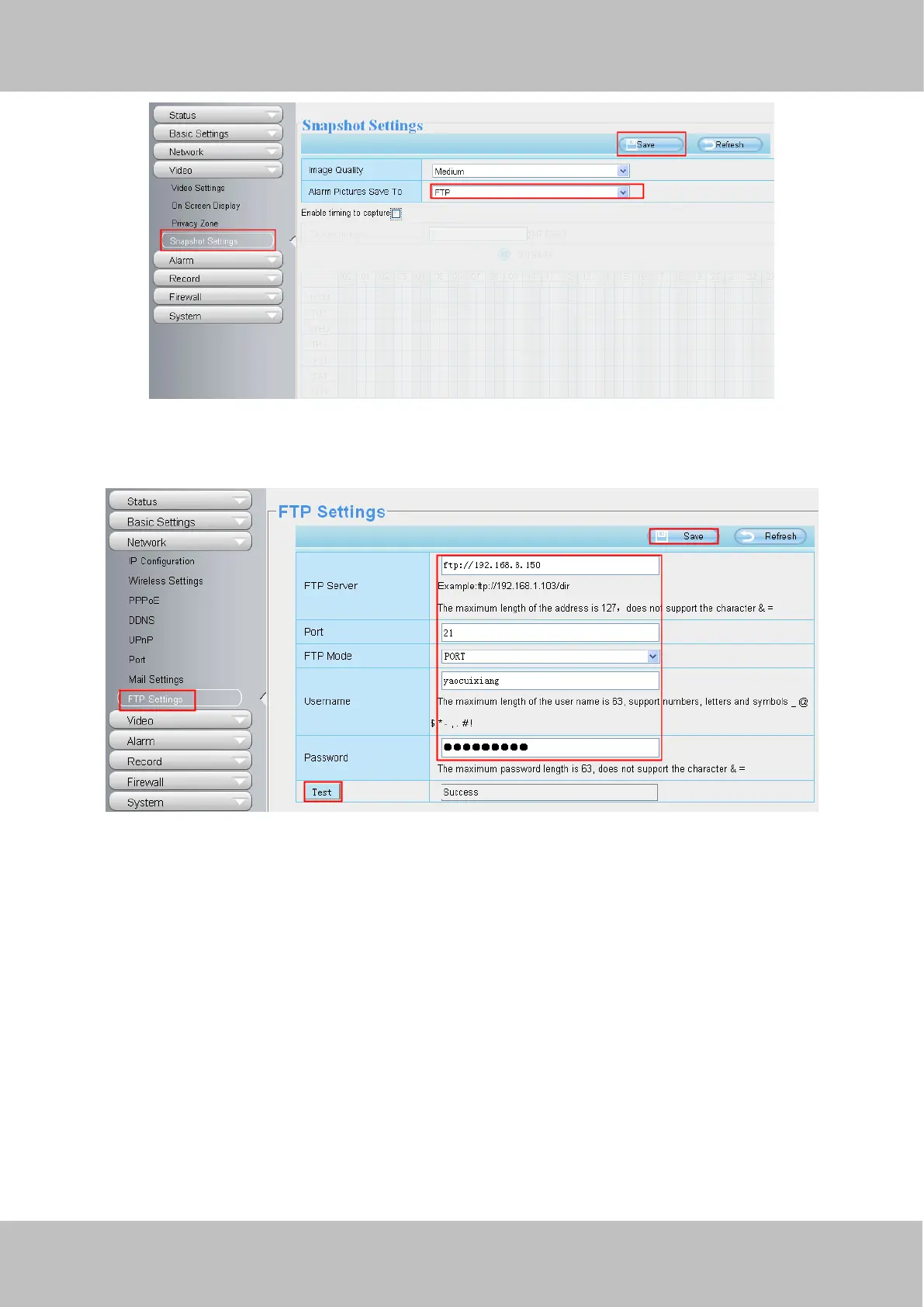
Figure 5.3
Choose Network > FTP Settings. The FTP Settings page appears. Configure the parameters, as shown in figure 5.4.
Figure 5.4
6.2 Modify the Camera Name and Time on the video
Scene
Assume that user A need to modify the camera name and time upper left corner of the video.
Procedure
1. Choose Basic Setting > Camera Name. The Camera Name page appears. Configure the parameters, as shown in
figure 5.5.

Table of Contents

Related product manuals