www
www
.foscam.co
.foscam.co
m
m
Shenzhen
Shenzhen
Foscam
Foscam
Intelligent
Intelligent
Technology
Technology
Co.,
Co.,
Limited
Limited
Tel:
Tel:
86
86
755
755
2674
2674
5668
5668
Fax:
Fax:
86
86
755
755
2674
2674
5168
5168
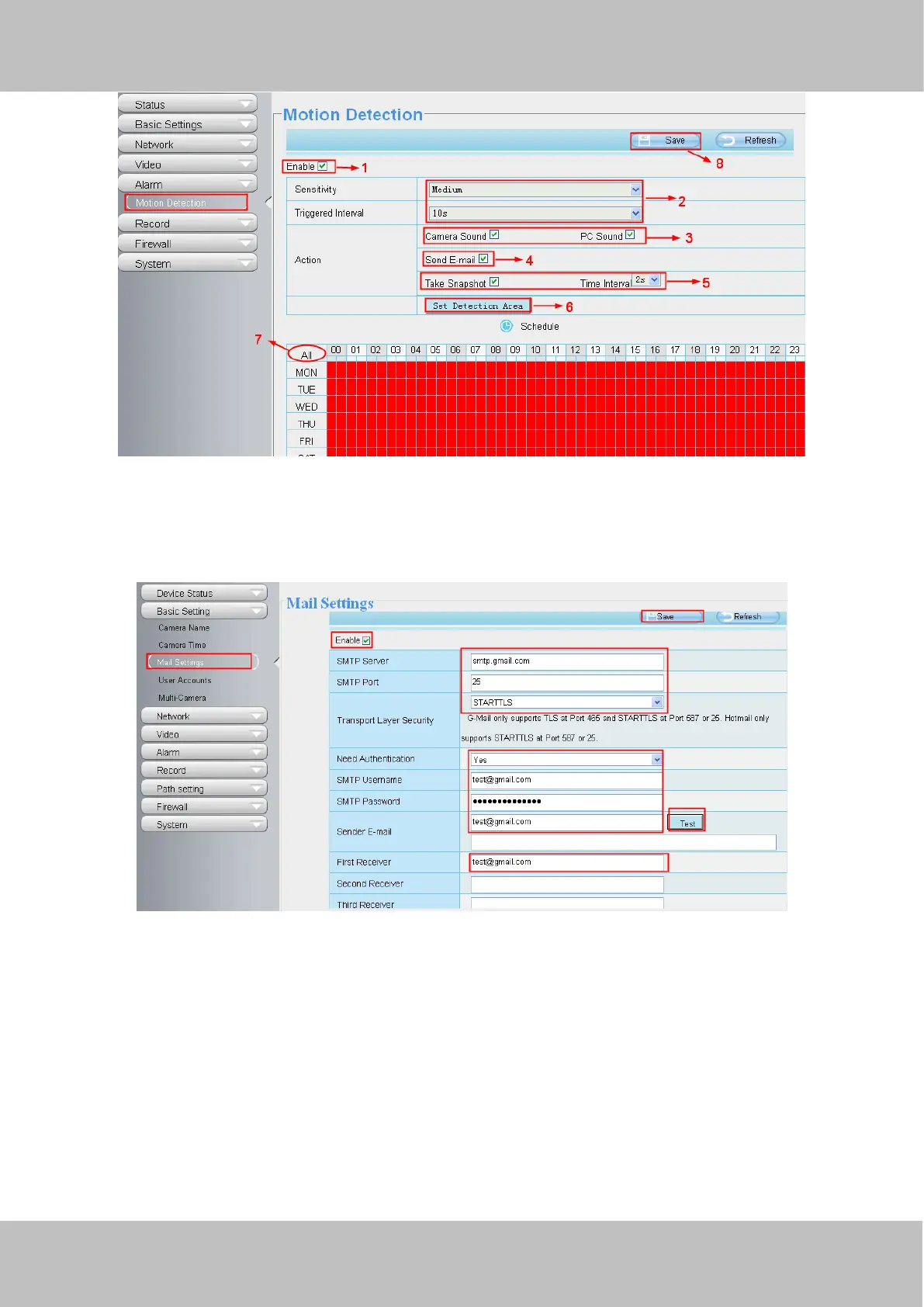
Figure 5.1
2. If you select the Send E-mail on the Motion Detection page, then you need to configure the mail message.
Choose Alarm > Motion Detection. The Motion Detection page appears. Configure the mail parameters, as shown in
figure 5.2.
Figure 5.2
3. If you select the Take Snapshot on the Motion Detection page, you need to configure the capture settings and FTP
storage path.
Choose Video > Snapshot Settings. The Snapshot Settings window appears. Configure the parameters, as shown in
figure 5.3.



 To Next Page