www
www
.foscam.co
.foscam.co
m
m
Shenzhen
Shenzhen
Foscam
Foscam
Intelligent
Intelligent
Technology
Technology
Co.,
Co.,
Limited
Limited
Tel:
Tel:
86
86
755
755
2674
2674
5668
5668
Fax:
Fax:
86
86
755
755
2674
2674
5168
5168
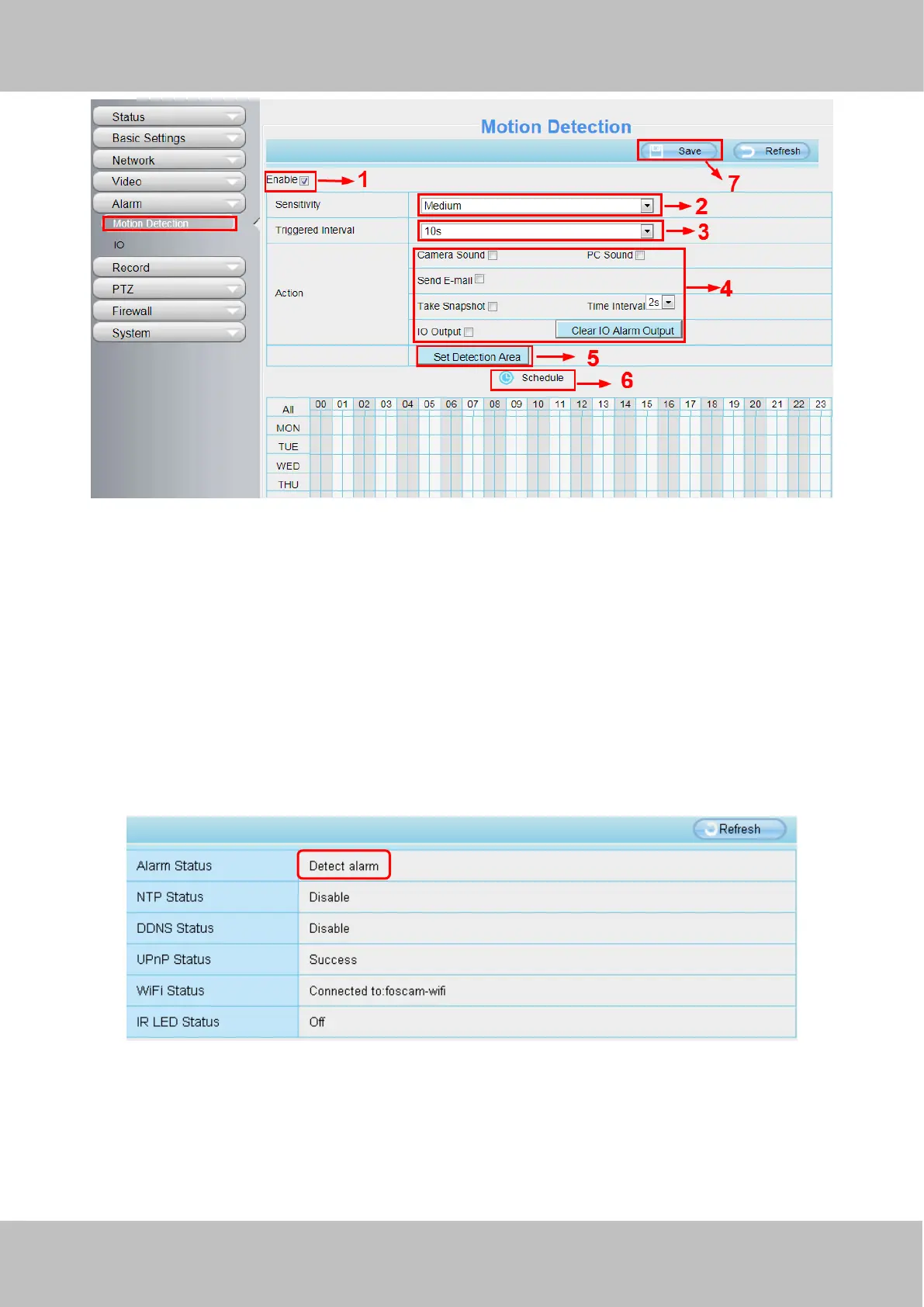
To enable motion detection, follow the steps below:
1 Enable Motion detection
2 Sensitivity---- It supports three modes: Low, Middle and High. The higher the sensitivity, the camera will be more
easily alarmed. Select one motion sensitivity.
3 Trigger interval--- The interval time between two motion detections. Here supports
5s/6s/7s/8s/9s/10s/11s/12s/13s/14s/15s. Select one interval time.
4 Select the alarm indicators
When the motion has been detected, the alarm status will turn to Detect alarm.
There are three alarm indicators:
A Camera Sound and PC Sound
If the camera has connected with a speaker or other audio output device, if you select Camera Sound or PC
Sound, when the motion has been detected, the people around the camera will hear beep alarm sound.



 To Next Page