www
www
.foscam.co
.foscam.co
m
m
Shenzhen
Shenzhen
Foscam
Foscam
Intelligent
Intelligent
Technology
Technology
Co.,
Co.,
Limited
Limited
Tel:
Tel:
86
86
755
755
2674
2674
5668
5668
Fax:
Fax:
86
86
755
755
2674
2674
5168
5168
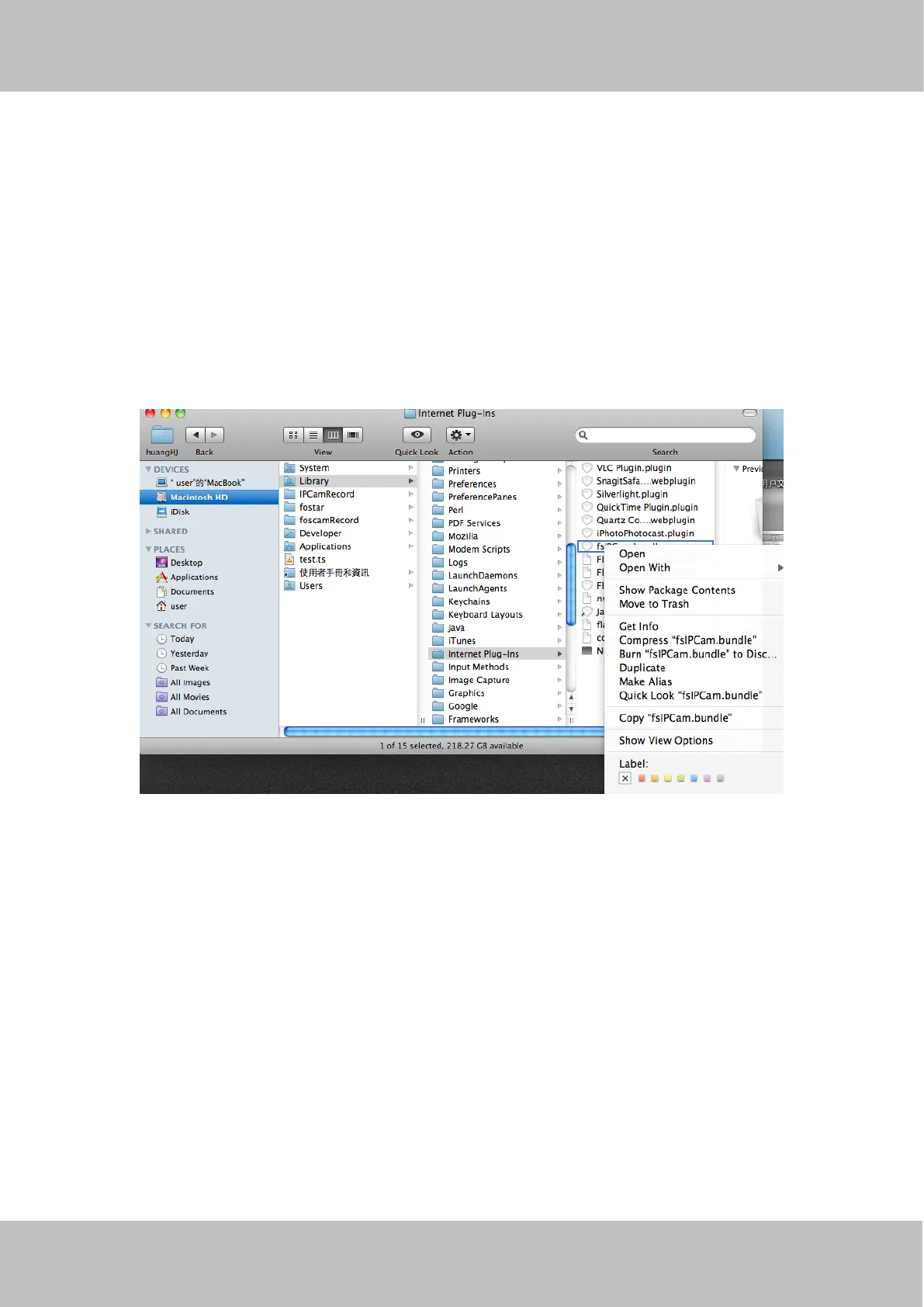
Figure 7.8
Remove the plug-in on Safari
If you need to remove the plug-in from Safari, please open a Finder window.
From the Finder menu bar click Go ---> Go to Folder
Copy then paste the following:
Library/Internet Plug-Ins
Click Go then move to the Internet Plug-Ins.
Find the fsIPCam.bundle file, and delete it.
Camera will prompt you to install the latest one when next logging.
Figure7.9
Remove the plug-in from Chrome
If you need to remove the plug-in from Google Chrome, please open a new tab.
Click Customize and Control Google Chrome, then go to Tools ---> Extensions.
Find the IPCAM extension, and click the junk icon to remove it.
Camera will prompt you to install the latest one when next logging.



 To Next Page