26
w
w
w
w
w
w
w
w
www
www
www
www
www
www
www
www
.foscam.co
.foscam.co
.foscam.co
.foscam.co
.foscam.co
.foscam.co
.foscam.co
.foscam.co
m
m
m
m
m
m
m
m
Shenzhen
Shenzhen
Shenzhen
Shenzhen
Shenzhen
Shenzhen
Shenzhen
Shenzhen
Foscam
Foscam
Foscam
Foscam
Foscam
Foscam
Foscam
Foscam
Intelligent
Intelligent
Intelligent
Intelligent
Intelligent
Intelligent
Intelligent
Intelligent
Technology
Technology
Technology
Technology
Technology
Technology
Technology
Technology
Co.,
Co.,
Co.,
Co.,
Co.,
Co.,
Co.,
Co.,
Limited
Limited
Limited
Limited
Limited
Limited
Limited
Limited
Tel:
Tel:
Tel:
Tel:
Tel:
Tel:
Tel:
Tel:
86
86
86
86
86
86
86
86
755
755
755
755
755
755
755
755
2674
2674
2674
2674
2674
2674
2674
2674
5668
5668
5668
5668
5668
5668
5668
5668
Fax:
Fax:
Fax:
Fax:
Fax:
Fax:
Fax:
Fax:
86
86
86
86
86
86
86
86
755
755
755
755
755
755
755
755
2674
2674
2674
2674
2674
2674
2674
2674
5168
5168
5168
5168
5168
5168
5168
5168
26
26
26
26
O
O
O
O n
n
n
n screen
screen
screen
screen Mouse
Mouse
Mouse
Mouse Control
Control
Control
Control
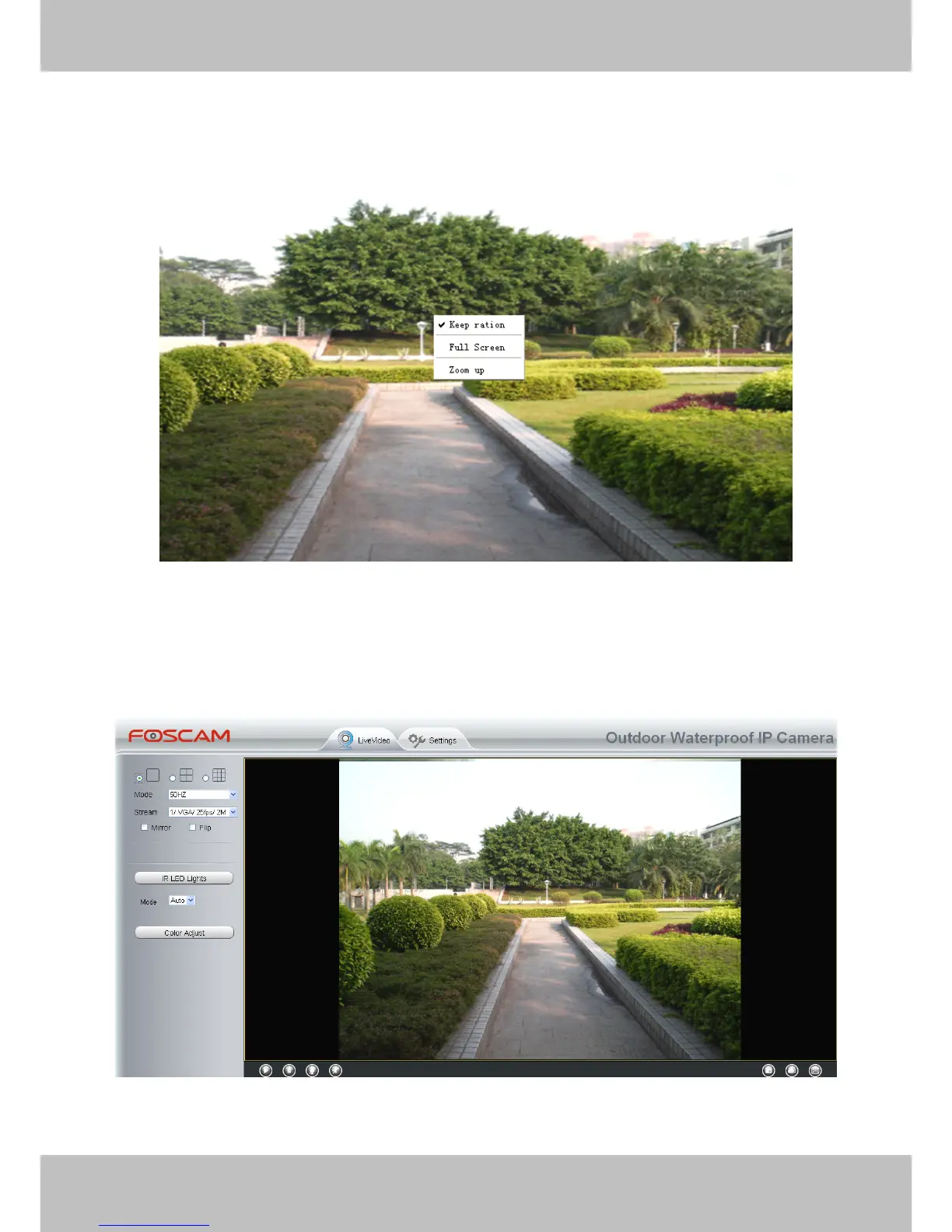
Right click the mouse and you can adjust the screen ration, full screen and Zoom up.
Figure 3.6
Keep
Keep
Keep
Keep ration:
ration:
ration:
ration: Select it and the camera will adjust the size of live window based on the computer
monitor automatically.
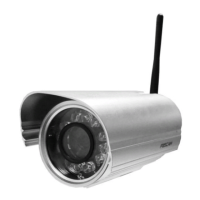
Sometimes there is a black border around the video (Figure 3.7), please select Keep
Keep
Keep
Keep ration
ration
ration
ration to
get a better visual quality (Figure3.3).
Figure 3.7
Full
Full
Full
Full Screen:
Screen:
Screen:
Screen: Select it and Click it to make full-screen, press ESC and exit full-screen.


 To Next Page