EasyManua.ls Logo

Fostex R8 - Advanced Features and Functions; Preroll and Locate Function Overview; Setting and Checking Preroll Time

Fostex R8
24 pages
Print Icon
To Next Page IconTo Next Page
To Previous Page IconTo Previous Page
Loading...
s
section
s.
ADVANCED
FEATURES
Please
пое
that
all
locate,
auto
return
and
zone
imè
memory
points
etc.
аге
automatically
canceled
when
power
to
the
RB
ie
turned
off
Preroll
When
yov
use
the
[locate
zero]
or
the
[locate]
function,
the
tape
wil
stop
precisely
at
0
cr
the
selected
memory
point.
For
rehearsal
or
recording,
though,
it
is
often
desirable
to
ear
a
few
seconds
of
music
prior
to
an
actual
entry,
making
it
easier
to
keep
time
and
come
in
correctly
These
few
sec-
ends
o
tape
before
the
entry
are
called
the
“orerol!,
end
the
R8
allows
you
to
set
an
automatic
preroll
that
will
work
with
the
locate
zero
and
locate
functions.
Whenever
these
func-
tions
are
used,
the
tape
will
then
stop
several
seconds
belore.
C
or
the
norma
memory
point,
‘The
preroll
tme
is
adjustable
between
0
and
9
seconds.
f
you
attempt
to
set
a
preroll
time
of
10
seconds
or
longer
an
error
message
"Err
4"
will
appear
cn
the
MEMORY
display.
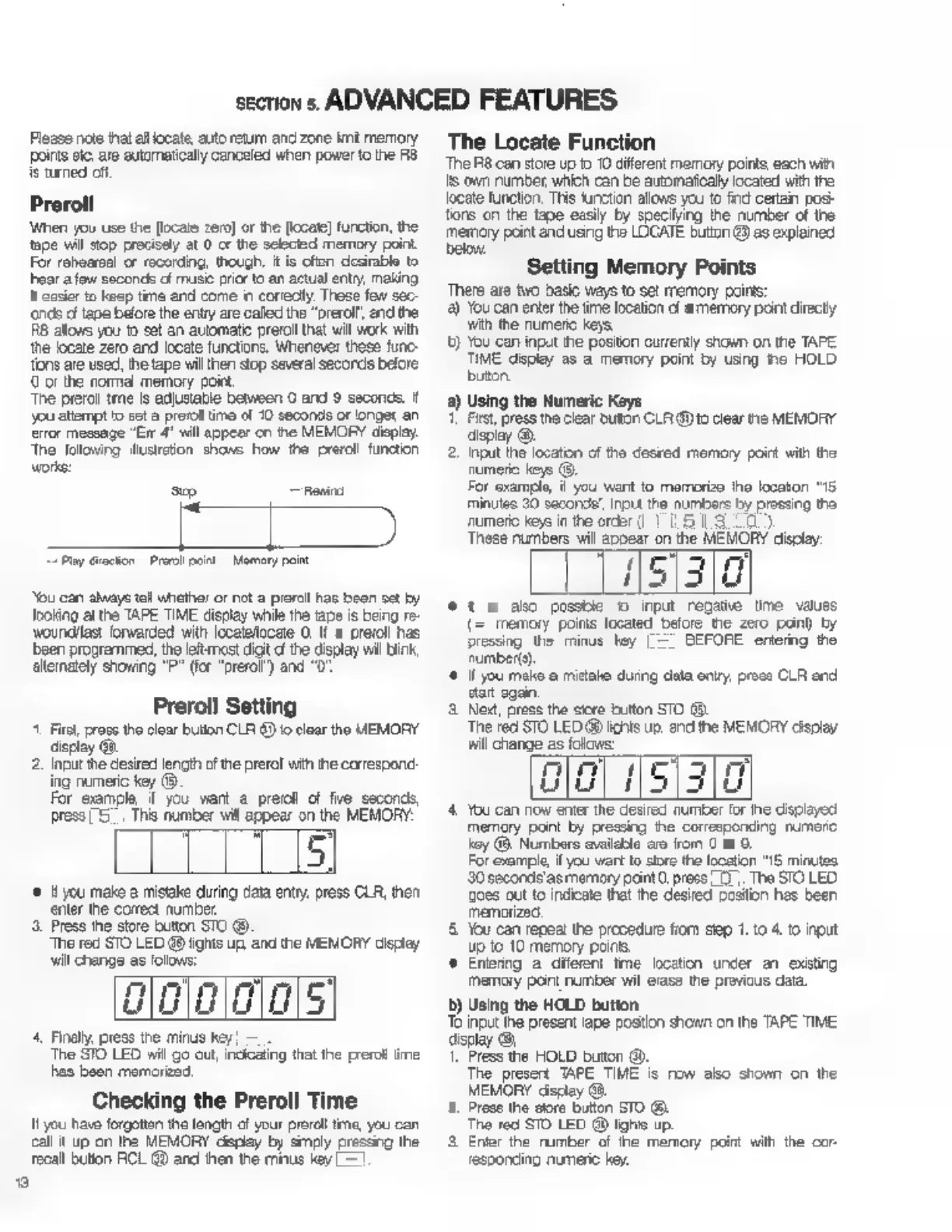
Тре
following
illustration
shows
how
the
preroll
function
works:
sp
пены
Lipi
“Play
Grection
Pre
pon
Memory
paint
You
can
always
tall
whether
or
not
а
preroll
has
been
set
by
Joking
at
the
TAPE TIME
display
while
the
tape
is
being
re-
woundllas:
forwarded
with
localelocete
O.
If
а
preroll
has
been
programmed,
the
lett
most
digit
d
the
display
wil
Бик,
alternately
showing
"P"
(for
“prerol’)
and
"0"
Preroll
Setting
^.
First,
press
the
clear
bution
CLR
6)
io
clear
the
MEMORY
display
@.
2,
Input
the
desired
lencth
of
the
prerol
with
the
correspond:
ing
numeric
key
(9.
For
example
f
you
want
а
preroll
of
fie
seconds,
press
5.
Ths
number
will
appear
on
the
MEMORY:
m
rn
Lu
уси
make
a
mistake
during
data
entry,
press
CLR,
then
Press
the
store
button
STO
89
The
red
STO
LED
48
lights
up
and
the
MEMORY
display
ninm
гт)
Lu
a
wu
The
STO
LED
will
go
out,
incicaling
that
the
preroll
ime
has
been
memorized.
It
you
have
forgotten
the
length
of
your
preroll
tme,
you
can
call
it
up
on
the
MEMORY
дврјау
by
simply
pressing
the
enter
the
correct
number
wil
change
as
folovs:
4,
Finally,
press
the
minus
key
Checking
the
Preroll
Time
recall
button
RCL
@
and
then
the
minus
key
The
Locate
Function
The
R8
can
store
up
to
10
different
memory
points,
each
wit
15
own
number,
which
can
be
automatically
located
with
the
locate
function,
This
function
allows
уси
to
find
certain
posi-
tions
on
the
tape
easily
by
specifying
the
number
of
the
memory
point
and
using
the
LOCATE
button
43)
as
explained
below,
б
?
Setting
Memory
Points
There
are
two
basic
ways
to
set
memory
points:
а)
You
can
enter
the
time
location
d
a
memory
point
directy
wth
the
numeric
keys.
t)
You
can
input
the
positon
currently
shown
on
the
TAPE
TIME
display
as
а
memory
point
by
using
he
HOLD
button
2)
Using
the
Numeric
Keys
First,
press
the
clear
button
CLR
@
to
clear
пе
MEMORY
display
©.
2.
при
the
location
of
the
desred
memory
point
with
the
numeric
keys
©.
For
example,
ii
you
want
to
memorize
the
locaton
“16.
minutes
30
second’,
input
the
numbers
Бу
prossing
the
numeric
keys
in
the
order
(1
15130)
These
numbers
will
appear
on
the
MEMORY
display:
151310
*
1
&
ako
possble
о
input
regatie
time
values
memory
poins
located
before
the
zero
pono
by
pressing
the
minus
hey
|
=
BEFORE
entering
the
number(s).
(f
you
mako
a
mistake
during
data
опту,
prose
CLR
and
start
gain.
3.
New,
press
the
store
button
STO
(8.
The
red
STO
LED
@
lichts
up.
and
the
MEMORY
display
will
change
аз
folows:
nm
d
5
3
rr
LIU
i
Ш
4.
You
can
now
enter
the
desired
number
for
ihe
displayed
memory
pont
by
pressing
the
corresponding
numcro
хоу
(&.
Numbers
availeble
are
from
C
to
9.
For
example,
if
you
wart
to
store
the
location
"15
minutes
30
secorde'as
memory
paint
O,
press
07.
The
STO
LED
oes
out
to
indicate
that
ће
desired
position
has
been
memorized
5.
You
can
repeat
the
procedure
fiom
step
1.
to
4.
to
при
up
to
10
memory
ропе,
ө
Entering
a
diferent
tme
location
under
an
existing
memory
pont
number
wil
erase
the
previous
data.
5)
Using
the
HOLD
button.
То
input
the
present
аре
postion
shown
on
the
TAPE
TIME
display
08.
1.
Press
the
HOLD
button
0).
The
present
TAPE
TIME
is
пом
abo
shown
on
the
MEMORY
display
Gà.
2.
Press
the
store
button
STO
(8.
The
red
STO
LED
@
ighis
up.
3
Enler
the
rumber
of
ће
memory
point
with
the
cor-
responding
numeric
key.

Other manuals for Fostex R8

Related product manuals