EasyManua.ls Logo

Fostex R8 - Setup Procedures; Power, Foot Switches, and Tape Loading

Fostex R8
24 pages
Print Icon
To Next Page IconTo Next Page
To Previous Page IconTo Previous Page
Loading...
Foot
Switch
Connections
Optional
Model
8051
foot
switches
can
be
connected
to
пе
PUNCH
IN/OUT
@
and
PLAYILOCATE
@
jacks
on
the
right
задо
of
the
control
panel
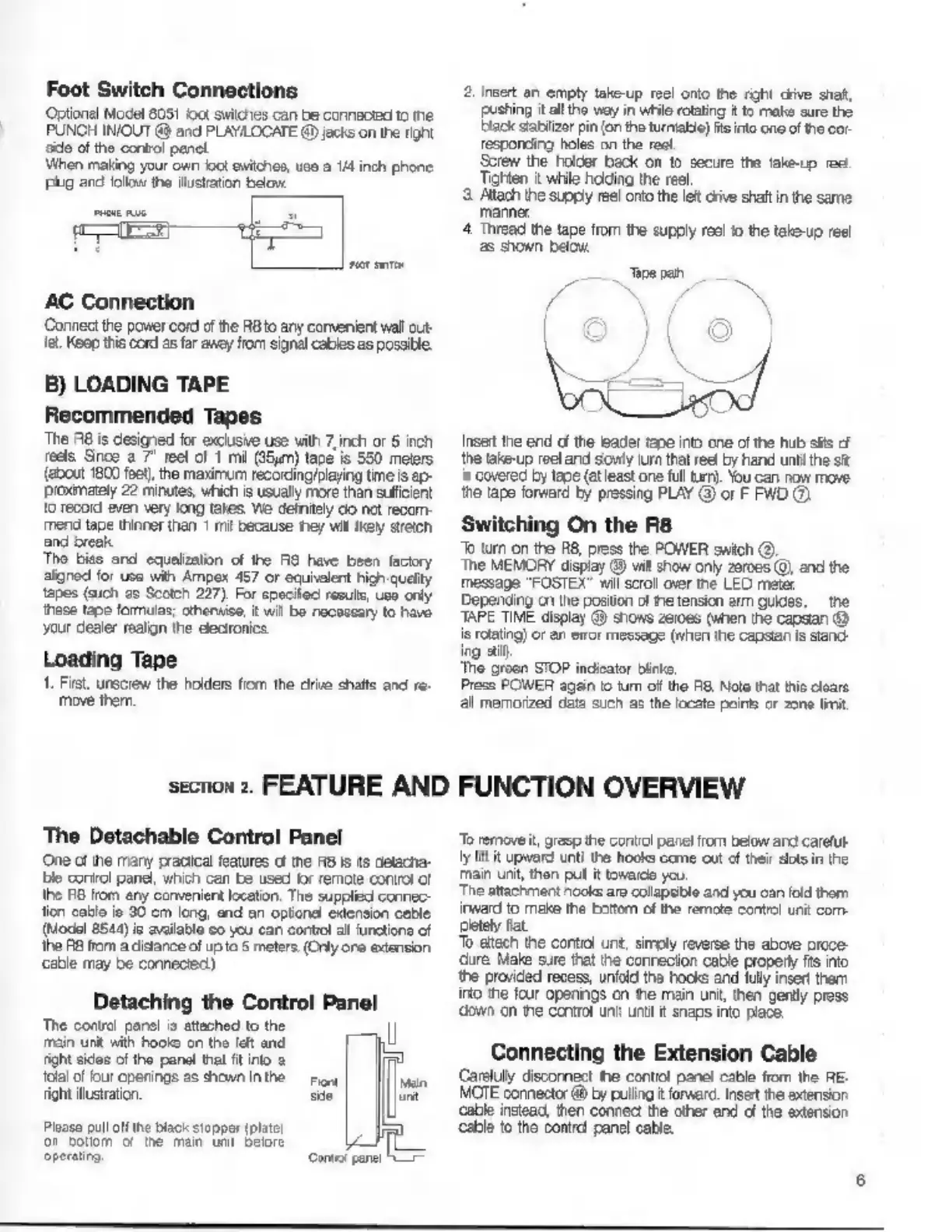
When
making
your
own
со!
switches,
uso
a
1/4
inch
phone
рид
and
folio
the
illustration
below.
AC
Connection
Connect
the
power
cord
of
the
RBto
any
convenient
wall
out-
Те.
Keep
this
cord
as
far
ancy
from
signal
cables
as
possible.
B)
LOADING
TAPE
Recommended
Tapes
The
A8
is
designed
for
exclusive
use
vith
7,
inch
or
5
inch
reels
Snos
а
7"
reel
of
1
mi
(25m)
tape
is
550
meters
(about
1800
feet)
the
maximum
recording/playing
time
is
ap-
рехтаеј
22
minutes,
which
is
usually
more
than
sufficient
'o
record
even
very
long
takes
We
definitely
со
net
recom-
mend
tape
thinner
than
1
mil
because
теу
ми
кеу
stich
and
break
Tho
bies
and
equalization
of
the
АЗ
have
been
factory
aigned
for
use
wih
Ampex
457
or
equielent
high
quelty
tapes
(auch
as
Scotch
227),
For
specited
resuls,
use
only
these
tape
formulas;
otherwise,
it
wil
Ба
necessary
to
havo
your
dealer
realign
the
electronics
Loading
Tape
1.
First,
unscrew
the
holders
from
the
drive
shafts
and
re-
move
them.
section
2.
FEATURE
AND
The
Detachable
Control
Panel
One
of
the
many
pracical
features
cf
tne
RB
Is
ts
detacha-
le
corirol
panel,
which
can
be
used
for
remote
control
of
the
FO
from
any
convenient
location.
The
supplied
connec-
tion
cable
ie
30
cm
long,
and
an
optional
extension
cable
(Model
8544)
is
available
co
you
can
contiol
al
unctione
of
the
RB
from
a
distance
of
up
to
5
meters.
(Only
ore
extension
сабе
may
be
connected)
Detaching
the
Control
Panel
Те
conti
рото
o
etched
to
the
р
minut
d
hon
er
and
RON
sce
of
ho
pond
Va
ra
Mad
рото
ње
rou!
as
fant
sin
m
||
Ploaso
pull
off
the
black
stopper
(plato
or
родот
of
the
тат
unt
belore
i
operating
Consol
panel
h
2,
inet
an
empty
take-up
reel
onto
the
right
chive
shaf,
pushing
it
all
the
way
in
while
rotating
it
to
make
sure
the
black
stabilizer
pin
(on
the
turntable)
fts
into
one
of
the
cor
responding
holes
on
the
reel
Screw
the
holder
back
on
to
secure
the
take-up
res
Tighten
it
while
holding
the
reel
3
Allach
the
supply
reel
onto
the
let
orive
shaft
in
the
same
manner.
4.
Thread
the
tape
from
the
supply
reel
to
the
take-up
reel
as
shown
below.
pe
pan
Insert
the
end
of
the
leader
tape
into
one
of
the
hub
slits
cf
the
take-up
reel
and
sowly
turn
that reel
by
hand
until
the
sit
is
covered
by
tape
(at
least
one
full
turn).
You
can
now
move
the
tape
forward
by
pressing
PLAY
©
or
F
FWD
C
Switching
On
the
R8
To
turn
on
the
R8,
press
the
POWER
switch
(О)
The
MEMORY
display
@
vil
show
only
zeroes
(0)
and
the
message
"FOSTEX"
wil
scroll
over
the
LED
meter
Depending
cn
the
position
of
пе
tension
arm
guides,
the
TAPE
TIME
display
@
shows
zeroes
(when
the
capstan
@
is
rotating)
or
an
eror
message
(when
the
capstan
is
sland-
ing
aif
‘The
groon
STOP
indicator
Биле,
Press
POWER
again
io
turn
of
the
R8.
Nolo
that
his
cloare
al
memorized
data
such
as
the
locate
points
cr
zone
limit
FUNCTION
OVERVIEW
Te
removeit,
grasp
the
contol
pane!
пот
below
and
careful
ly
lit
it
upward
unti
the
hooks
come
out
of
their
slots
in
the
тат
unt,
thon
pul
it
toward
you.
The
attachment
nooks
are
collapsible
and
you
can
fold
thom
inward
to
make
the
boom
of
the
remote
control
unit
com
пев
fat.
То
attach
the
contiol
unt,
simoly
reverse
the
above
orcce-
dure
Male
sure
that
the
conrecion
cable
propery
fts
по
the
provided
recess,
unfold
the
hooks
and
fully
insert
them
into
the
four
opanings
on
ће
main
unt,
then
gently
press
down
оп
ne
control
unit
unt
t
snaps
into
place.
Connecting
the
Extension
Cable
Carefully
disconnect
the
control
panel
cable
from
the
ВЕ.
MOTE
connector
&
by
pulling
it
forward.
Insert
the
extension
cable
instead,
then
connect
the
other
end
of
the
extension
cable
to
the
control
panel
cable.

Other manuals for Fostex R8

Related product manuals