EasyManua.ls Logo

Fostex R8 - Data Entry and Error Handling; Calculating Tape Reel Zone; Data Value Entry and Error Messages

Fostex R8
24 pages
Print Icon
To Next Page IconTo Next Page
To Previous Page IconTo Previous Page
Loading...
Data
Value
Entry
Tn
the
preceding
chapters,
you
have
already
learned
how
to
input
various
kinds
сї
dala
such
as
locare
memory
ponts
The
folowing
explains
a
sighily
diferent
method
of
value
entry
which
is
particularly
useful
when
you
want
to
cores:
or
aktor
exeting
data
To
be
ablo
to
uso
thie
mothod,
a
poriod
must
bo
blinking
on
the
MEMORY
дврау
0
The
period
кеу.
is
then
used
to
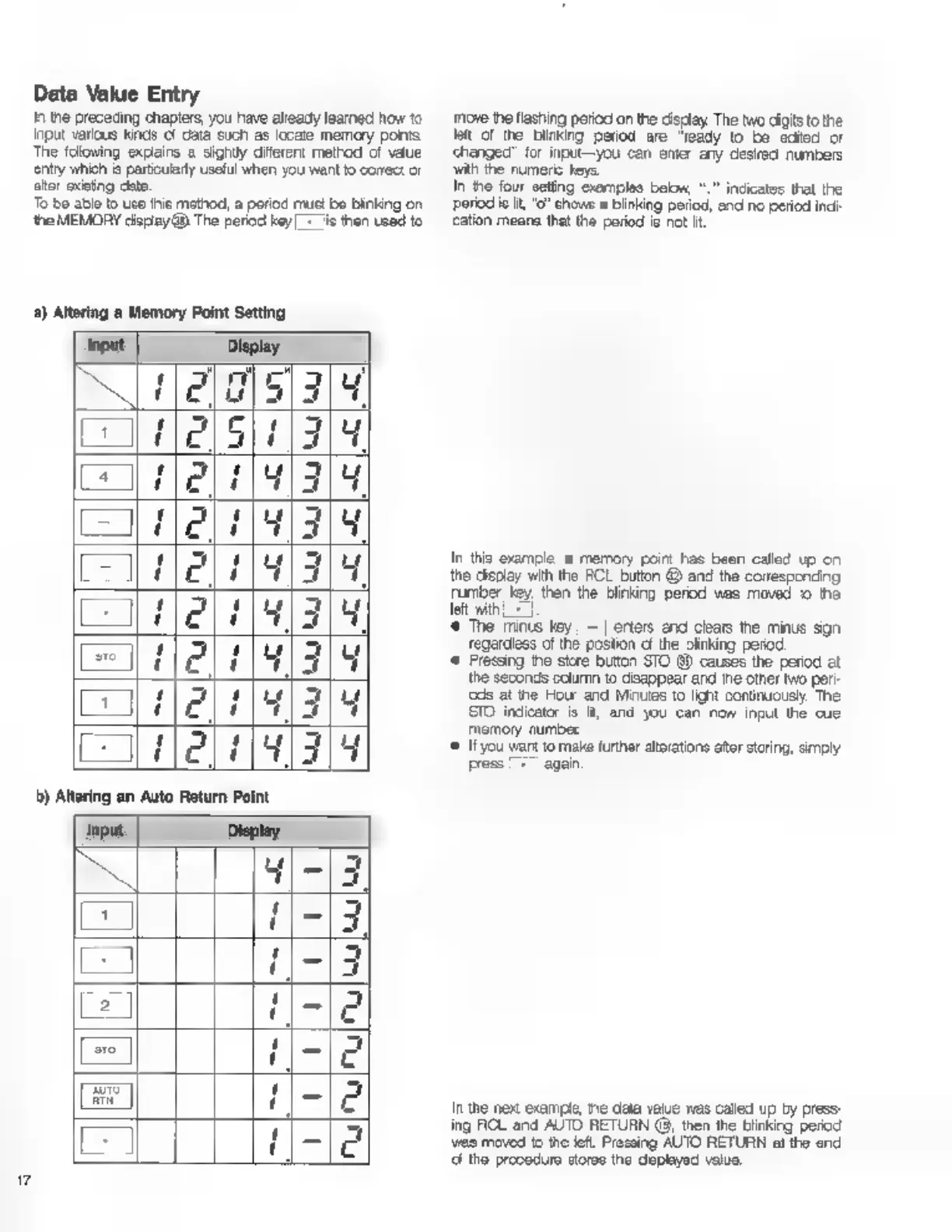
a)
Altering
а
Memory
Point
Setting
input
Display.
(005/34
сл
lels]
1211191319
=
2191319
feli
Hlal
ја
19/3
ЕНЕС
"421793
Lune
(41314
m
Display.
4|-|3
=
1-13
z
1-13
2
11-102
e
се
ABE
Е
a
move
the
flashing
perioc
on
the
cisclay
The
two
digits
to
the
lat
of
the
купка
period
are
"ready
to
be
edited
or
changed’
for
input—you
can
enter
any
desired
numbers
ЗАР
the
numeric
keys.
In
the
four
seting
examples
beon,
“.
indicates
that
the
period
ie
it,
"о?
chows
a
blinking
period,
and
no
period
inci
cation
means
that
the
period
is
not
Н.
In
this
example
a
memory
point
Fas
been
called
up
on
the
display
with
the
FCL
button
@
and
the
correspending
ruber
Key
then
the
Blinking
perod
was
moved
1o
the
left
with
Ls
*
The
minus
key
|
=]
erters
end
clars
the
minus
sign
regardless
of
the
postion
cf
the
linking
регод
*
Fressing
the
store
button
STO
99
causes
the
period
at
the
seconds
column
to
disappear
and
tne
other
two
peri-
cds
at
the
Hour
and
Minutes
to
lignt
continuously.
The
STO
indicator
is
It,
and
you
can
now
input
the
cue
memory
number
«©
Ifyou
want
to
make
further
atorations
ator
storing,
simply
press
|
+
again
In
the
nex
example,
пе
data
value
was
called
up
by
press-
ing
ROL
and
AUTO
RETURN
(8,
then
the
blinking
period
vao
moved
to
the
left.
Pressing
AUTO
RETURN
al
the
end
d
tho
procedura
storas
the
оруса
value,

Other manuals for Fostex R8

Related product manuals