EasyManua.ls Logo

Fostex X-28 - Page 16

Fostex X-28
36 pages
Print Icon
To Next Page IconTo Next Page
To Previous Page IconTo Previous Page
Loading...
REC
SELECT
SWITCH
AND
DIRECT-
RECORDING:
Setting
the
REC
SELECT
switches
to
the
numbered
positions
(1,2,
3
and
4)
enables
direct
recording.
This
means
that
the
signal
on
the
selected
input
channel
is
recorded
directly
to
the
corresponding
track,
bypassing
the
PAN
and
AUX
SEND
controls
of
the
channel,
as
well
as
the
EQ
controls
and
MASTER
fader.
The
REC
SELECT
switch
must
be
set
to
the
same
number
as
the
channel
to
which
the
input
signal
is
connected.
(For
example,
if
the
signal
is
connected
to
channel
1,
the
leftmost
REC
SE¬
LECT
switch
must
be
set
to
1.)
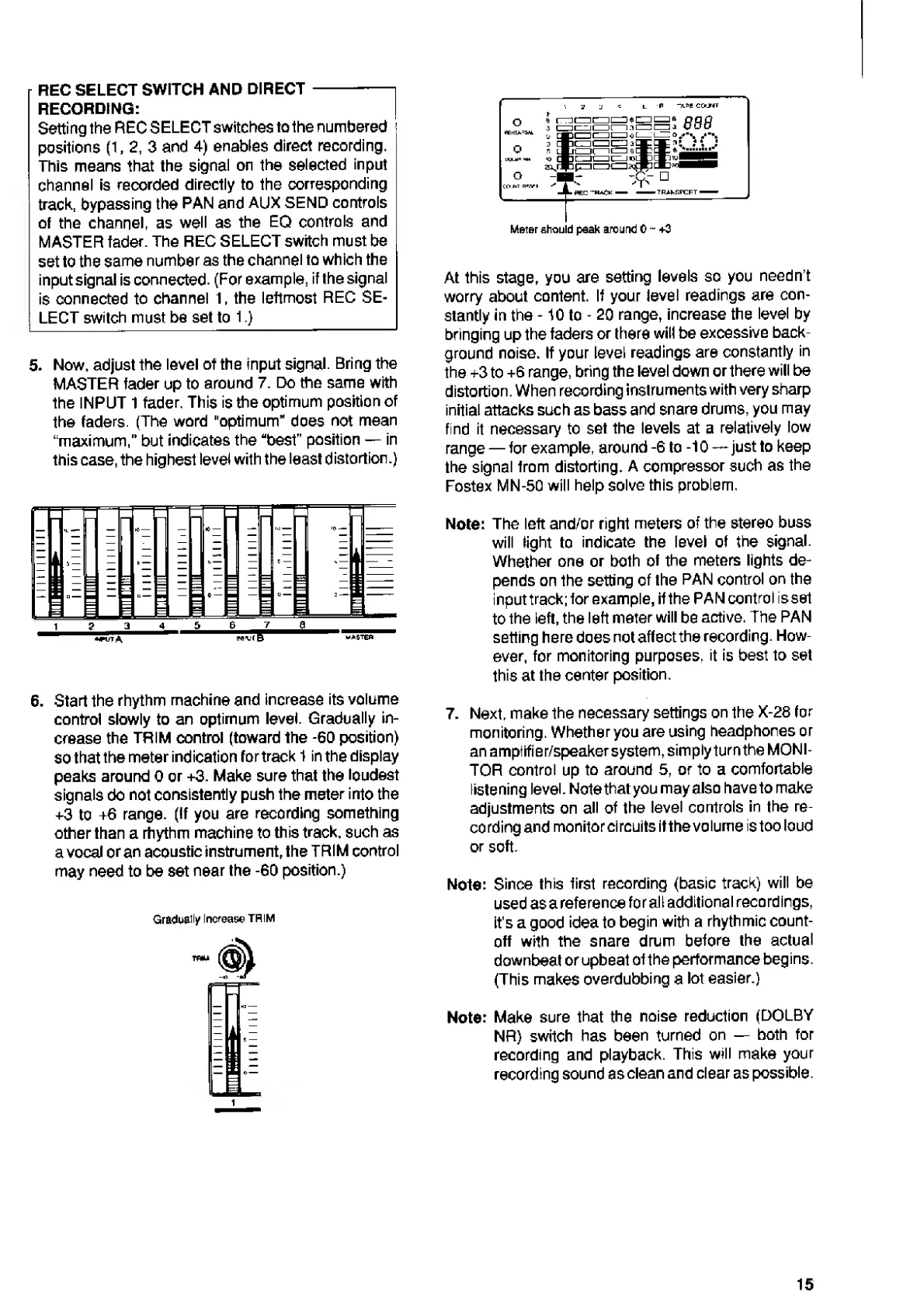
5.
N
ow,
adjust
the
level
of
the
input
signal.
Bring
the
MASTER
fader
up
to
around
7.
Do
the
same
with
the
INPUT
1
fader,
This
is
the
optimum
position
of
the
faders.
(The
word
"optimum"
does
not
mean
“maximum,”
but
indicates
the
“best”
position
in
this
case,
the
highest
level
with
the
least
distortion.)
1_
g
3
4
5
6
_
master
6.
S
tart
the
rhythm
machine
and
increase
its
volume
control
slowly
to
an
optimum
level.
Gradually
in¬
crease
the
TRIM
control
(toward
the
-60
position)
so
that
the
meter
indication
fortrack
1
in
the
display
peaks
around
0
or
+3.
Make
sure
that
the
loudest
signals
do
not
consistently
push
the
meter
into
the
+3
to
+6
range,
(if
you
are
recording
something
other
than
a
rhythm
machine
to
this
track,
such
as
a
vocal
or
an
acoustic
instrument,
the
TRIM
control
may
need
to
be
set
near
the
-60
position.)
Gradually
Increase
TRIM
Meter
should
peak
around
0
~
+3
At
this
stage,
you
are
setting
levels
so
you
needn't
worry
about
content.
If
your
level
readings
are
con¬
stantly
in
the
-10
to
-
20
range,
increase
the
level
by
bringing
up
the
faders
or
there
will
be
excessive
back¬
ground
noise.
If
your
level
readings
are
constantly
in
the
+3
to
+6
range,
bring
the
level
down
or
there
will
be
distortion.
When
recording
instruments
with
very
sharp
initial
attacks
such
as
bass
and
snare
drums,
you
may
find
it
necessary
to
set
the
levels
at
a
relatively
low
range
for
example,
around
-6
to
-10
just
to
keep
the
signal
from
distorting.
A
compressor
such
as
the
Fostex
MN-50
will
help
solve
this
problem,
Note:
The
left
and/or
right
meters
of
the
stereo
buss
will
tight
to
indicate
the
level
of
the
signal.
Whether
one
or
both
of
the
meters
lights
de¬
pends
on
the
setting
of
the
PAN
control
on
the
input
track;
for
example,
if
the
PAN
control
is
set
to
the
left,
the
left
meter
will
be
active.
The
PAN
setting
here
does
not
affect
the
recording.
How¬
ever,
for
monitoring
purposes,
it
is
best
to
set
this
at
the
center
position.
7.
N
ext,
make
the
necessary
settings
on
the
X-28
for
monitoring.
Whether
you
are
using
headphones
or
an
amptifier/speaker
system,
simply
turn
the
MONI¬
TOR
control
up
to
around
5,
or
to
a
comfortable
listening
level.
Note
that
you
may
also
have
to
make
adjustments
on
all
of
the
level
controls
in
the
re¬
cording
and
monitor
circuits
it
the
volume
is
too
loud
or
soft.
Note:
Since
this
first
recording
(basic
track)
will
be
used
as
a
reference
for
all
additional
recordings,
it's
a
good
idea
to
begin
with
a
rhythmic
count¬
off
with
the
snare
drum
before
the
actual
downbeat
or
upbeat
of
the
performance
begins.
(This
makes
overdubbing
a
lot
easier.)
Note:
Make
sure
that
the
noise
reduction
(DOLBY
NR)
switch
has
been
turned
on
both
for
recording
and
playback.
This
will
make
your
recording
sound
as
clean
and
clear
as
possible.
15

Related product manuals