EasyManua.ls Logo

Fostex X-28 - Punch-in Recording

Fostex X-28
36 pages
Print Icon
To Next Page IconTo Next Page
To Previous Page IconTo Previous Page
Loading...
You
will
probably
want
to
repeat
playback
several
times
to
get
the
best
mix
for
recording.
Once
you
are
ready
to
record
the
results,
follow
these
basic
steps:
9.
Use
the
stereo
meter
indications
on
the
X-28's
display
and
the
MASTER
fader
to
set
up
the
proper
signal
level
that
will
be
sent
to
the
master
recorder.
10.
Set
the
record
level
controls
on
the
master
recorder
so
that
a
0
meter
reading
on
the
X-28
will
produce
a
corresponding
0
reading
on
the
master
recorder.
Punch-in
Recording
Punch-in
recording
is
the
process
of
re-recording
over
a
specific
portion
of
a
recorded
track.
Normally,
this
is
used
to
fix
a
bad
note
in
an
otherwise
acceptable
performance.
Rather
than
record
the
entire
track
all
over
again
and
take
the
chance
that
the
performance
as
a
whole
will
suffer,
it’s
often
easier—and
better—
to
fix
only
the
mistake(s).
Other
uses
of
this
technique
are
to
erase
minor
timing
errors
(forexample.
someone
starts
a
part
too
soon
or
continues
it
too
long)
or
to
eliminate
unwanted
sounds
from
an
open
mic
(loud
coughing
or
inhaling).
This
technique
is
also
used
to
take
advantage
of
non-
recorded
portions
of
a
track.
To
illustrate,
let's
say
you've
recorded
a
guitar
solo
in
the
middle
of
a
song.
Except
for
that
part,
the
track
with
the
solo
is
s
ilent.
You
might
want
to
add
some
percussion
parts
to
those
sections
where
the
guitar
is
not
playing.
Punch-in
recording
is
the
perfect
way
to
do
this.
You
can
use
the
panel
oontrols
to
execute
punch-in
recording
during
playback.
To
do
this,
while
the
X-28
is
running,
hold
down
the
REC
button
and
simultaneously
press
PLAY
at
the
point
you
wish
to
start
recording;
if
the
REC
SELECT
switches
have
been
properly
set,
recording
will
begin.
Press
the
STOP
button
to
stop
recording.
However,
if
you
are
playing
an
instrument
or
for
some
reason
need
to
be
a
distance
away
from
the
recorder,
you
may
find
it
difficult
to
use
the
panel
controls
for
punch-in
recording.
For
this
reason,
the
X-28
features
a
special
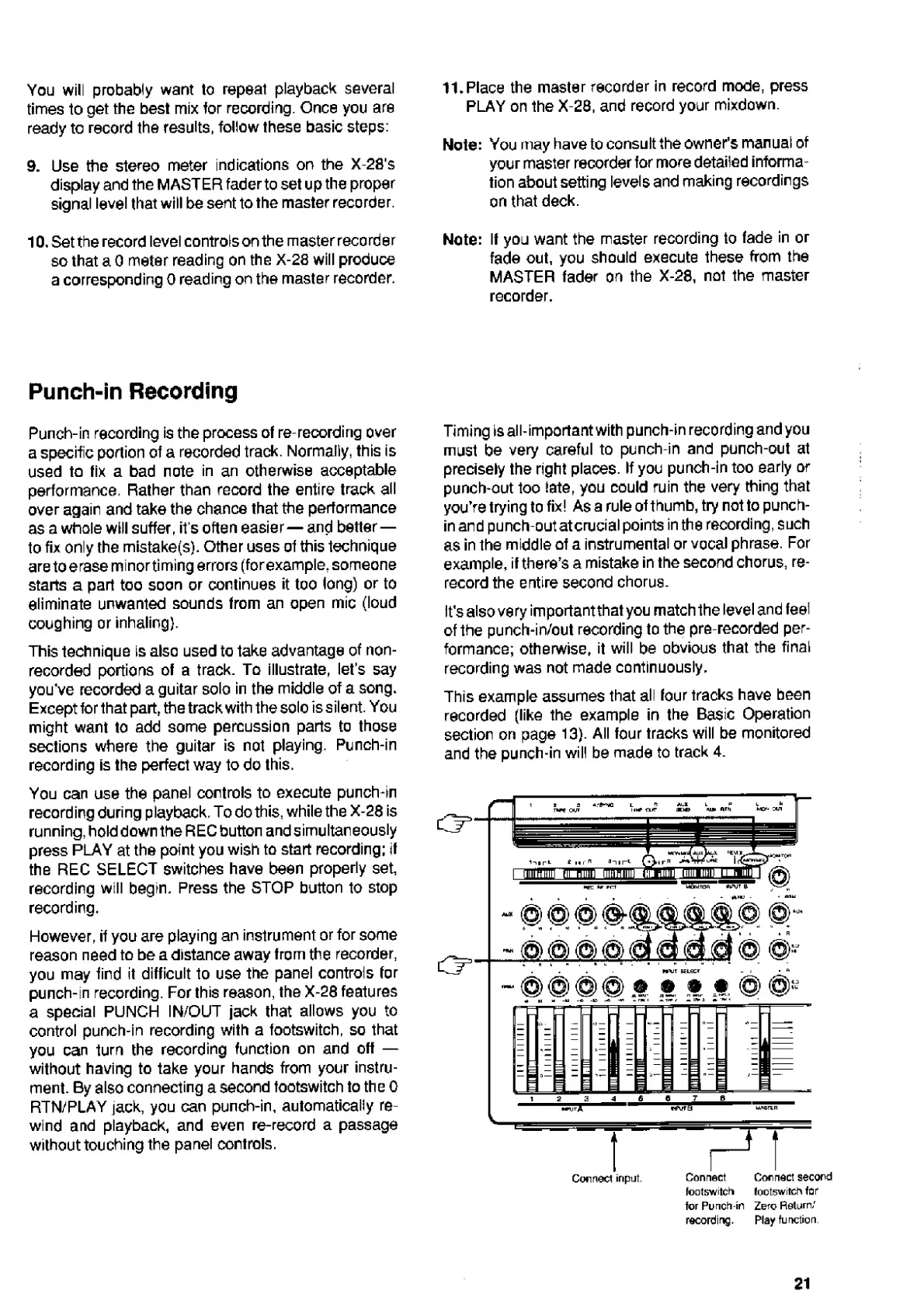
PUNCH
IN/OUT
jack
that
allows
you
to
control
punch-in
recording
with
a
footswitch,
so
that
you
can
turn
the
recording
function
on
and
off
without
having
to
take
your
hands
from
your
instru¬
ment.
By
also
connecting
a
second
lootswitch
to
the
0
RTN/PLAY
jack,
you
can
punch-in,
automatically
re¬
wind
and
playback,
and
even
re-record
a
passage
without
touching
the
panel
controls.
11.Place
the
master
recorder
in
record
mode,
press
PLAY
on
the
X-28,
and
record
your
mixdown.
Note:
You
may
have
to
consult
the
owner’s
manual
of
your
master
recorder
for
more
detailed
informa¬
tion
about
setting
levels
and
making
recordings
on
that
deck.
Note:
If
you
want
the
master
recording
to
fade
in
or
fade
out,
you
should
execute
these
from
the
MASTER
fader
on
the
X-28,
not
the
master
recorder.
Timing
is
all-important
with
punch-in
recording
and
you
must
be
very
careful
to
punch-in
and
punch-out
at
precisely
the
right
plaoes.
If
you
punch-in
too
early
or
punch-out
too
late,
you
could
ruin
the
very
thing
that
you’re
trying
to
fix!
As
a
rule
of
thumb,
try
not
to
punch-
in
and
punch-out
atcrucial
points
in
the
recording,
such
as
in
the
middle
of
a
instrumental
or
vocal
phrase.
For
example,
if
there’s
a
mistake
in
the
second
chorus,
re¬
record
the
entire
second
chorus.
it’s
also
very
important
that
you
match
the
level
and
feel
of
the
punch-in/out
recording
to
the
pre-recorded
per¬
formance;
otherwise,
it
will
be
obvious
that
the
final
recording
was
not
made
continuously.
This
example
assumes
that
all
four
tracks
have
been
recorded
(like
the
example
in
the
Basic
Operation
section
on
page
13).
All
four
tracks
will
be
monitored
and
the
punch-in
will
be
made
to
track
4.
for
Punch-in
Zero
Return/
recording.
Play
function
21

Related product manuals