EasyManua.ls Logo

Fostex X-28 - Advanced Recording Techniques; Overdubbing Tracks

Fostex X-28
36 pages
Print Icon
To Next Page IconTo Next Page
To Previous Page IconTo Previous Page
Loading...
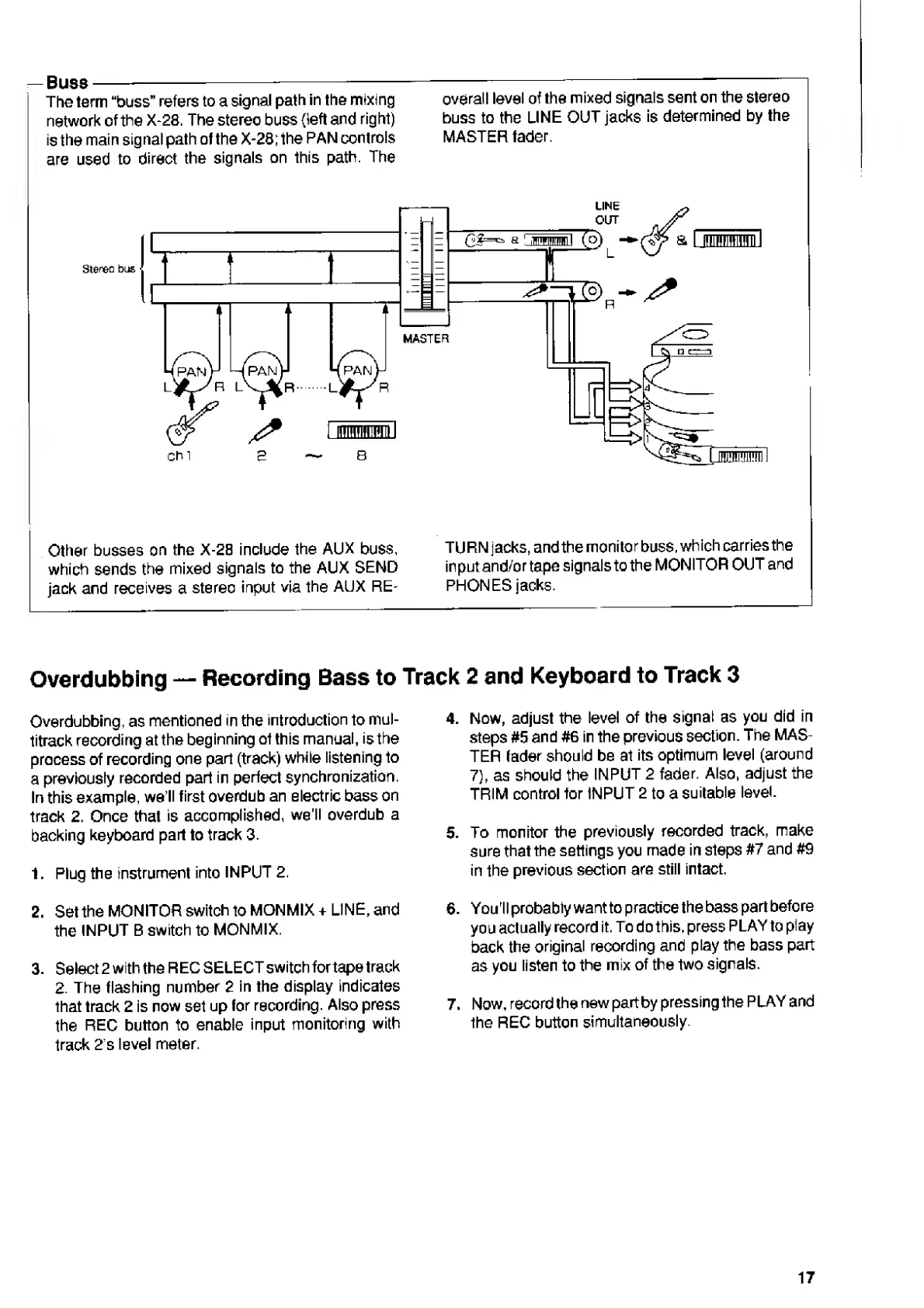
Buss-----
The
term
“buss”
refers
to
a
signal
path
in
the
mixing
network
of
the
X-28.
The
stereo
buss
{left
and
right)
is
the
main
signal
path
of
the
X-28;
the
PAN
controls
are
used
to
direct
the
signals
on
this
path.
The
overall
level
of
the
mixed
signals
sent
on
the
stereo
buss
to
the
LINE
OUT
jacks
is
determined
by
the
MASTER
fader.
Other
busses
on
the
X-28
include
the
AUX
buss,
which
sends
the
mixed
signals
to
the
AUX
SEND
jack
and
receives
a
stereo
input
via
the
AUX
RE¬
TURN
jacks,
and
the
monitor
buss,
which
carries
the
input
and/ortape
signals
to
the
MONITOR
OUT
and
PHONES
jacks.
Recording
Bass
to
Track
2
and
Keyboard
to
Track
3
Overdubbing
Overdubbing,
as
mentioned
in
the
introduction
to
mul¬
titrack
recording
at
the
beginning
ot
this
manual,
is
the
process
of
recording
one
part
(track)
while
listening
to
a
previously
recorded
part
in
perfect
synchronization.
In
this
example,
we
ll
first
overdub
an
electric
bass
on
track
2.
Once
that
is
accomplished,
we’ll
overdub
a
backing
keyboard
part
to
track
3.
1.
Plug
the
instrument
into
INPUT
2.
2.
Set
the
MONITOR
switch
to
MONMIX
+
LINE,
and
the
INPUT
B
switch
to
MONMIX.
3.
Select
2
with
the
REG
SELECT
switch
for
tape
track
2.
The
flashing
number
2
in
the
display
indicates
that
track
2
is
now
set
up
for
recording.
Also
press
the
REC
button
to
enable
input
monitoring
with
track
2's
level
meter.
4.
Now,
adjust
the
level
of
the
signal
as
you
did
in
steps
#5
and
#6
in
the
previous
section.
The
MAS¬
TER
fader
should
be
at
its
optimum
level
(around
7),
as
should
the
INPUT
2
fader.
Also,
adjust
the
TRIM
control
for
INPUT
2
to
a
suitable
level.
5.
To
monitor
the
previously
recorded
track,
make
sure
that
the
settings
you
made
in
steps
#7
and
#9
in
the
previous
section
are
still
intact.
6.
You'll
probably
want
to
practice
the
bass
part
before
you
actually
record
it.
To
do
this,
press
PLAY
to
play
back
the
original
recording
and
play
the
bass
part
as
you
listen
to
the
mix
of
the
two
signals.
7.
Now,
record
the
new
partby
pressing
the
PLAY
and
the
REC
button
simultaneously.
17

Related product manuals