EasyManua.ls Logo

Fostex X-28 - Overdubbing the Final Track - Vocal and; Mono Monitoring in Stereo Recording.18

Fostex X-28
36 pages
Print Icon
To Next Page IconTo Next Page
To Previous Page IconTo Previous Page
Loading...
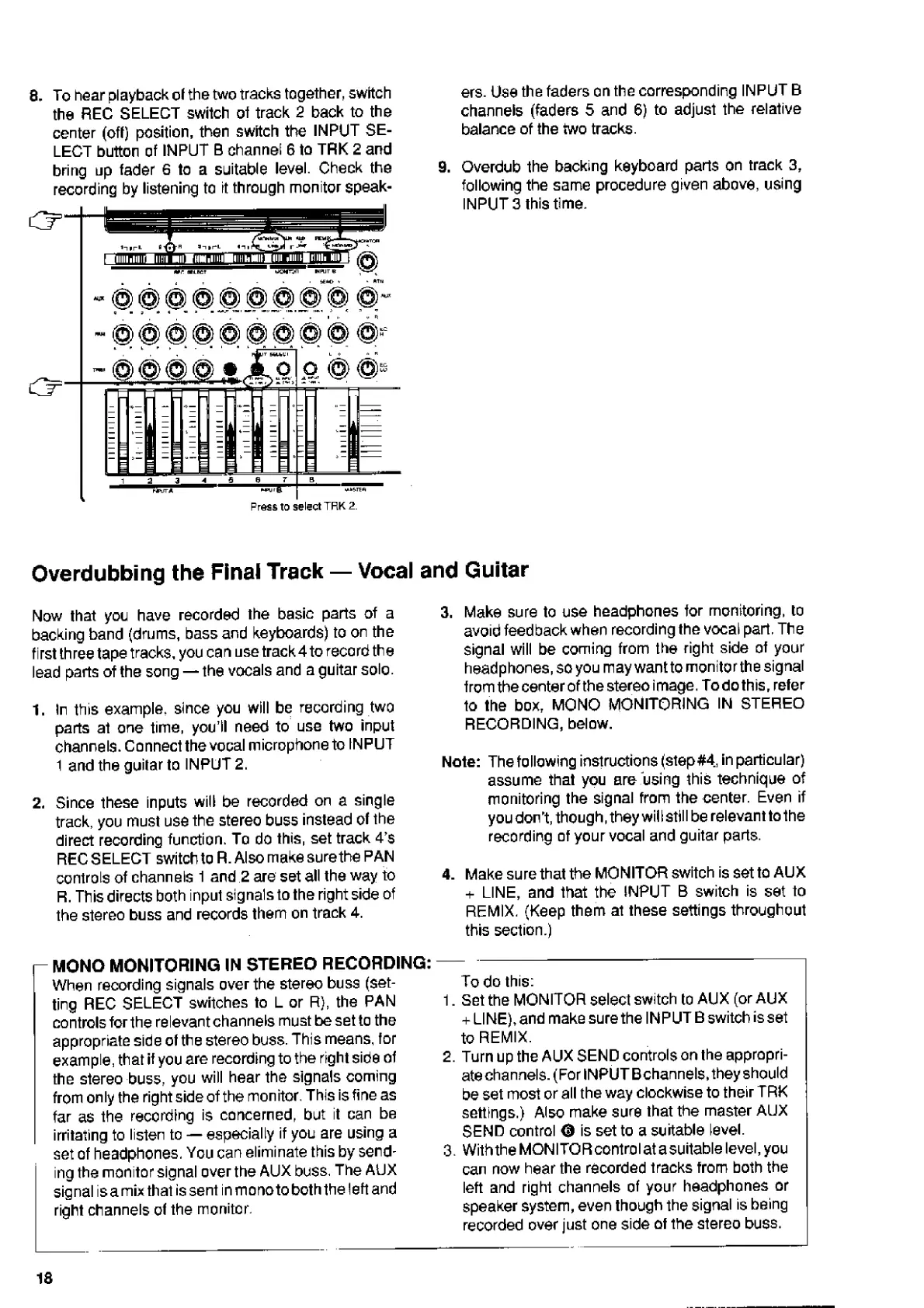
8.
To
hear
playback
of
the
two
tracks
together,
switch
the
REC
SELECT
switch
of
track
2
back
to
the
center
(off)
position,
then
switch
the
INPUT
SE¬
LECT
button
of
INPUT
B
channel
6
to
TRK
2
and
bring
up
fader
6
to
a
suitable
level.
Check
the
recording
by
listening
to
it
through
monitor
speak-
@
@
H
®
@
®
@
©
ers.
Use
the
faders
on
the
corresponding
INPUT
B
channels
(faders
5
and
6)
to
adjust
the
relative
balance
of
the
two
tracks.
9.
Overdub
the
backing
keyboard
parts
on
track
3,
following
the
same
procedure
given
above,
using
INPUT
3
this
time.
&
Press
to
select
TRK
2.
Vocal
and
Guitar
Overdubbing
the
Final
Track
Now
that
you
have
recorded
the
basic
parts
of
a
backing
band
(drums,
bass
and
keyboards)
to
on
the
first
three
tape
tracks,
you
can
use
track
4
to
record
the
lead
parts
of
the
song
the
vocals
and
a
guitar
solo.
1.
In
this
example,
since
you
will
be
recording
two
parts
at
one
time,
you’ll
need
to
use
two
input
channels.
Connect
the
vocal
microphone
to
INPUT
1
and
the
guitar
to
INPUT
2.
2.
Since
these
inputs
will
be
recorded
on
a
single
track,
you
must
use
the
stereo
buss
instead
of
the
direct
recording
function.
To
do
this,
set
track
4’s
REC
SELECT
switch
to
R.
Also
make
sure
the
PAN
controls
of
channels
f
and
2
are
set
all
the
way
to
R.
This
directs
both
input
signals
to
the
right
side
of
the
stereo
buss
and
records
them
on
track
4.
3.
Make
sure
to
use
headphones
for
monitoring,
to
avoid
feedback
when
recording
the
vocal
part,
The
signal
will
be
coming
from
the
right
side
of
your
headphones,
so
you
may
want
to
monitorthe
signal
from
the
center
ofthe
stereo
image.
Todothis,
refer
to
the
box,
MONO
MONITORING
IN
STEREO
RECORDING,
below.
Note:
The
following
instructions
(step#4,
in
particular)
assume
that
you
are
using
this
technique
of
monitoring
the
signal
from
the
center.
Even
if
you
don't,
though,
they
will
still
be
relevant
to
the
recording
of
your
vocal
and
guitar
parts.
4.
Make
sure
that
the
MONITOR
switch
is
set
to
AUX
+
LINE,
and
that
the
INPUT
B
switch
is
set
to
REMIX.
(Keep
them
at
these
settings
throughout
this
section.)
i-
MONO
MONITORING
IN
STEREO
RECORDING:
When
reoording
signals
over
the
stereo
buss
(set¬
ting
REC
SELECT
switches
to
L
or
R),
the
PAN
controls
for
the
relevant
channels
must
be
set
to
the
appropriate
side
of
the
stereo
buss.
This
means,
for
example,
that
if
you
are
recording
to
the
right
side
of
the
stereo
buss,
you
will
hear
the
signals
coming
from
only
the
right
side
ofthe
monitor.
This
is
fine
as
far
as
the
recording
is
concerned,
but
it
can
be
irritating
to
listen
to
especially
if
you
are
using
a
set
of
headphones.
You
can
eliminate
this
by
send¬
ing
the
monitor
signal
over
the
AUX
buss.
The
AUX
signal
isamix
that
is
sent
in
monotoboththe
left
and
right
channels
of
the
monitor.
To
do
this:
1.
Set
the
MONITOR
select
switch
to
AUX
(or
AUX
+
LINE),
and
make
sure
the
INPUT
B
switch
is
set
to
REMIX.
2.
Turn
up
the
AUX
SEND
controls
on
the
appropri¬
ate
channels.
(For
INPUT
B
channels,
they
should
be
set
most
or
all
the
way
clockwise
to
their
TRK
settings.)
Also
make
sure
that
the
master
AUX
SEND
control
0
is
set
to
a
suitable
level.
3.
With
the
MON
I
TOR
control
at
a
suitable
level,
you
can
now
hear
the
recorded
tracks
from
both
the
left
and
right
channels
of
your
headphones
or
speaker
system,
even
though
the
signal
is
being
recorded
over
just
one
side
of
the
stereo
buss.
18

Related product manuals