EasyManua.ls Logo

Fostex X-28 - Monitoring and Simultaneous Recording

Fostex X-28
36 pages
Print Icon
To Next Page IconTo Next Page
To Previous Page IconTo Previous Page
Loading...
^Monitoring-
Understanding
the
concept
ol
monitoring
is
essen¬
tia!
to
mastering
the
multitrack
record
process.
To
monitor
a
recording
means
to
listen
to
it.
It
also
means
to
check
sound
levels
aurally,
over
the
headphones
or
speaker
system,
or
visually,
by
means
of
the
level
meters.
One
important
thing
you
should
understand
about
monitoring
is
that
you
can
be
recording
a
signal
at
one
level
and
yet
be
hearing
it
through
the
monitor
at
a
different
level.
This
is
particularly
crucial,
for
example,
if
the
MONITOR
control
is
set
nearO.
You
may
find
yourself
cranking
up
the
input
faders
and
TRIM
controls
just
to
be
able
to
hear
the
signal
which
could
result
in
a
horribly
distorted
recording,
and
even
possible
damage
to
the
recorder.
For
this
reason,
always
set
the
monitor
controls
to
their
optimum
positions
first,
then
adjust
the
input
levels.
Another
thing
to
remember
is
that
there
are
two
different
types
of
signals
that
are
monitored
during
the
recording
process:
those
currently
being
re¬
corded
(live
or
input
signals)
and
those
that
have
already
been
recorded
(tape
signals).
This
differ¬
ence
is
important
in
overdubbing.
You
must
adjust
the
levels
of
the
individual
tape
signals
with
the
faders
to
get
the
proper
balance
of
the
recorded
tracks
when
overdubbing
a
new
part.
The
X-28
always
gives
you
a
visual
monitor
of
the
tape
signals
with
the
level
meters
in
the
display,
regardless
of
the
monitor
settings.
However,
with
direct
recording
(setting
REC
SELECT
to
track
numbers),
the
input
bypasses
the
stereo
buss,
and
the
level
shown
in
the
stereo
buss
meter
is
NOT
a
true
indication
of
the
level
that
is
to
be
recorded
to
the
track.
Always
be
sure
to
press
the
REC
button
to
enable
input
monitoring
with
the
REC
TRACK
level
meters.
For
more
information
on
monitoring,
see
the
boxed
section,
AUX
(Auxiliary)
Send
and
Return,
page
20.
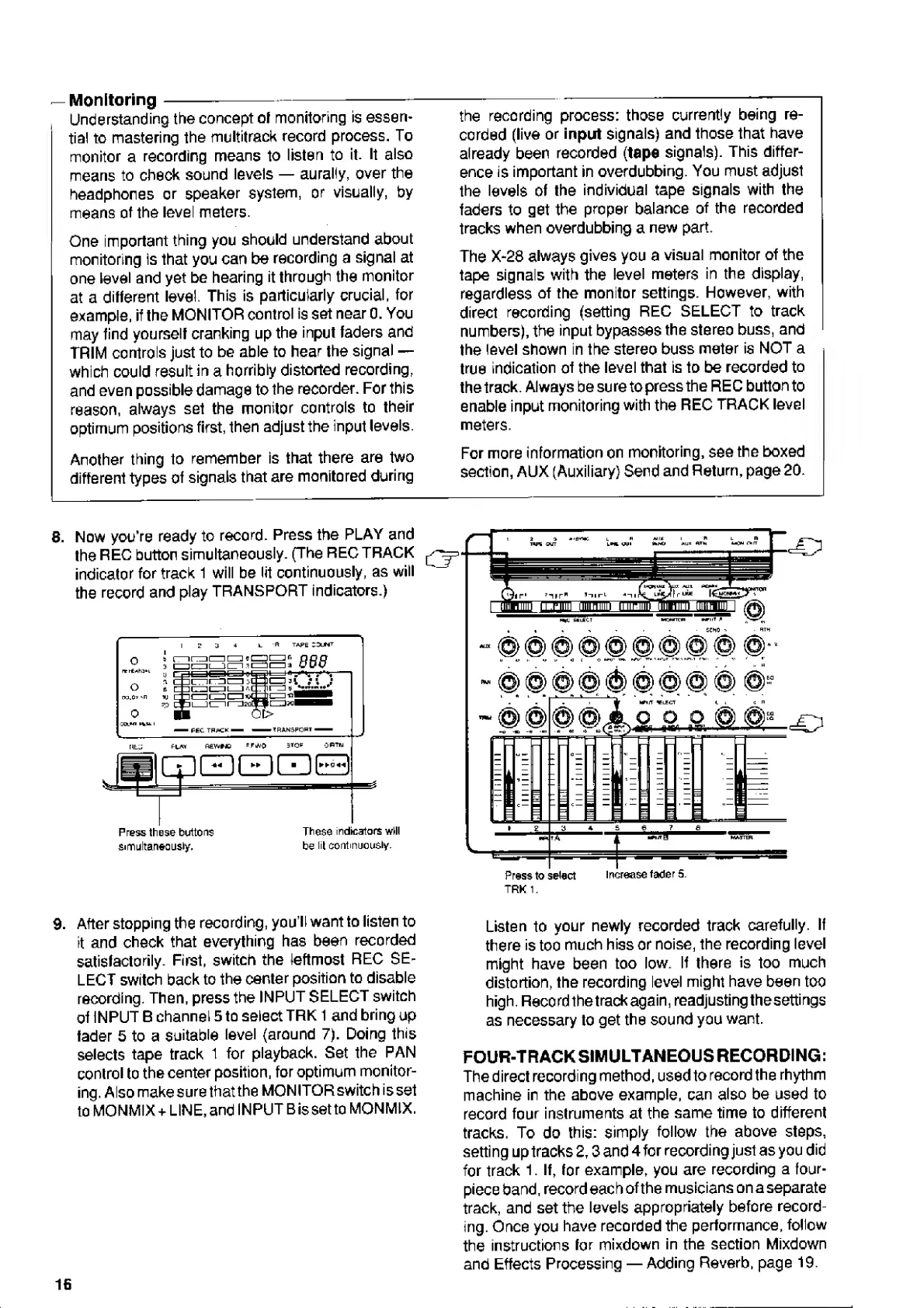
8.
Now
you’re
ready
to
record.
Press
the
PLAY
and
the
REC
button
simultaneously.
(The
REC
TRACK
indicator
for
track
1
will
be
lit
continuously,
as
will
the
record
and
play
TRANSPORT
indicators.)
tape
SQlMI
i
-
FEC
TRACK
-
-TRANSPORT-
FLAT
REYVHO
P
F
WO
3
T
O
p
i~“ii
--
imhH
i
Press
these
buttons
simultaneously.
These
indicartors
will
be
lit
continuously.
|
WifT
*lECT
<.
l
G
n
A
.
0
O
a
©
^
Press
to
select
Increase
fader
5.
TRK
1,
9.
After
stopping
the
recording,
you’ll
want
to
listen
to
it
and
check
that
everything
has
been
recorded
satisfactorily.
First,
switch
the
leftmost
REC
SE¬
LECT
switch
back
to
the
center
position
to
disable
recording.
Then,
press
the
INPUT
SELECT
switch
of
INPUT
B
channel
5
to
select
TRK
1
and
bring
up
fader
5
to
a
suitable
level
(around
7).
Doing
this
selects
tape
track
1
for
playback.
Set
the
PAN
control
to
the
center
position,
for
optimum
monitor¬
ing.
Alsomakesure
that
the
MONITOR
switch
is
set
to
MONMIX
+
LINE,
and
INPUT
Bis
set
to
MONMIX.
Listen
to
your
newly
recorded
track
carefully.
If
there
is
too
much
hiss
or
noise,
the
recording
level
might
have
been
too
low.
If
there
is
too
much
distortion,
the
recording
level
might
have
been
too
high.
Record
the
track
again,
readjusting
thesettings
as
necessary
to
get
the
sound
you
want.
FOUR-TRACK
SIMULTANEOUS
RECORDING:
The
direct
recording
method,
used
to
record
the
rhythm
machine
in
the
above
example,
can
also
be
used
to
record
four
instruments
at
the
same
time
to
different
tracks.
To
do
this:
simply
follow
the
above
steps,
setting
up
tracks
2,3
and
4
for
recording
just
as
you
did
for
track
1.
If,
for
example,
you
are
recording
a
four-
piece
band,
record
each
of
the
musicians
on
a
separate
track,
and
set
the
levels
appropriately
before
record¬
ing.
Once
you
have
recorded
the
performance,
follow
the
instructions
for
mixdown
in
the
section
Mixdown
and
Effects
Processing
Adding
Reverb,
page
19.
16

Related product manuals