EasyManua.ls Logo

Fostex X-28 - Tape Sync - Combining Ten MIDI Inputs with Three Tape Tracks.30

Fostex X-28
36 pages
Print Icon
To Next Page IconTo Next Page
To Previous Page IconTo Previous Page
Loading...
12.
Now
that
you
have
recorded
three
tape
tracks
to
augment
your
sequencer
tracks,
you
can
mixdown
all
the
parts
with
reverb
on
a
master
recorder.
To
do
this,
make
sure
that
the
rhythm
machine
and
syn¬
thesizer
outputs
are
connected
to
the
INPUT
A
channels,
then
set
the
levels
of
the
signals
with
the
fader
and
TRIM
controls.
13.
Play
back
the
sequencer
and
X-28
in
synchroniza¬
tion.
Follow
the
normal
mixdown
procedure
(see
page
19).
Adjust
the
level,
PAN
and
AUX
SEND
controls
of
all
channels.
Then
rehearse
the
mixdown
as
necessary,
and
record
the
mix
to
a
master
recorder.
Note:
Do
not
allow
the
tape
sync
signal
recorded
on
track4tobe
mixed
withthe
other
signals.
During
this
entire
operation
(after
the
tape
sync
signal
has
been
recorded),
make
sure
that
the
INPUT
SELECT
switch
for
channel
8
is
set
to
INPUT
and
that
its
fader
and
AUX
SEND
control
are
set
toO.
Tape
Sync
Combining
Ten
MIDI
Inputs
With
Three
Tape
Tracks
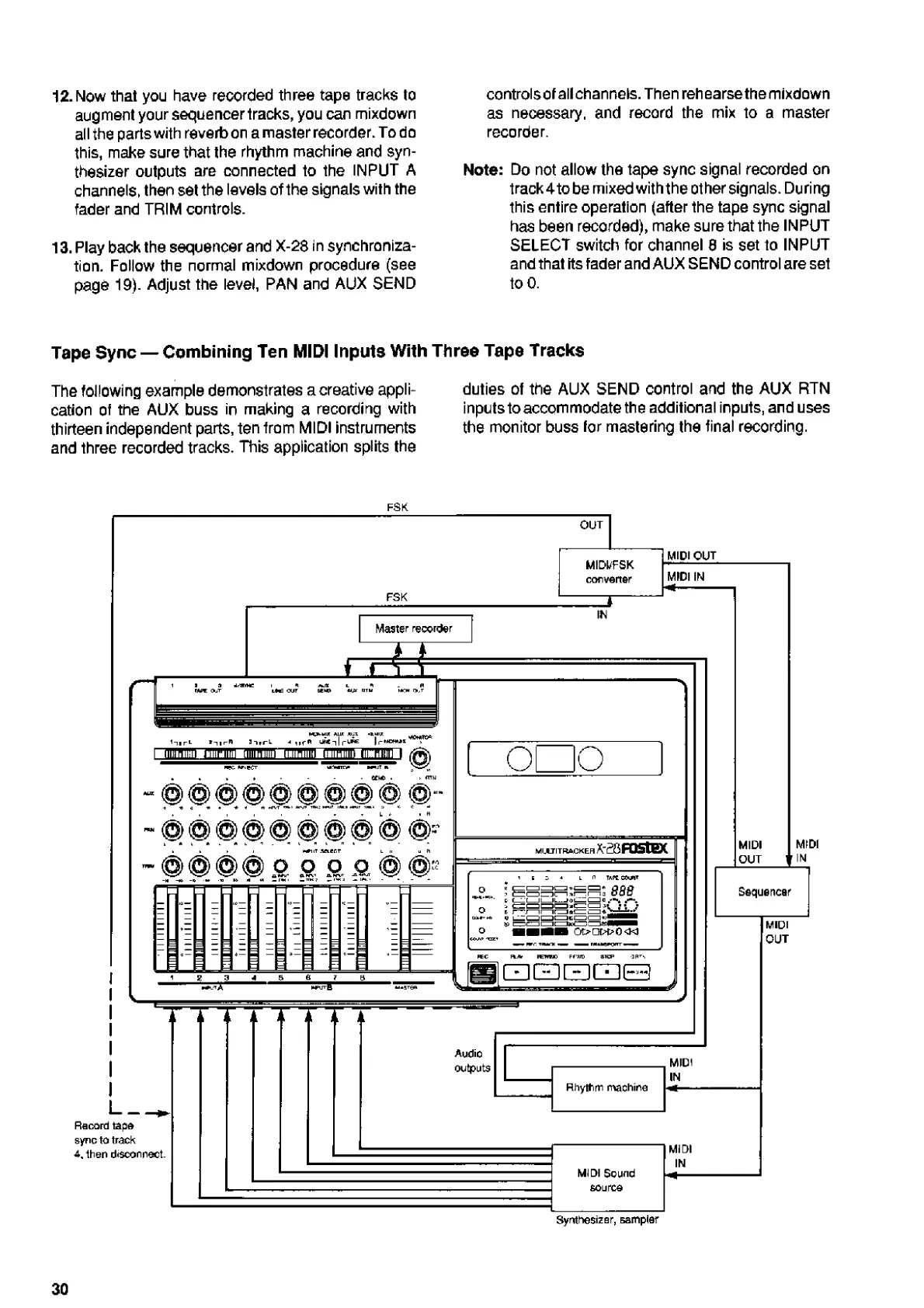
The
following
example
demonstrates
a
creative
appli¬
cation
of
the
AUX
buss
in
making
a
recording
with
thirteen
independent
parts,
ten
from
MIDI
instruments
and
three
recorded
tracks.
This
application
splits
the
duties
of
the
AUX
SEND
control
and
the
AUX
RTN
inputs
to
accommodate
the
additional
inputs,
and
uses
the
monitor
buss
for
mastering
the
final
recording.
FSK
_
OUT
I_*
Record
tape
sync
to
track
4,
then
disconnect
Synthesizer,
sampler
30

Related product manuals