EasyManua.ls Logo

Fostex X-28 - Special Applications

Fostex X-28
36 pages
Print Icon
To Next Page IconTo Next Page
To Previous Page IconTo Previous Page
Loading...
SPECIAL
APPLICATIONS
In
the
previous
section,
the
examples
were
kept
as
simple
as
possible
(e.g.,
one
instrument
pertrack,
input
1
recorded
to
track
1,
etc.)
to
acquaint
you
with
the
basics
of
multitrack
recording.
However,
as
you’ll
see
in
thissection,
your
X-28hasagreat
degree
of
flexibility
and
sophistication,
and
can
be
used
in
a
wide
variety
of
recording
and
mixing
situations.
Example
1:
Simultaneous
Stereo
Recording
of
Eight
Sound
Sources
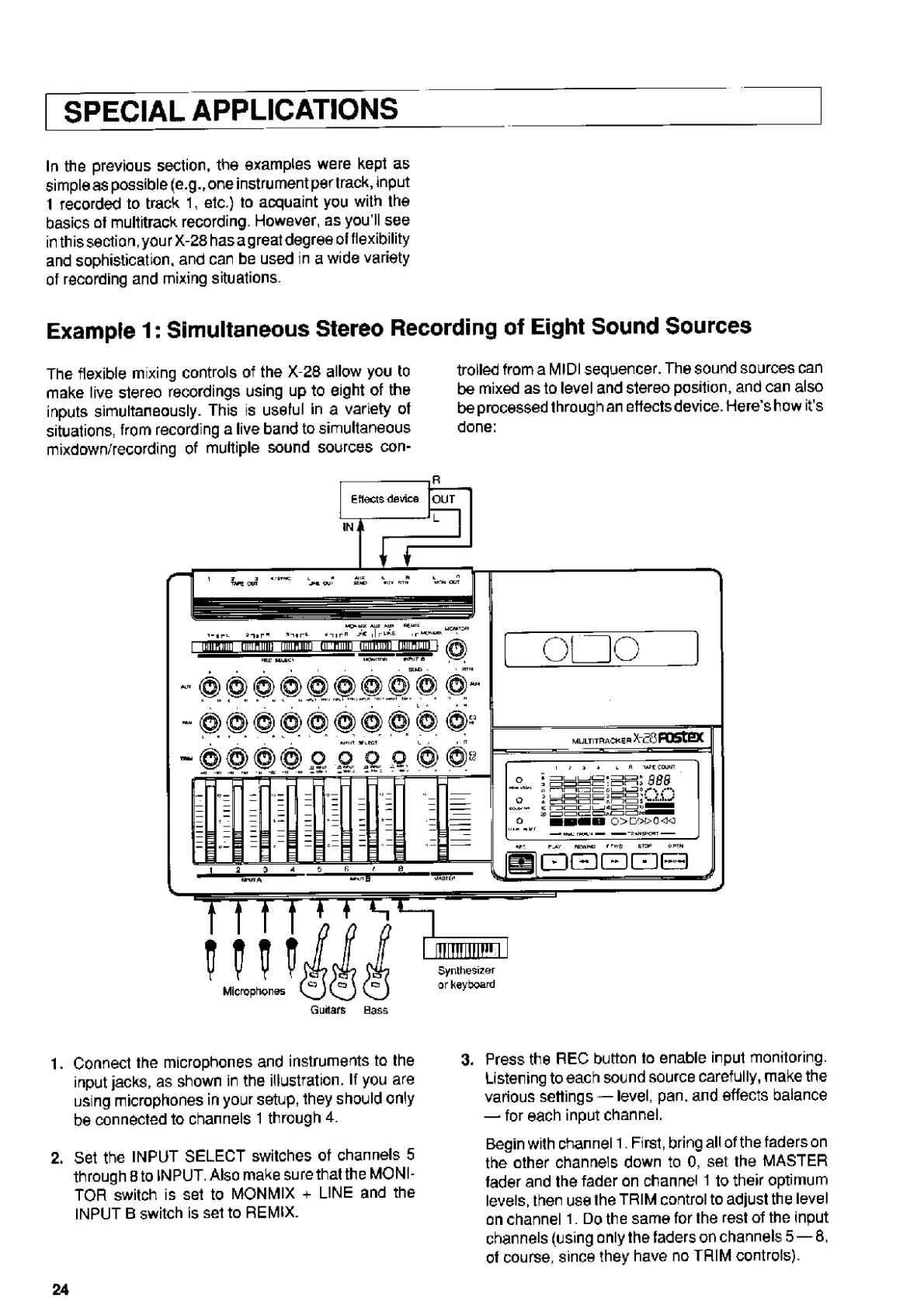
The
flexible
mixing
controls
of
the
X
28
allow
you
to
make
live
stereo
recordings
using
up
to
eight
of
the
inputs
simultaneously.
This
is
useful
in
a
variety
of
situations,
from
recording
a
live
band
to
simultaneous
mixdown/recording
of
multiple
sound
sources
con¬
trolled
from
a
MIDI
sequencer.
The
sound
sources
can
be
mixed
as
to
level
and
stereo
position,
and
can
also
be
processed
through
an
effects
device.
Here’s
how
it's
done:
f
+
t
t
+
S
4
—i
_
o
o
o
1
Li
Microphones
IIIIIU
Synthesizer
or
keyboard
Guitars
Bass
1.
Connect
the
microphones
and
instruments
to
the
input
jacks,
as
shown
in
the
illustration.
If
you
are
using
microphones
in
your
setup,
they
should
only
be
connected
to
channels
1
through
4.
2.
Set
the
INPUT
SELECT
switches
ot
channels
5
through
8
to
INPUT.
Also
make
sure
that
the
MONI¬
TOR
switch
is
set
to
MONMIX
+
LINE
and
the
INPUT
B
switch
is
set
to
REMIX.
3.
P
r
ess
the
REC
button
to
enable
input
monitoring.
Listening
to
each
sound
source
carefully,
make
the
various
settings
level,
pan.
and
effects
balance
for
each
input
channel.
Begin
with
channel
1.
First,
bringallofthefaderson
the
other
channels
down
to
0,
set
the
MASTER
fader
and
the
fader
on
channel
1
to
their
optimum
levels,
then
use
the
TRIM
control
to
adjust
the
level
on
channel
1.
Do
the
same
for
the
rest
of
the
input
channels
(using
only
the
faders
on
channels
5—8,
of
course,
since
they
have
no
TRIM
controls).
24

Related product manuals