EasyManua.ls Logo

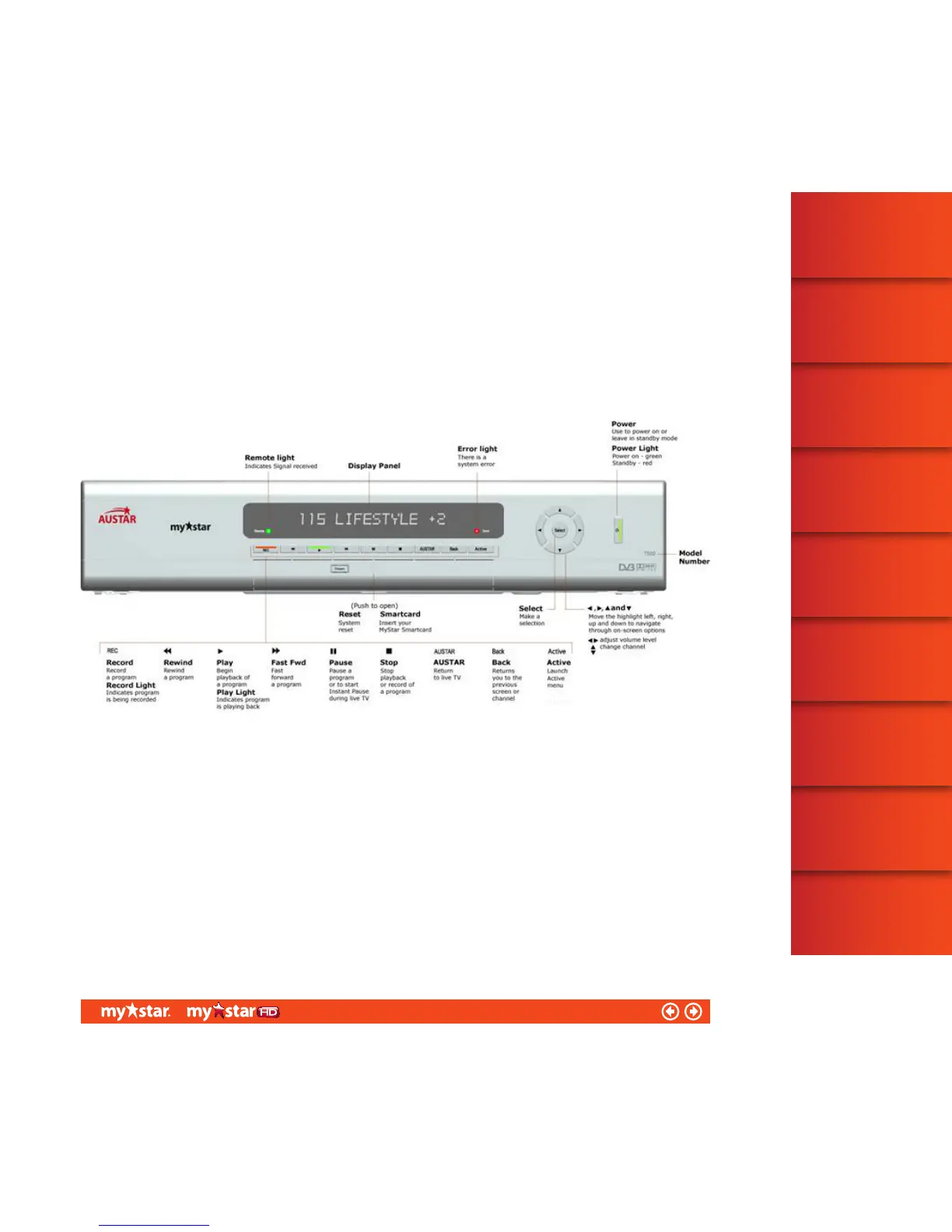
Foxtel MyStar - MyStar front panel

Foxtel MyStar
81 pages
Print Icon
To Next Page IconTo Next Page
To Previous Page IconTo Previous Page
Loading...
TECHNICAL HELP
& SPECIFICATIONS
TECHNICAL HELP
& SPECIFICATIONS
PUTTING THE “HD”
INTO MYSTAR HD
PERSONALISING
YOUR MYSTAR
YOUR PLANNER
WATCHING YOUR
RECORDINGS
RECORDING
WITH MYSTAR
HOW TO FIND

YOUR MYSTAR
REMOTE CONTROL
MYSTAR – WHAT’S

CONTENTS
TECHNICAL HELP
& SPECIFICATIONS
MYSTAR TECHNICAL SPECS

The front panel has all the basic features you need to operate the MyStar service; however we recommend you
use the MyStar remote control to get the most out of your viewing. For details on the MyStar back panel, refer to
page 64.
Note: MyStar’s Display Panel lights up when performing certain requests.
65/81

Table of Contents