PERSONALISING
YOUR MYSTAR
TECHNICAL HELP
& SPECIFICATIONS
PUTTING THE “HD”
INTO MYSTAR HD
PERSONALISING
YOUR MYSTAR
YOUR PLANNER
WATCHING YOUR
RECORDINGS
RECORDING
WITH MYSTAR
HOW TO FIND
YOUR MYSTAR
REMOTE CONTROL
MYSTAR – WHAT’S
CONTENTS
PERSONALISING
YOUR MYSTAR
Making sure you get the full Picture Display
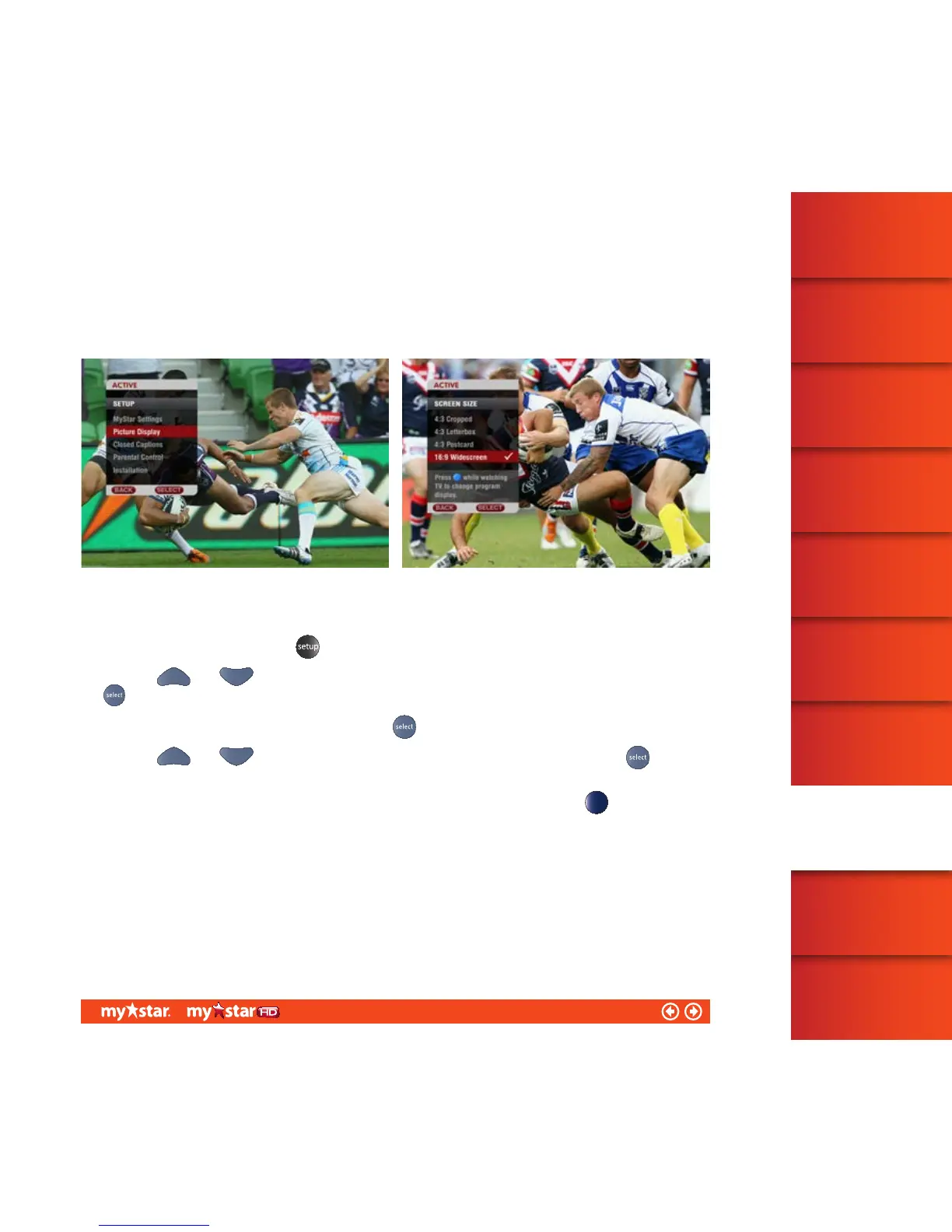
MyStar enables you to adjust the way your program is displayed on your TV screen.
Figure 37 Figure 38
To adjust your Picture Display:
Launch the Setup menu, press the
button on the MyStar remote control
Use your
and arrows to move the on-screen highlighter to ‘Picture Display’ and then press the
button (see figure 37)
Then select the ‘Screen size’ option by pressing the
button.
Use your
and buttons to select your preferred picture display and then press the button to
confirm your selection (see figure 38 )
Note: You can modify your picture display while watching normal TV by simply pressing the
coloured button
onthe MyStar remote control.
46/81



 To Next Page