EasyManua.ls Logo

Frama MATRIX F22 - Basic Screen Layout

Frama MATRIX F22
56 pages
Print Icon
To Next Page IconTo Next Page
To Previous Page IconTo Previous Page
Loading...
Frama Matrix F22
11
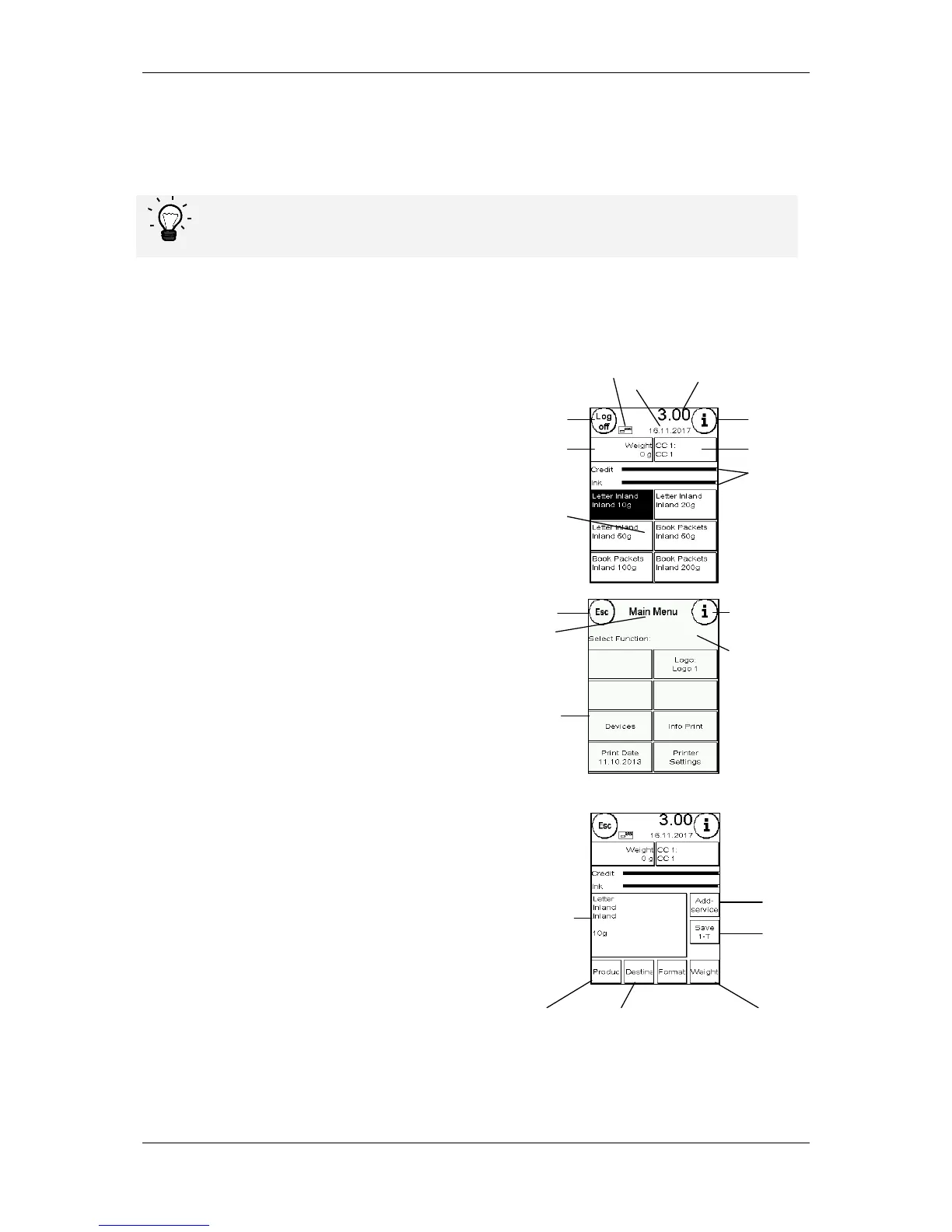
1.6. Basic screen layout
The Frama Matrix F22 franking system uses a touch screen for operation and navigation through
the menus.
Detailed information concerning the tariff control system screens is available in
section 4.3. Determining postage value from page 21.
All the functions that are not available are hidden as a rule. This means that there are differences in
the screens between Admin mode and the Cost Centre mode.
All inputs are made via the touch screen. There are no other keys for operating the machine.
One touch
start menu layout
System screen layout
(Main menu)
Attribute-guided
menu layout
i information
(calls further
information)
CC key
(change Cost centre)
Credit and
ink indicator
Shut down
system
Weight display
(information only)
OneTouch
key area
Franking value
Franking date
Ready indicator
Esc
key
(back)
Menu name
Function key
Instruction field
i information
(calls further
information)
enter
additional Services
OneTouch
(save assignment)
enter
Product
enter
Destination
enter
Weight
Product
description

Related product manuals