F3Dn Service Manual Motor Test / Section 2.5
For Technical Support, Call 800-537-2653. Copyright 2006 Franke, Inc. All rights reserved.
2.5 Motor Test Procedure
Note: Follow this Motor Test Procedure before replacing:
§ Drum Rotor Motor [Section 2.6]
§ Door Lift Motor [Section 2.7]
§ Door [Open] Motor [Section 2.8
1) Roll the unit out to allow easy access to rear
service panel.
2) Leave unit plugged in but be cautions when
opening unit back and touching Boards, etc.
3) Remove the two screws to open rear service
access panel.
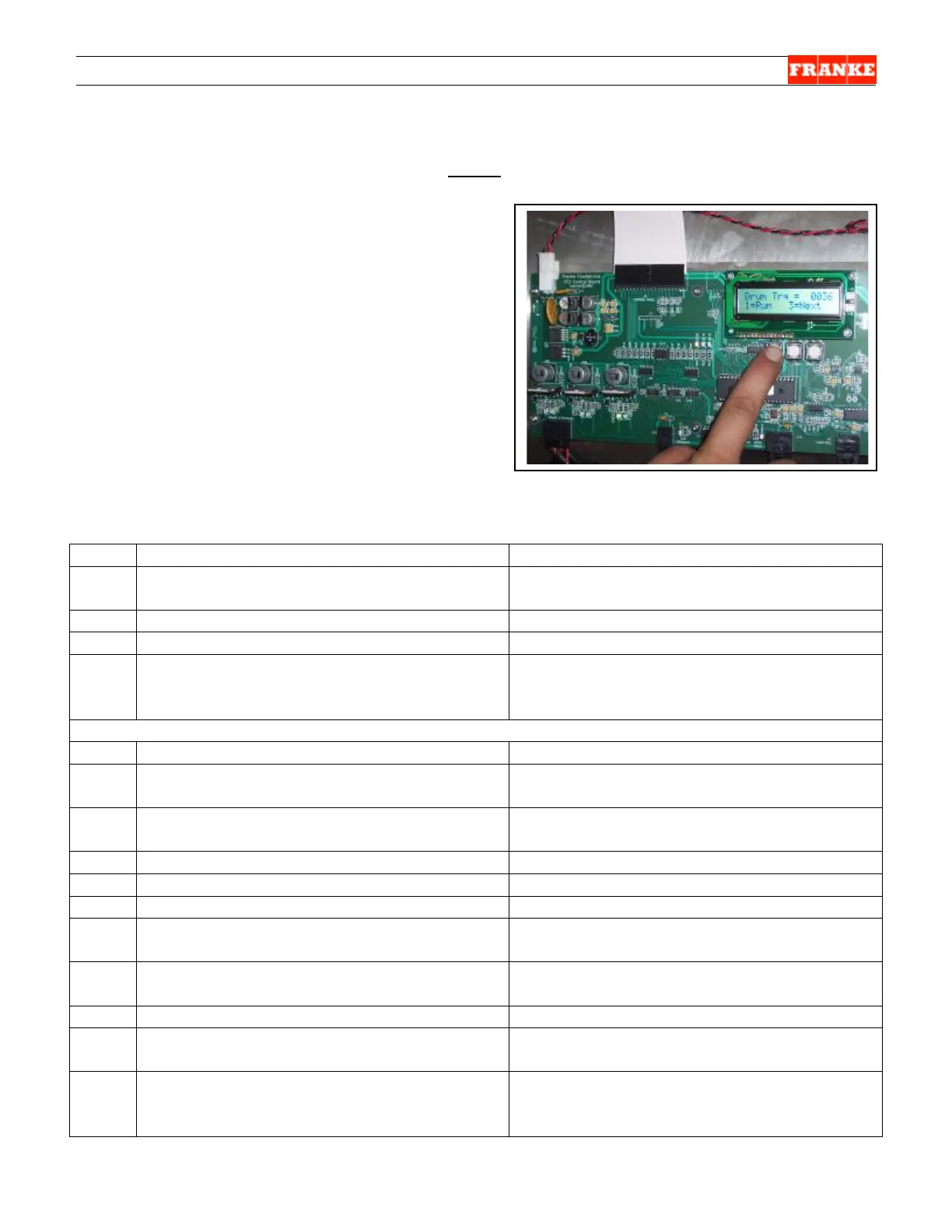
4) Go to Main Control Boards and locate the
diagnostic display (upper right) and three
white command buttons marked: SW1, SW2
and SW3, just below the display surface
mount.
Key: Bold type = Actual Display Content. // = Break to second line of Display
Step Action Required Resulting Diagnostic Display
1 From unit front turn Lane Power Touch
Pad ON.
Display will cycle through setup screens
ending with: Stby [Standby].
2
Push and hold buttons: SW1 and SW3: All Clear?? // 1=OK 3=Exit
3 Press SW1 button. [=OK]
U.S. or Alt?? // 1=US 2= Alt. [Alternate]
4
Press SW1 or SW2 button as required.
[Procedure assumes SW1=US pressed.]
Preload = 2175 [Four digit number]
Add Large Load [681 gm or 1.5 lbs.] //
1=OK
Note: Check to verify fries loading chute is in place and no stray fries are in loading area.
5 Press SW1 button. [=OK]
6 Add 1.5 pound weight [or six 4:1 Patties] to
lane product loading chute.
7 Press SW1 button. [=Cal]
Large = 226 // Z = ---- P= ---- C=---- //
Done 1= Cal 3 = Exit
8 Press S3 button. [to exit Calibration Test]
9
Press and hold S2 and S3 buttons Motor Test ? // 1=OK 2= Nxt 3=Exit
10 Press SW1 button. [=OK]
Drum Mtr? // 1= OK 3=Nxt [Next]
11 Press SW1 button. [=OK]
Drum Trq = 0000 [Torque value] // 1 =
Run 3 = Next
12 Press SW1 button to run motor. Check
motor shaft and listen for excessive noise.
Drum Trk = 00XX [Numeric value will
change. A high number means a problem.]
13 Press SW3 button [=Next Test].
Lift Motor? // 1 = OK 3 = Next
14 Press SW1 button. [=OK]
Trq = 0000 LC = 0000 [Load Cell] //
1 = Run 3 = Next
15 Press SW1 button. [Lowers slide, turns
cam & motor rotates.]
Trq = 00XX [Typically small value] LC =
XXXX [Live reading from Load Cell. Can
check load cell function.]



 To Next Page