EasyManua.ls Logo

Fremco MicroFlow TOUCH - Page 36

Fremco MicroFlow TOUCH
40 pages
Print Icon
To Next Page IconTo Next Page
To Previous Page IconTo Previous Page
Loading...
P a g e | 36 of 40
FREMCO A/S
ELLEHAMMERVEJ 14 | DK9900 FREDERIKSHAVN, DENMARK | VAT NO.: DK30815416
TELEPHONE +45 7230 1213 | SALES@FREMCO.DK | WWW.FREMCO.DK
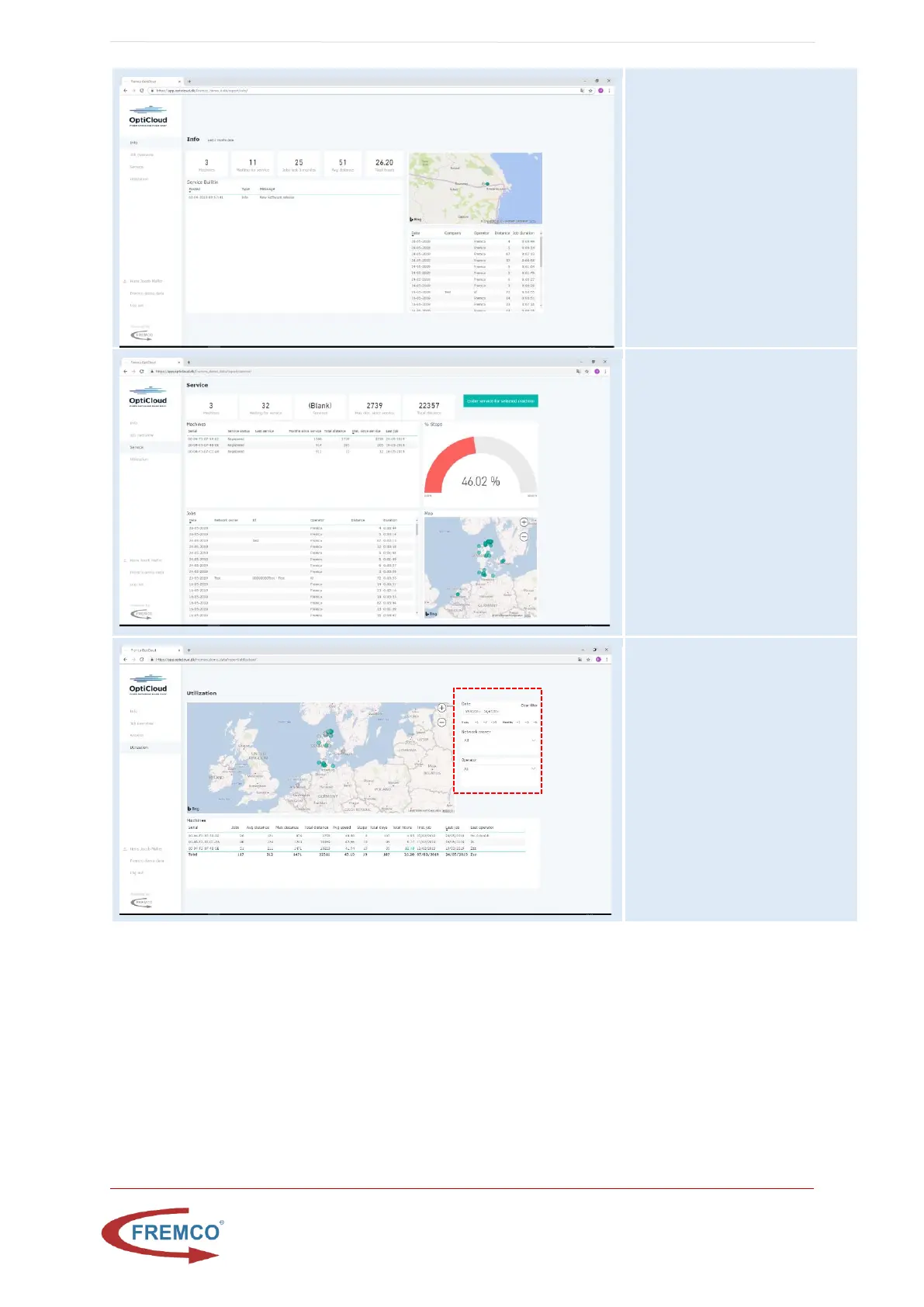
Info
Give an status
information of the last 3
months
The service bulletin
contains important
information from Fremco
related to OptiCloud and
Microflow Log
Service
Gives an overview of
machines service status
%stops indicates how
many jobs had a stop
during the operation
You can do data drill
down, by selecting a
single machine from the
list
Utilization
This screen illustrates where
and how often the machine
fleet has been utilized.
In the map each machine has
its own colour so it is
possible to identify the area
of operation for each
machine
Data filtering can be done in
the menu to the right
Data drilldown can be done
by selecting a machine in the
list below the map

Related product manuals