P a g e | 16 of 40
FREMCO A/S
ELLEHAMMERVEJ 14 | DK9900 FREDERIKSHAVN, DENMARK | VAT NO.: DK30815416
TELEPHONE +45 7230 1213 | SALES@FREMCO.DK | WWW.FREMCO.DK
10.4. TOUCH DISPLAY SCREEN OVERVIEW
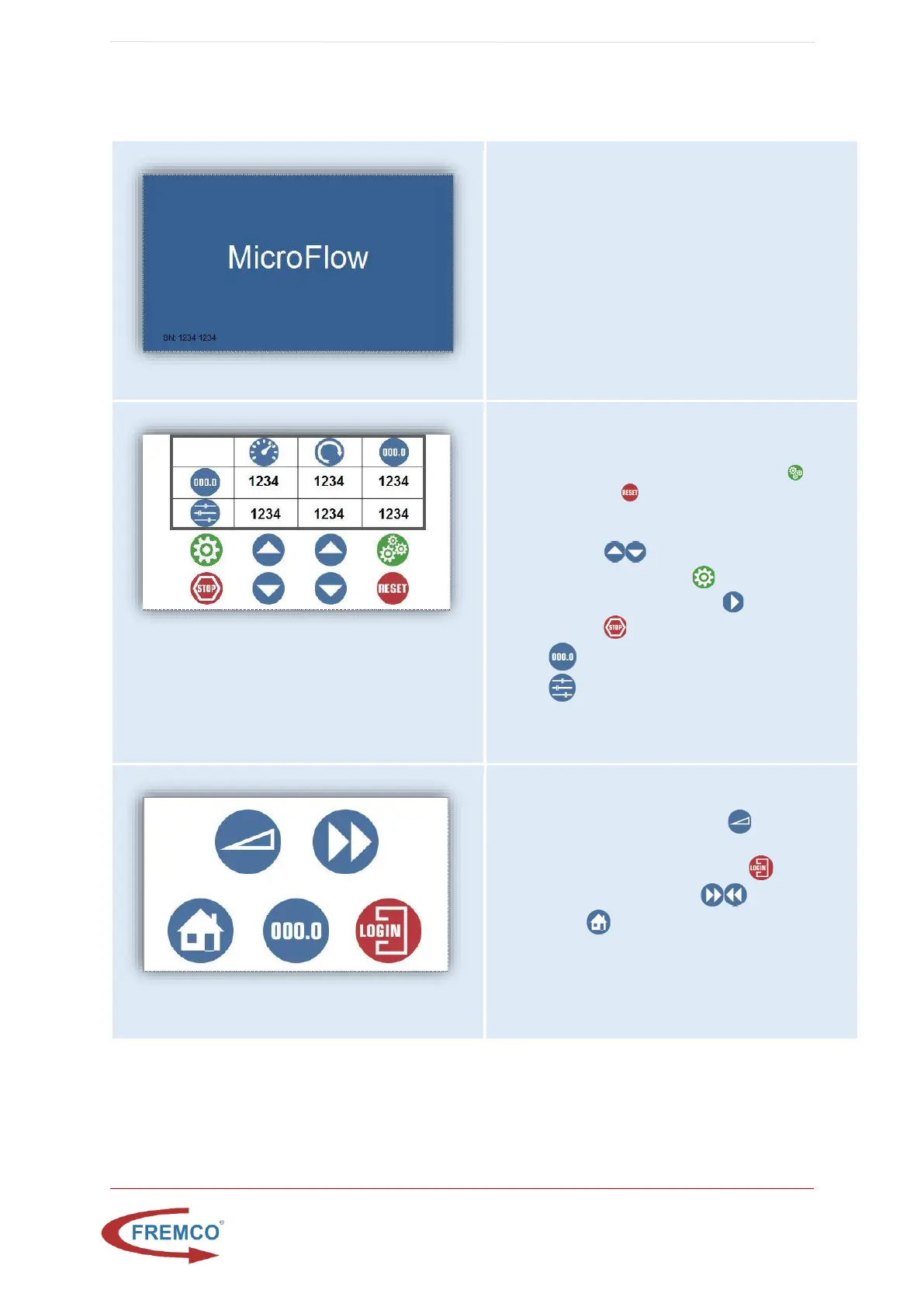
Startup/Pause Window
Shown during startup, or when machine has been
inactive for some time.
Tab to activate main screen.
Main Window
This window is shown during machine operation. On
this screen it is possible to:
• Set and reset stop length, by pressing to set
length, and to reset (set to 0 disables the
length stop function)
• Increase/decrease both speed and torque, by
pressing .
• Access setup window,
• See machine status, running or
stopped
• Actual speed, torque and length
• Preset speed, torque and length
Setup Window
From this window it is possible to:
• Access motor ramp window
• Log in to a service info page (login is required,
and only for service personnel)
• Toggle motor direction
• Press to go back to main window


 To Next Page