QUANTUM™ LX/HD SYSTEM INTERFACE PANEL
INSTALLATION-OPERATION-MAINTENANCE
090.030-IOM (OCT 13)
Page 4
BASIC SIP CONNECTIONS
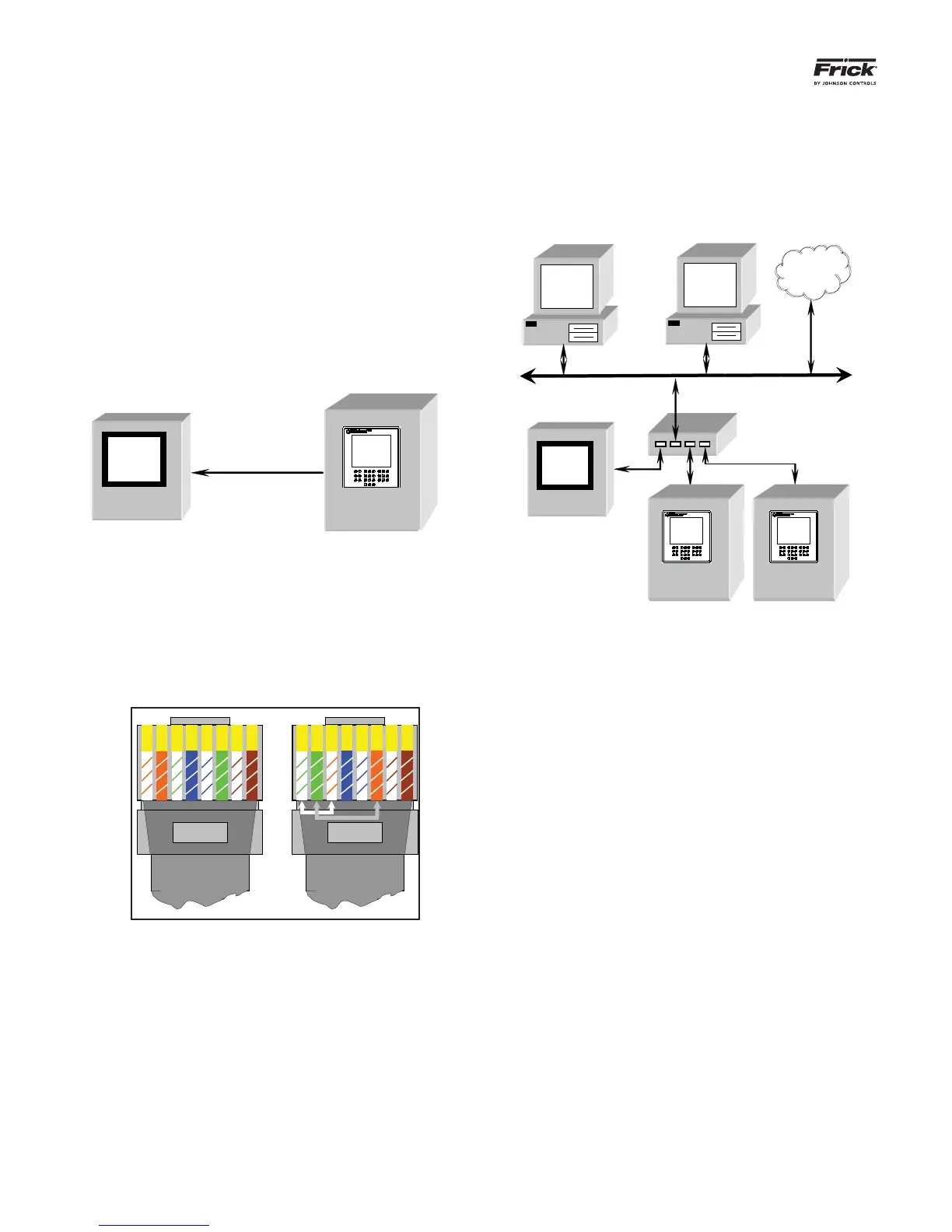
The Frick SIP may be connected directly to a single Quan-
tum™ LX or HD panel for a minimum system confi guration, or
it may be connected to an existing Ethernet network.
Connecting the SIP to an existing Quantum™ LX or HD con-
trol panel is accomplished by routing a recommended CAT-5
Ethernet cable to each of the panels that you wish to include
in your network (the recommended cables and parts may be
found in any of the Quantum™ LX or HD communications
manuals).
For a Single Panel (Minimum Confi guration) – Only one
CAT-5 cable will need to be run from the panel, and it may
plug directly into the SIP.
SIP
Crossover Cable
Quantum™ LX or HD
Note: Most pre-made, store-bought Ethernet cables
are the straight pin-to-pin variety, and work in most
confi gurations. However, if you want to connect two
Ethernet devices directly together, in this case one
SIP to one Quantum™ LX or HD panel, you will need
to use a crossover Cat-5 cable. Refer to the following
pictorial to construct a crossover cable:
1 2 3 4 5 6 7 8
Left (Not Crossed)
3 6 1 4 5 2 7 8
Right (Crossed)
Both Ends of a crossover-cable
CAT-5 Ethernet cable color codes
1 – White w/orange stripe 5 – White w/blue stripe
2 – Orange w/white stripe 6 – Green w/white stripe
3 – White w/green stripe 7 – White w/brown stripe
4 – Blue w/white stripe 8 – Brown w/white stripe
For multiple Panels - Each cable should be routed back
from the Quantum™ LX or HD panel to a common area,
where the ends can be plugged into a switch. The switch
will then have a single cable that connects to the SIP (and
to an optional existing Ethernet network).
Ethernet Network
Switch
SIP
Quantum™ LX Quantum™ LX
Internet
Quantum™ LX or HD Quantum™ LX or HD



 To Next Page