QUANTUM™ LX/HD SYSTEM INTERFACE PANEL
INSTALLATION-OPERATION-MAINTENANCE
090.030-IOM (OCT 13)
Page 7
Header
Page List
SIP PAGE INTRODUCTION
General Information
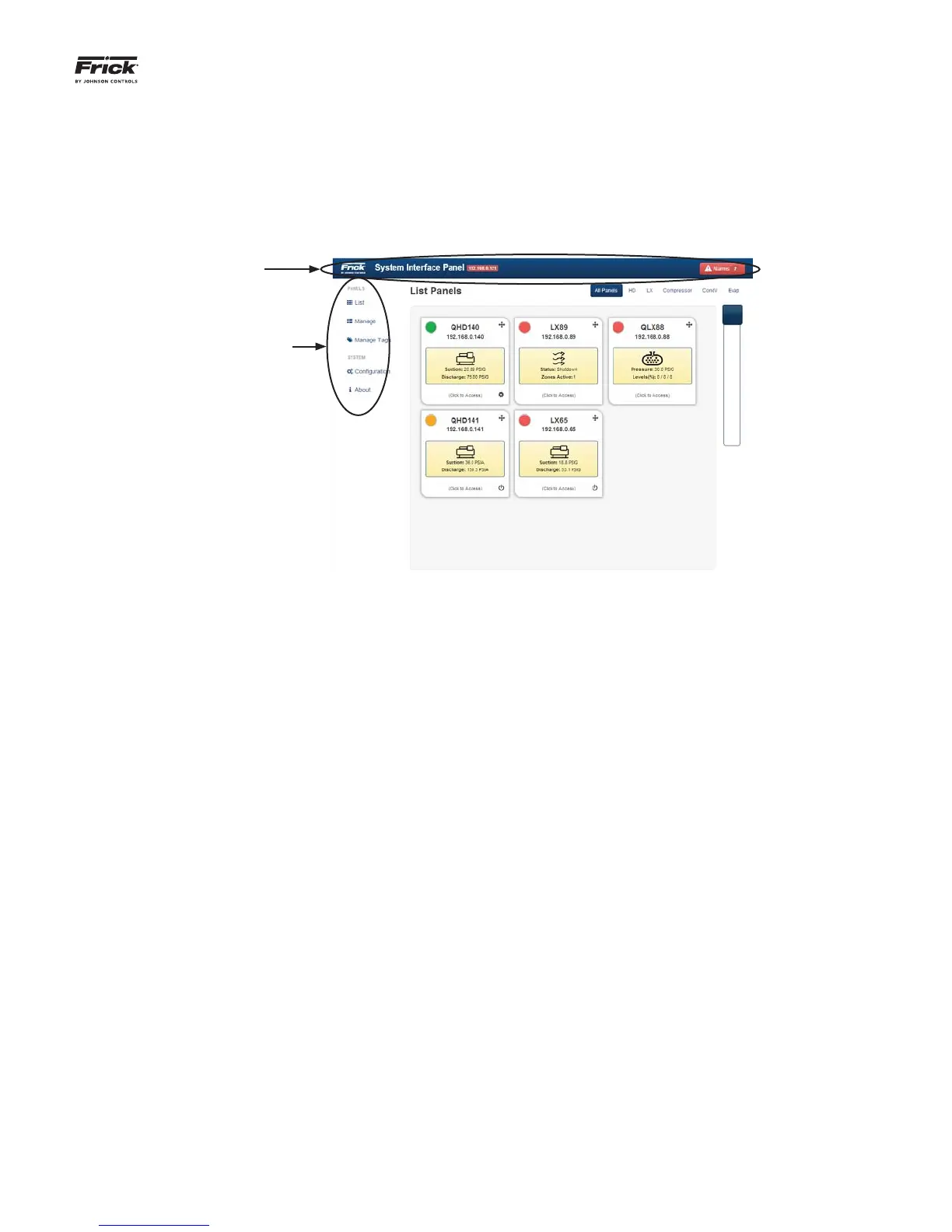
All available pages will have two areas that are identical.
Using the List page as an example:
Header - The area at the top of all pages shows the Frick
logo, the name “System Interface Panel”, the IP Address,
and fi nally an Alarm notifi cation (described later).
Page List - The area at the left side of all pages provides
a menu to navigate between pages:
• List - Selecting this from any screen will return you
to the List screen.
• Manage - Selecting this will allow you to confi gure all
of the devices that will be controlled and monitored
through the SIP.
• Manage Tags - Selecting this will allow custom nam-
ing of panel groups.
• Confi guration - Use this page to confi gure the Ether-
net settings for the SIP.
• About - An informational screen that provides infor-
mation about the software that this SIP is running.
Some pages will have a slider bar as shown at the right side
of the above screen. Moving the slider up or down will allow
more of the screen content (if present) to be viewed.



 To Next Page