i Setting the Off Timer
The Off _mer enables you to switch off the air conditioner automatically after a
given time. You can select the Off timer only when the air conditioner is on.
The off timer will only work in conjunction with the Cool mode.
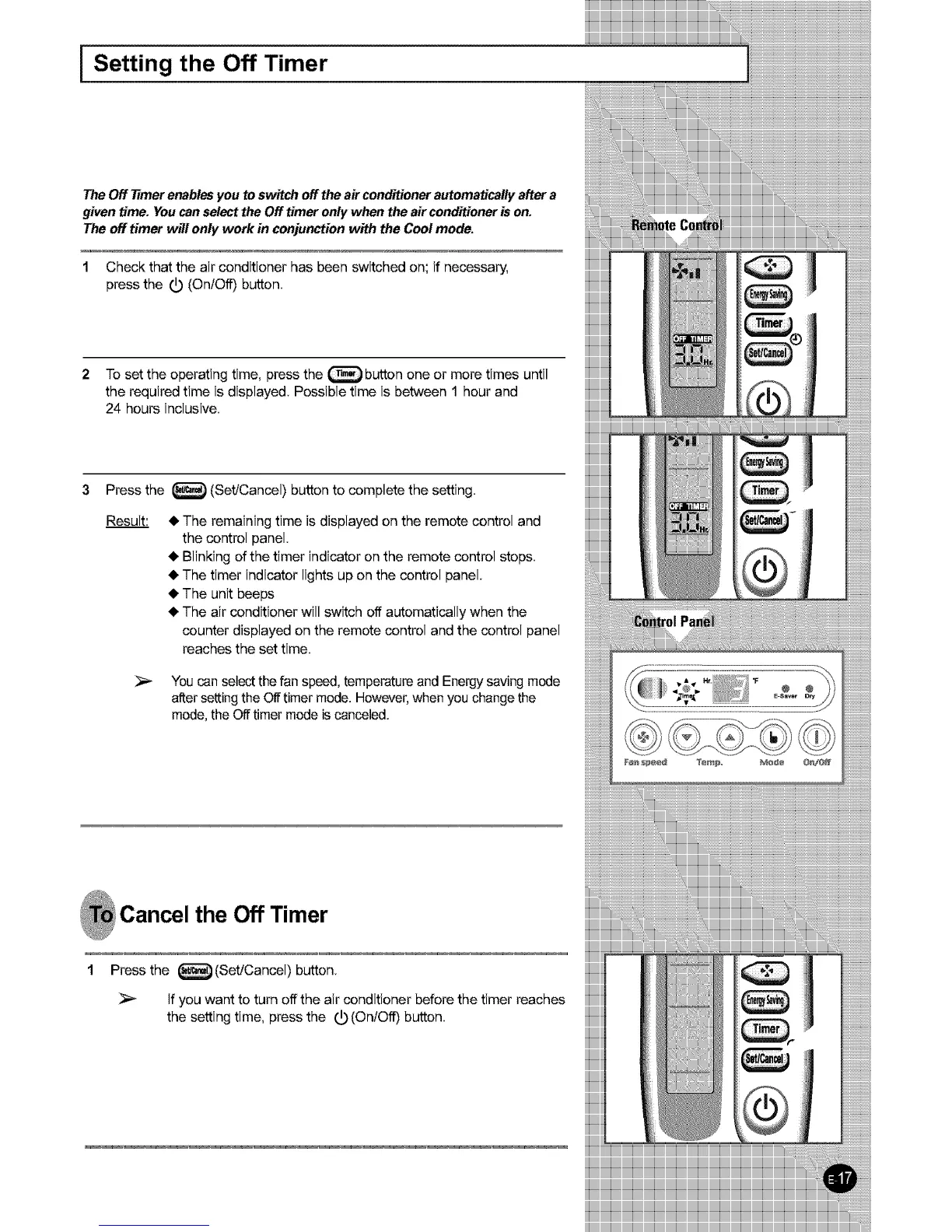
1 Check that the air conditioner has been switched on; if necessary,
press the _ (OnlOff) button.
2 To set the operating time, press the _ button one or more times until
the required time is displayed. Possible time is between 1 hour and
24 hours inclusive.
3 Press the _ (Set/Cancel) button to complete the setting.
Result:
• The remaining time is displayed on the remote control and
the control panel.
• Blinking of the timer indicator on the remote control stops.
• The timer indicator lights up on the control panel.
• The unit beeps
• The air conditioner will switch off automatically when the
counter displayed on the remote control and the control panel
reaches the set time.
Youcan selectthefan speed,temperatureand Energysaving mode
alter settingthe Offtimer mode. However,when you changethe
mode,the Off timer modeis canceled.
Cancel the Off Timer
1 Press the _ (Set/Cancel) button.
if you want to turn off the air conditioner before the timer reaches
the setting time, press the (_) (OnlOff) button.
iiiiiiiiiiiiiiiiiiiiiiiii
iiiiiiiiiiiiiiiiiiiiiiiil
iiiiiiiiiiiiiiiiiiiiiiiil
iiiiiiiiiiiiiiiiiiiiiiiil
iiiiiiiiiiiiiiiiiiiiiiiil
iiiiiiiiiiiiiiiiiiiiiiiil
iiiiiiiiiiiiiiiiiiiiiiiil
iiiiiiiiiiiiiiiiiiiiiiiil
iiiiiiiiiiiiiiiiiiiiiiiil
iiiiiiiiiiiiiiiiiiiiiiiili
iiiiiiiiiiiiiiiiiiiiiiiil
iiiiiiiiiiiiiiiiiiiiiiiil
iiiiiiiiiiiiiiiiiiiiiiiil
iiiiiiiiiiiiiiiiiiiiiiiil
iiiiiiiiiiiiiiiiiiiiiiiil
iiiiiiiiiiiiiiiiiiiiiiiil
iiiiiiiiiiiiiiiiiiiiiiiil
iiiiiiiiiiiiiiiiiiiiiiiil
iiiiiiiiiiiiiiiiiiiii_--



 To Next Page