eep Timer
The Sleep Timer can be used when you are cooling your room to switch
the air conditioner off automatically after 8 hours.
ff you wish to switch the unit off at a specific time, refer to
page 17.
1 Make sure that you have selected the Cool mode.
2
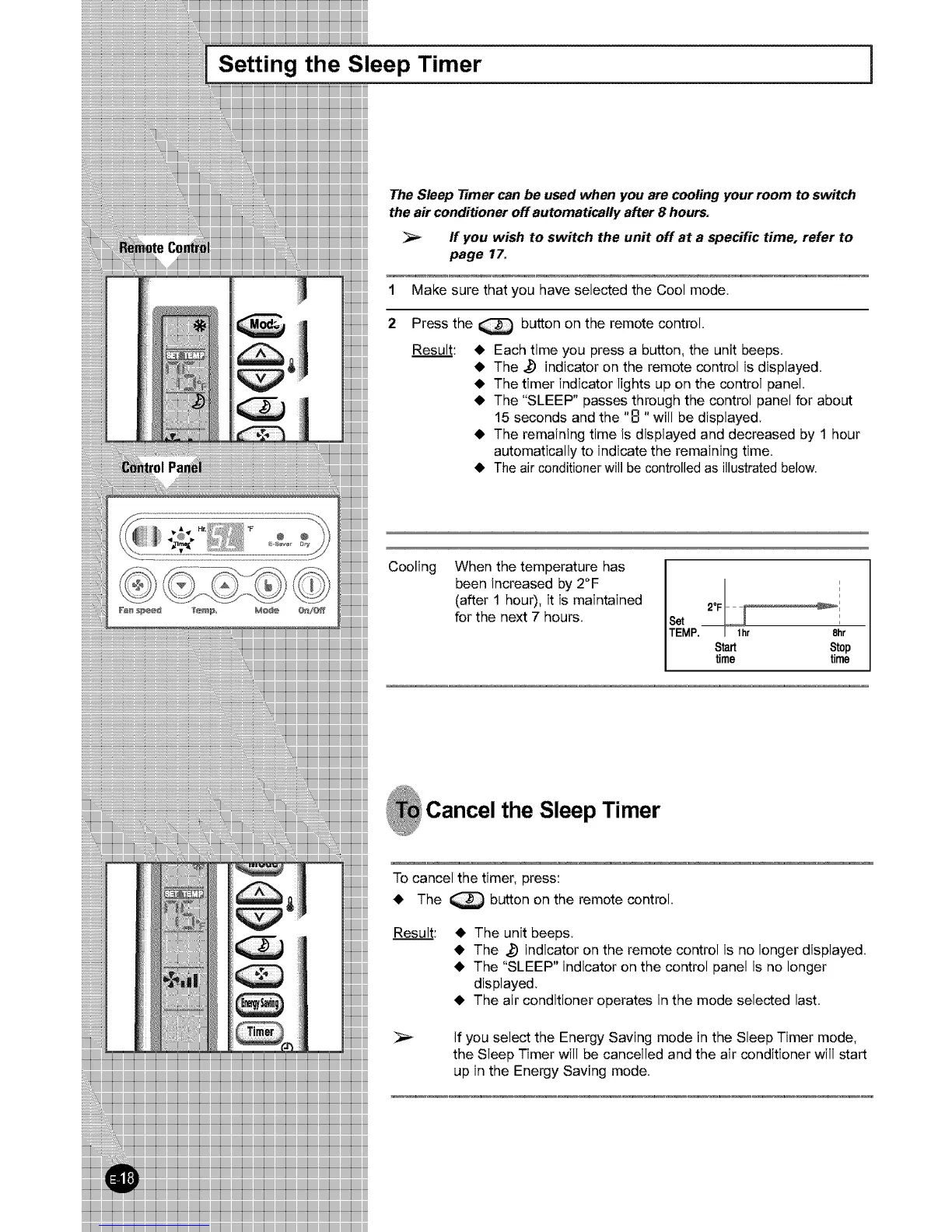
Press the _ button on the remote control.
Result: • Each time you press a button, the unit beeps.
• The _ indicator on the remote control is displayed.
• The timer indicator lights up on the control panel.
• The "SLEEP" passes through the control panel for about
15 seconds and the "B "will be displayed.
• The remaining time is displayed and decreased by 1 hour
automatically to indicate the remaining time.
• Theair conditionerwill be controlledas illustratedbelow.
Cooling When the temperature has
been increased by 2°F
(after 1 hour), it is maintained
for the next 7 hours.
i
° _:
Set
TEMP. I lhr 8-hr
Start Stop
time time
Cancel the Sleep Timer
To cancel the timer, press:
• The _ button on the remote control.
Result:
• The unit beeps.
• The _ indicator on the remote control is no longer displayed.
• The "SLEEP" indicator on the control panel is no longer
displayed.
• The air conditioner operates in the mode selected last.
If you select the Energy Saving mode in the Sleep Timer mode,
the Sleep Timer will be cancelled and the air conditioner will start



 To Next Page