PAGE 12 OF 26 0118 I H -7184
12
P329 M_HA mane.fm
6.3 Feeding the strap around the
package
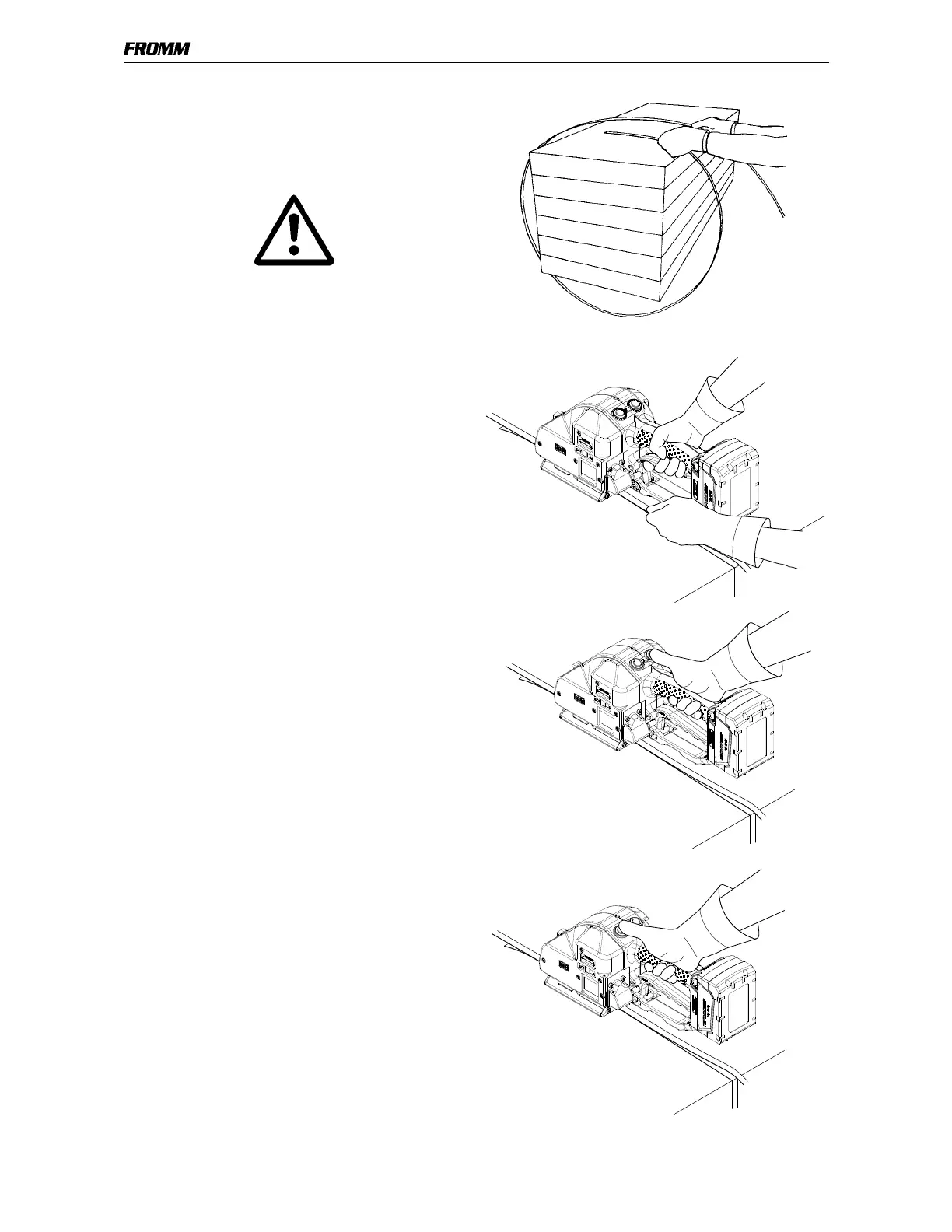
• The strapping is fed around the package as
illustrated.
Warning! The plastic strap which will be welded
must be free from oil, grease and other dirt.
Dirty plastic straps can't be welded correct!
6.4 Inserting the strap
• Pull up the handle lever firmly with your right hand.
• Insert the two straps well aligned on each other
into the strap guide using your left hand.
The lower strap end must slightly protrude the end
of the base plate.
• Release the handle lever.
6.5 Tensioning the strap,
Operation mode Manual
• Press down the tension button and then release it
again after the desired strap tension has been
reached.
The tensioning operation can be interrupted and
restarted at any time.
During tensioning the LED lights green.
After automatic cut off of the tensioning force it
can be tensioned again not before 8 seconds.
6.6 Sealing the straps,
Operation mode Manual
• Press and release immediately the sealing button.
The plastic strap is welded and cut off from the rest of
the strap.
During the welding the LED lights green.
After elapsing of the adjusted welding time (see 6.2.2)
the cooling time begins (LED lights yellow).
During that time the tool must not be removed from
the strap.


 To Next Page