3
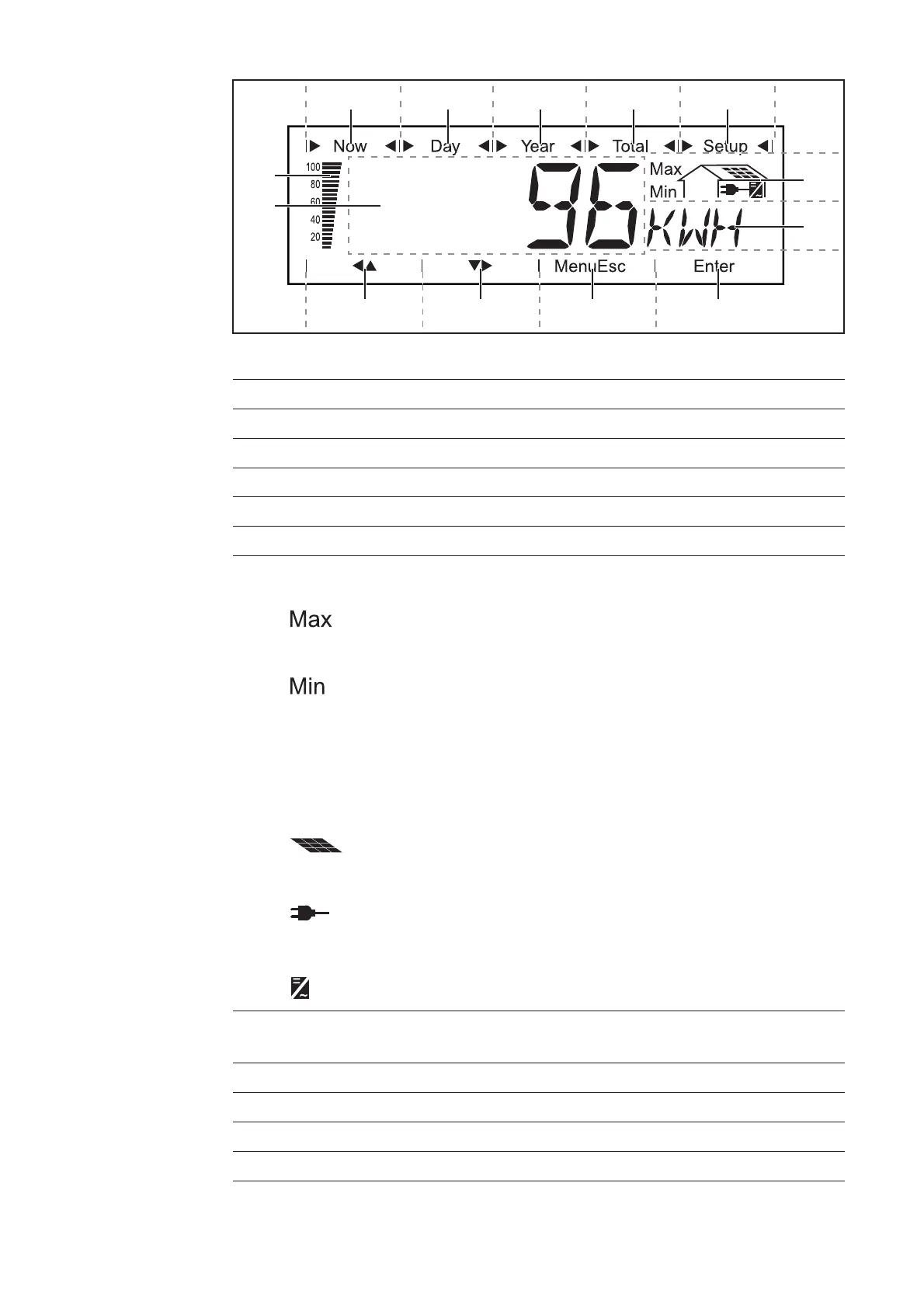
Display
(12)
(1) (2) (3) (4) (5)
(6)
(7)
(8)(9)(10)(11)
(13)
Display
(7) area for unit display
for displaying the applicable measuring unit
(8) Icon for the ‘Enter’ key
(9) Icons for the ‘Menu/Esc’ key
(10) Icons for the ‘Down/Right’ key
(11) Icons for the ‘Left/Up’ key
... indicates the maximum value within the period of obser-
vation (depending on the display mode chosen)
... indicates the minimum value within the period of obser-
vation (depending on the mode of display chosen)
Important The Min. and Max. values may not corres-
pond to the absolute extreme values, as the measured
data are recorded at two second intervals.
... appears with data readings that are directly related to
the solar modules
... appears with AC data readings that are directly related
to the grid
... appears with data readings that are related directly to
the inverter
Item Function
(1) Icons for the ‘Now’ display mode
(2) Icons for the ‘Day’ display mode
(3) Icons for the ‘Year’ display mode
(4) Icons for the ‘Total’ display mode
(5) Icons for the ‘Setup’ display mode
(6) Icons for operating conditions



 To Next Page