31
EN
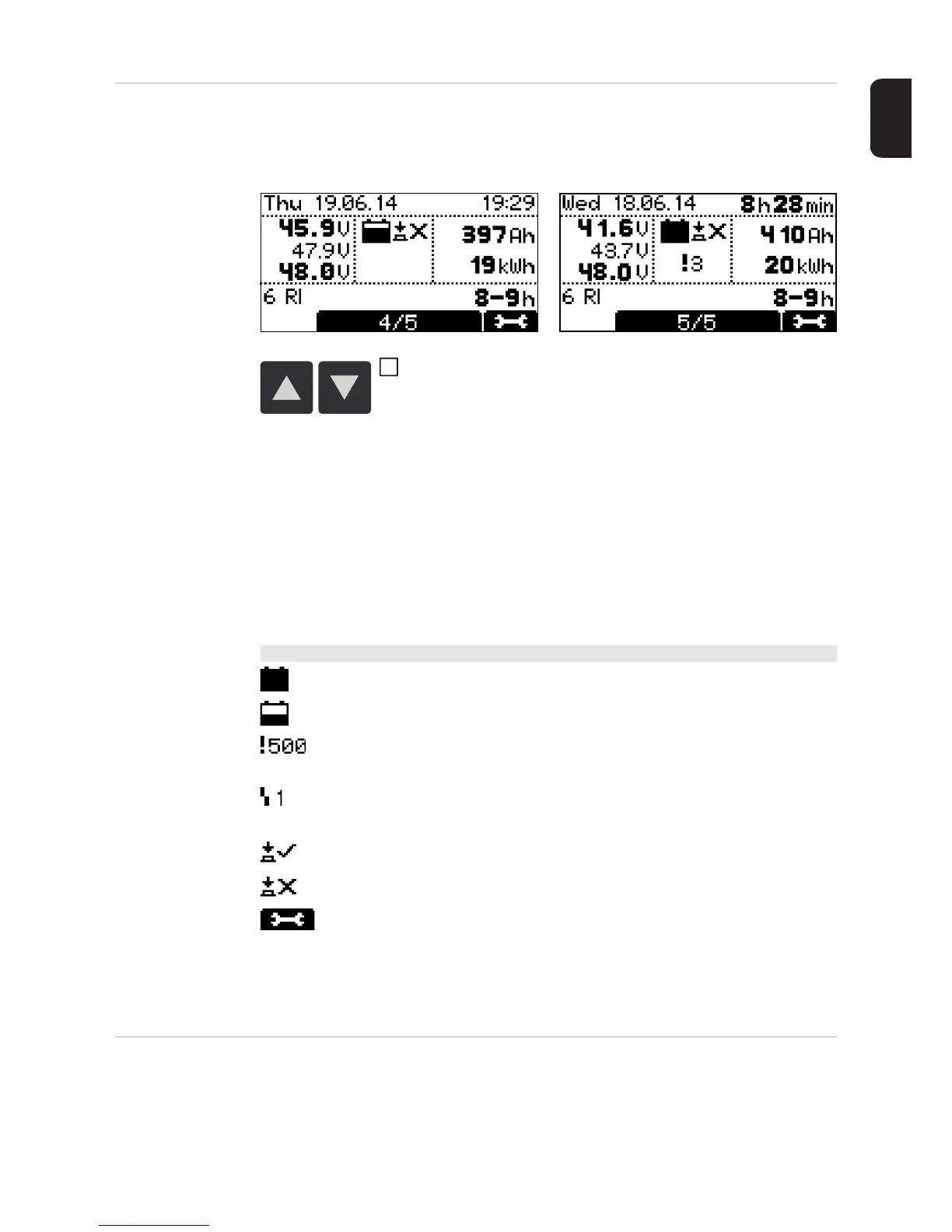
History mode History mode provides information about the parameters for all the stored charging pro-
cesses. In order to show changing or different displays, two versions of the display window
are shown below:
Text content of the display window:
- Start date of charge, e.g. Thursday 19.06.14
- Start time of charge, e.g. 19:29 or charging period, e.g. 8h28min
- Voltage at charge start, e.g. 45.9 V
- Voltage after 5 minutes, e.g. 47.9 V
- Voltage at charge end, e.g. 48.0 V
- Consumed Ah, e.g. 397 Ah
- Consumed kWh, e.g. 19 kWh
- Charging characteristic, e.g. 6 RI
- Set charging period, e.g. 8-9 h or set Ah, e.g. 400 Ah or set charge end time (not
shown)
Configuration
mode
Configuration mode provides the following setting options:
- "Charging settings": settings for the battery
- Type of battery, e.g. "Wet"
- Charging characteristic, e.g. "IU"
- Capacity (Ah) or charging time (h) depending on the charging characteristic
Use the "Up/Down" keys to scroll between the pages for each
stored charging process
Symbols shown:
- Full battery:
Charging has been completed
- Empty battery:
Charging has not been completed
- Exclamation mark with number:
Warning has been output with the corresponding status code. More informa-
tion can be found in the "Status codes" section.
- Symbol with number:
Error has been output with the corresponding status code. More information
can be found in the "Status codes" section.
- Key symbol with a tick:
Charging was stopped properly using the "Stop/Start" key
- Key symbol with a cross:
Charging was stopped without using the "Stop/Start" key
- Charging details - Display of certain battery data at the beginning and end of
the charging process:
Number of cells
Ah
Characteristic
Type of battery
1




 To Next Page