6 RECORDING SCHEDULE
6.1 OVERVIEW
Recording times and settings are controlled by the recording schedule which is stored in memory
on the BAR-LT. The schedule allows you to program recordings to start at a particular time and
date with repeating periods throughout the day and over multiple days. In this way you can
maximise your deployment time by only recording the times you are interested in or sub-sampling
throughout the day and/or alternating days.
The schedule can contain multiple schedule entries which can be individually programmed to have
different start and end times, repeating periods and different recording settings like sample rate,
compression and the channel it records from.
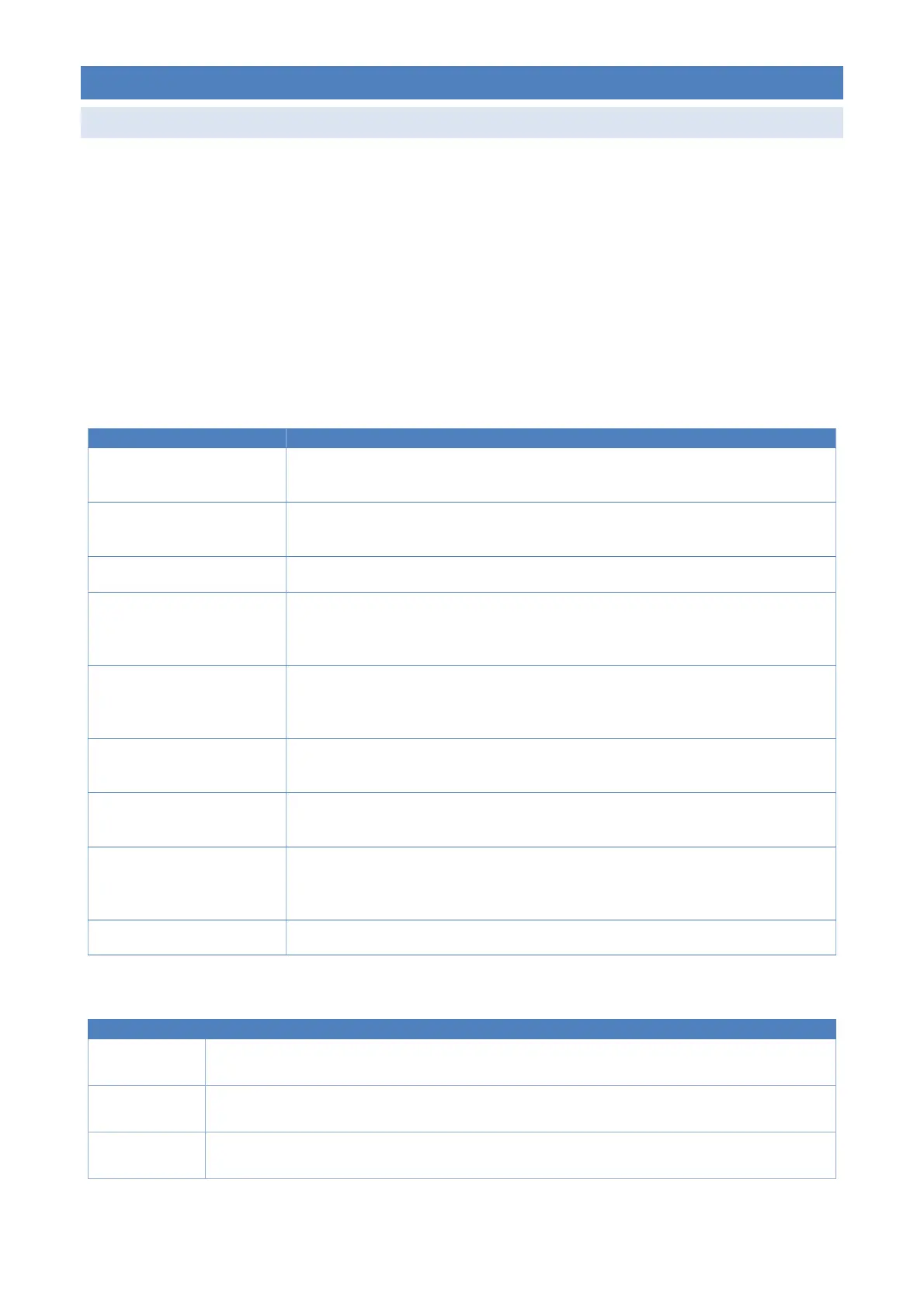
Each schedule entry has the following fields that determine when the recordings will take place:
Field Description
Start time This the time that the first recording of the day will start. This can be an absolute
time, e.g. 06:00 or sun based e.g. sunrise - 01h30m
Start date This is the date that the first recording will take place. If this is set in the future, then
recorder will sleep until this date is reached.
Recording duration This is the length of time each recording will run for.
Repeat throughout the
day? (YES/NO)
This option allows the recording to be repeated every repeat period until repeat
stop time is reached. This allows you to easily sub-sample across a day. E.g. start at
sunrise and record for 10 minutes every hour until sunset.
- Repeat period The period of time between the start of a recording and start of its next repeated
recording. If repeat period is equal to recording duration, then it will perform back-
to-back recordings with a 5 second gap it uses to prepare each new recording.
- Repeat stop time This is the time that the last recording of the day will start. This can be absolute
time, e.g. 20:00 or sun based e.g. sunset + 01h30m
Repeat over multiple days?
(YES/NO)
This option allows the recordings to repeat over days and then stop at a particular
date.
- Daily repeat period This is the length (in days) of the repeating cycle. If this is set to 1 it will record every
day until the stop date is reached. If it’s set to 2, it will record every second day. If
it’s set to 3 it will record for one day every third day, etc.
- Stop date This is the last day on which recordings will occur.
Some examples of the types of recordings you can schedule are shown below:
Entry name Description
Dawn Start at Sunrise -1hr and record for 2hrs every day @ 44.1kHz with FLAC compression from mic
channel A.
Dawn to Dusk Start at Sunrise +1hr and record for 5mins every hour until Sunset - 1hr every day @ 22kHz with
no compression (WAV) from mic channel B.
All day Start at 01/May/2019 at 00:00 and record for 5mins every hour until 23:00 every 2
nd
day until
31/July/2019 @ 22kHz with no compression (WAV) from both mic channels A&B.
Schedules can be created and edited on a computer or on the recorder itself.



 To Next Page