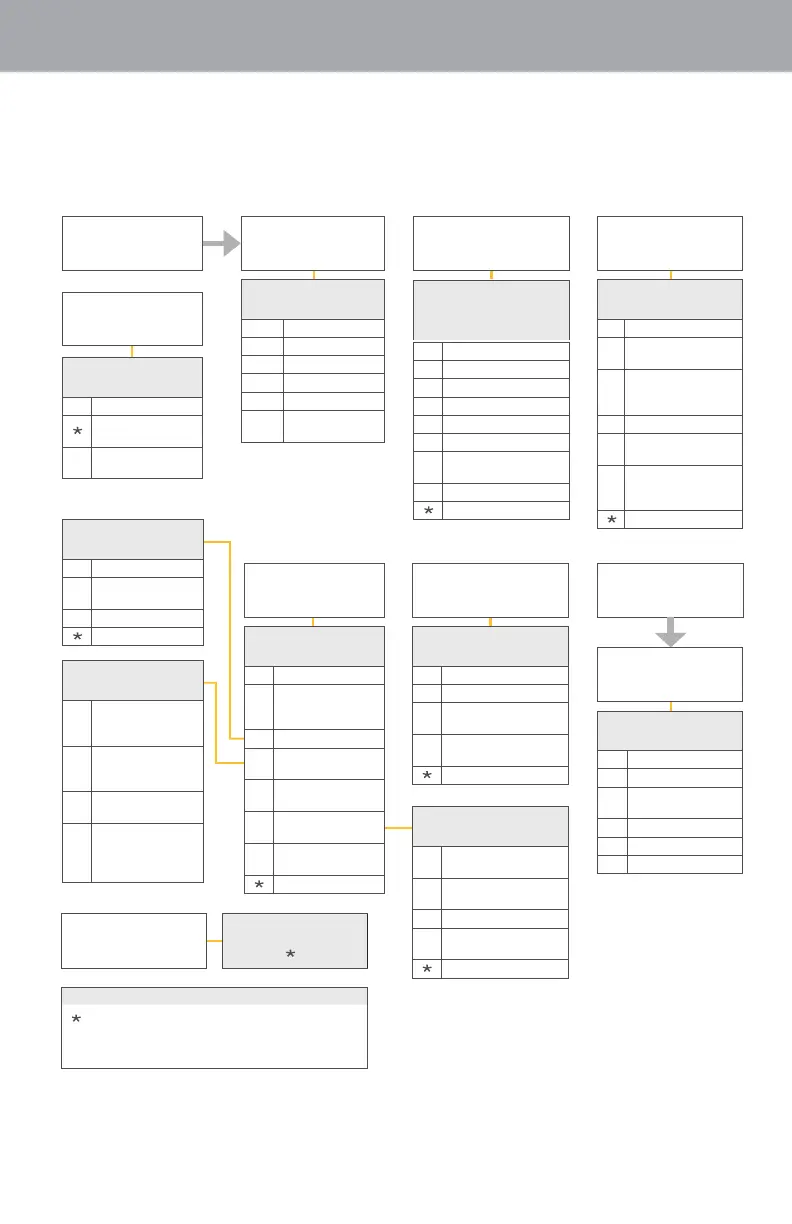
Appendix B
Voicemail Menu Map
48
To access this menu, dial *100 from your
telephone Or dial 1.844.387.5200 (for
customers residing in CA, FL and TX), or
1.844.994.4993 (for customers residing
in IN), and enter your phone number and
passcode.
3
Work with
Greetings Menu
1
Erased Messages
2
Send Message
6
Review Deleted
Message
1
Listen to Message
5
Reminders
0
Help
Review Messages
4
Mailbox Settings
7
Switch Account
Hear Message
1
Repeat
3
Delete
4
Reply
5
Send a Copy
22
Save as New
#
Leave as
Saved
Enter phone or
Group List number,
then
#
1
Review Message
2
Mark as Urgent
3
Mark as Private
4
Re-record Message
5
Report on Delivery
6
Report on Read
7
Add or Remove
Recipient
#
Send as is
*
Exit
Mailbox Settings
Menu
1
Group Lists
2
Hands-free
and Time-saver
Options
3
Security Options
4
Group Mailbox
Options
5
Notification
Options
6
Additional
Settings
7
Advanced Call
Feature Options
*
Exit
Enter phone
number, then
# or * if error
Hear Messages
1
Repeat
2
Restore
3
Permanently
Delete
4
Reply
5
Send a Copy
#
Next Message
Reminders Menu
1
Disable Settings
2
Add New Reminder
3
Recurring
Reminders Settings
4
One-Time
Reminder Settings
*
Exit
Helpful Hints
#
Next Hint
*
Return to Main
Menu
1
Replay from
Start Menu
Greeting Options
Menu
1
Personal Greeting
2
Extended
Absence
3
Sys-Gen
Greetings and
Name Recording
5
Busy Greetings
6
Out-of-Office
Hours Greeting
9
Forward All Calls
to Voice Mail
Greeting
*
Exit
Common Keys
*
Cancel Input or Move
Up a Level
0
Helpful Hints
#
End Input or Move
Forward in a List
8
Pause/Resume
Security
Options
1
Change Pin
2
Fast Login
Feature
3
Skip Pin Feature
*
Exit
Group Mailbox
Options *
1
Enable
Secondary
Mailboxes
2
Disable
Secondary
Mailboxes
3
Add Secondary
Mailboxes
5
Include/Exclude
Sub Mailboxes
from your new
Summary
Additional Settings
1
Review Operator
Number Settings
3
Language Selection
4
Broadcast Options
5
Define Default Fax
Number
*
Exit
*
Up to 5 secondary mailboxes can be set up by
the primary
account owner, each with a unique
PIN and greeting and notification options.



 To Next Page