NANO PRO
13
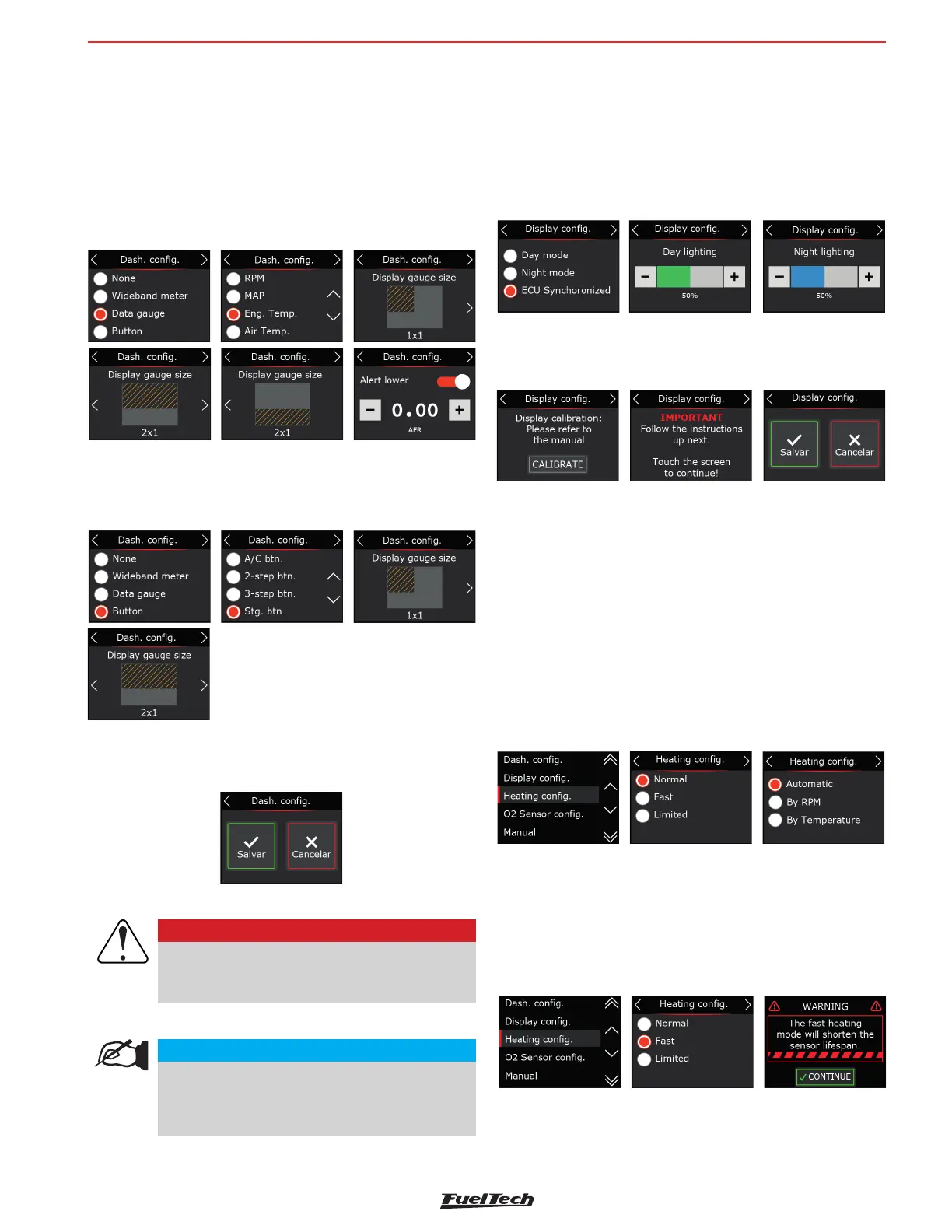
Button
Select which buttons will be triggered in each dash. It is possible
to con gure up to 2 buttons per screen.
After each con guration it is necessary to go to the last screen
and click on the save button.
NOTE
When the screen remains idling with no input from
the user for longer than 10 seconds, the action
is canceled and the interface returns to the main
screen.
8.2 Display con guration
In this menu you can choose the screen lighting in day and night
modes. These values are independent of the ECU, that is, the
day and night values can be different between ECU and Nano
PRO Switching between modes can be activated by a button
on the Nano PRO screen or come directly from the ECU via the
FTCAN 2.0 network.
After lighting setup, the display calibration screen will appear.
It is recommended that it be done on the rst installation and
whenever you notice dif culty in touching the screen.
8.3 Heating setup
O2 sensor heating is essential for starting the lambda sensor
reading. On the Nano PRO there are 3 heating modes:
Normal: Standard heating currently used by the WB-O2 Nano.
This is the recommended mode for FuelTech ensuring a longer
O2 sensor life.
It is possible to choose one of the three parameters to start
the heating in automatic mode (whenever it is turned on), by
temperature or RPM.
Data gauge
Select which data will be displayed in each dash. It is possible
to con gure up to 3 parts of information per screen with different
sizes and positions.
If necessary, also con gure the minimum and maximum values
for each con gured information. These alerts are displayed on
the Nano PRO screen and are independent of the ECU, and
may be different values from those con gured in each module.
IMPORTANT
Buttons to work correctly, it is necessary to
con gure the inputs in the ECU map in the
FTManager software.
Fast heating, uses a high current to shorten the heating time. By
using this option the O2 sensor life will be drastically reduced.
It is possible to choose one of the three parameters to start
the heating in automatic mode (whenever it is turned on), by
temperature or RPM.


 To Next Page