NANO PRO
18
9.2 Nano PRO Software Update
To update the Nano PRO software, follow the steps described below:
a - Connect the ECU through the USB cable to the computer and open the FTManager Software.
b - Turn ON the ignition key.
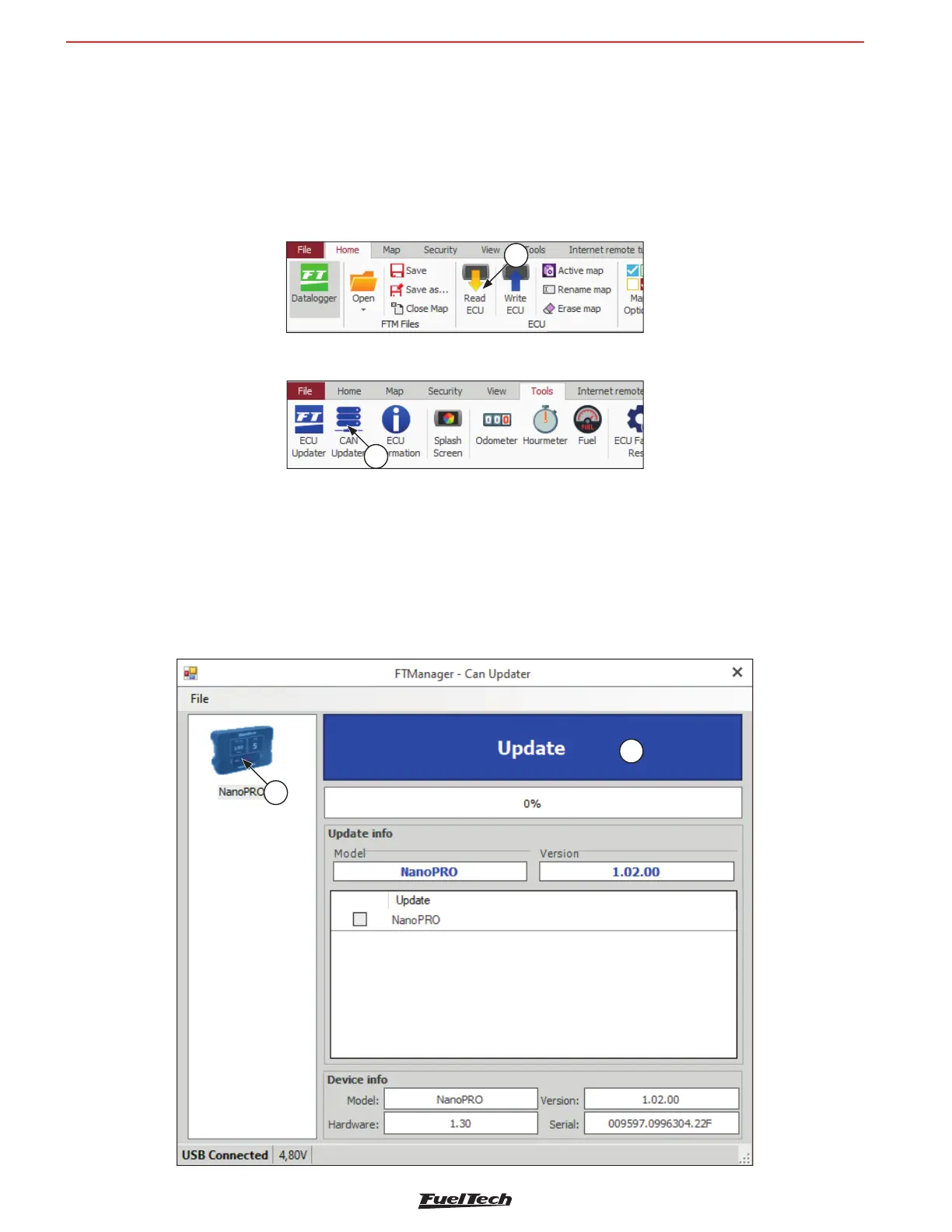
c - In the FTManager software, on the “Home” tab, click on the button “Read ECU” (1) to open the map in the
software.
1
d - Open the “Tools” tab and click on the button “CAN Updater” (2);
2
e - A screen for updating the Nano PRO Software will open. On the left (3) of the screen will appear all the equipment
available on the CAN network. Select which Nano PRO will be updated.
f - Click on the button “Update” (4).
g - Wait for the update process to nish, after that the Nano PRO will restart automatically.
h - Check the Nano PRO settings. See “9. Con guration via the FTManager Interface” on page 16, or directly
from the Nano PRO interface.
3
4



 To Next Page