NANO PRO
16
9. Confi guration via the FTManager Interface
To con gure the Nano PRO through the FTManager software, follow the steps described below:
a - Open the map in FTManager Software
b - Access the “Tools” menu and then click on “External Modules” and locate “Nano PRO and open the con guration
screen.
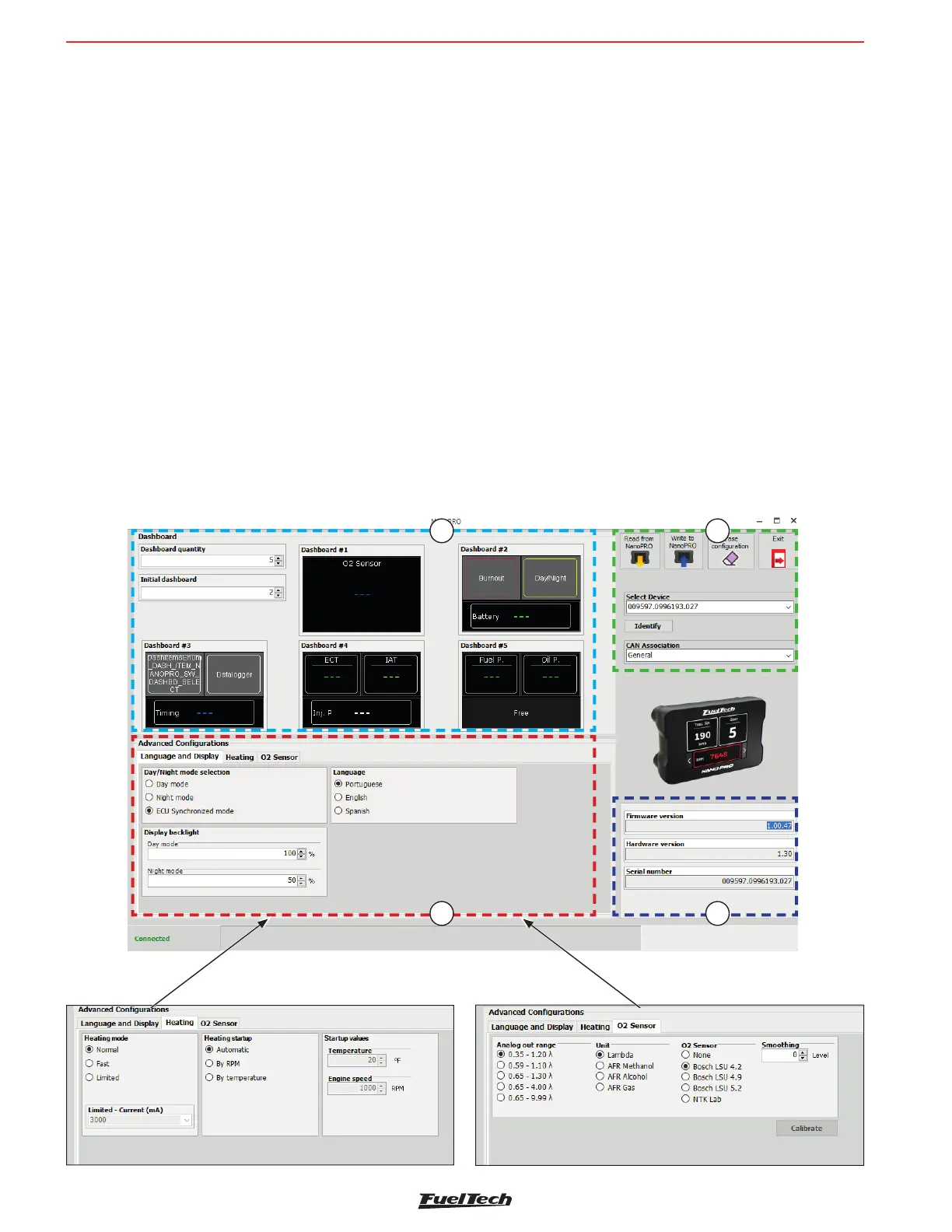
This screen is divided into four distinct parts.
1 - Dashboard con guration: Allows you to con gure the 5 dashboard screens with the data you deem necessary,
as well as de ne which will be the main screen.
2 - Advanced Settings: There are three tabs with all the necessary settings for the Nano PRO to operate correctly
- Display and language: select the language of the Nano PRO and set the brightness levels for day and night
mode.
- Heating: adjusts the O2 sensor heating mode and sets the parameters of RPM and minimum temperature
for the start of heating.
- O2 sensor: de nes which sensor will be used, Unit of measure and the Range of the analog output.
3 - Buttons and Nano PRO selection: there are four buttons for reading and writing the settings in the Nano PRO
memory as well as selecting which device is being con gured (if you have more than one Nano PRO on the
CAN network).
4 - Serial number and hardware and rmware version.
1 3
42


 To Next Page