28
WWW.FUHR.DE
multitronic
881/881GL/ServoAccess
The electricity and data transfer control unit of the
FUHR autotronic can be used for left handed as well as right
handed doors.
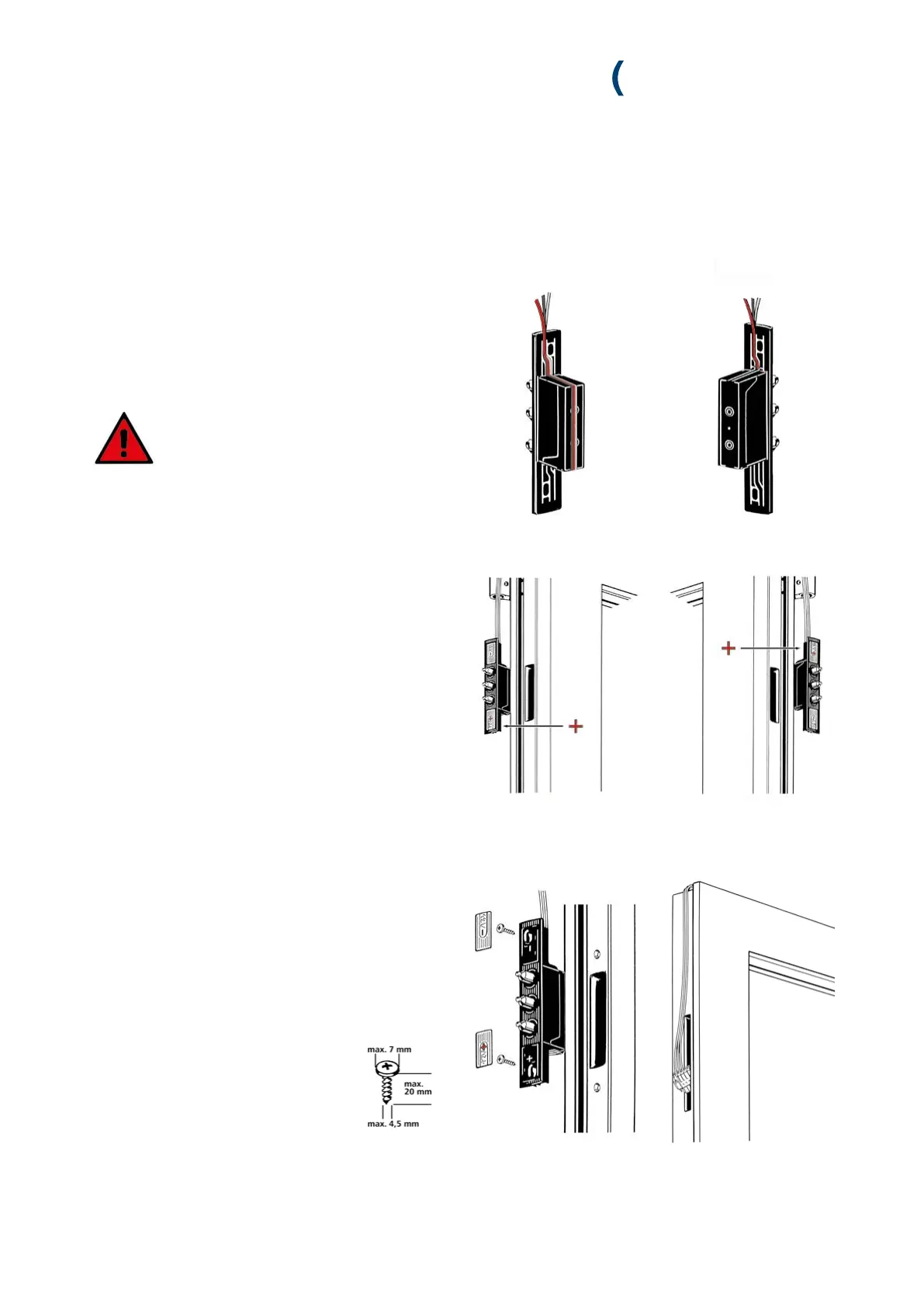
On right handed doors the tappet contact device is installed
as supplied.
On right handed doors the cable is placed in the guide
channel on the rear side of the casing.
Check the polarity (plus/minus) before
installing the tappet contacts, refer to the
component’s identification marking:
DIN right = Plus symbol on the bottom
DIN left = Plus symbol on the top
1. Remove the silver covers from the tappet contact device.
2. Insert the tappet contact device into the door leaf’s routed
recess.
3. Lay the cable with the green plug in the channel above the
door.
4. Screw-fix the casing to the door leaf profile.
5. Replace the covers.
6. Insert the green plug in the additional locking point’s
top routing and lead it down to the routed recess for the
electrical drive unit.
4.2.2 INSTALLATION OF THE TAPPET CONTACTS
DIN right DIN left
DIN right DIN left


 To Next Page