73
5
Taking Photographs
Autofocus
The Focus-Point Display
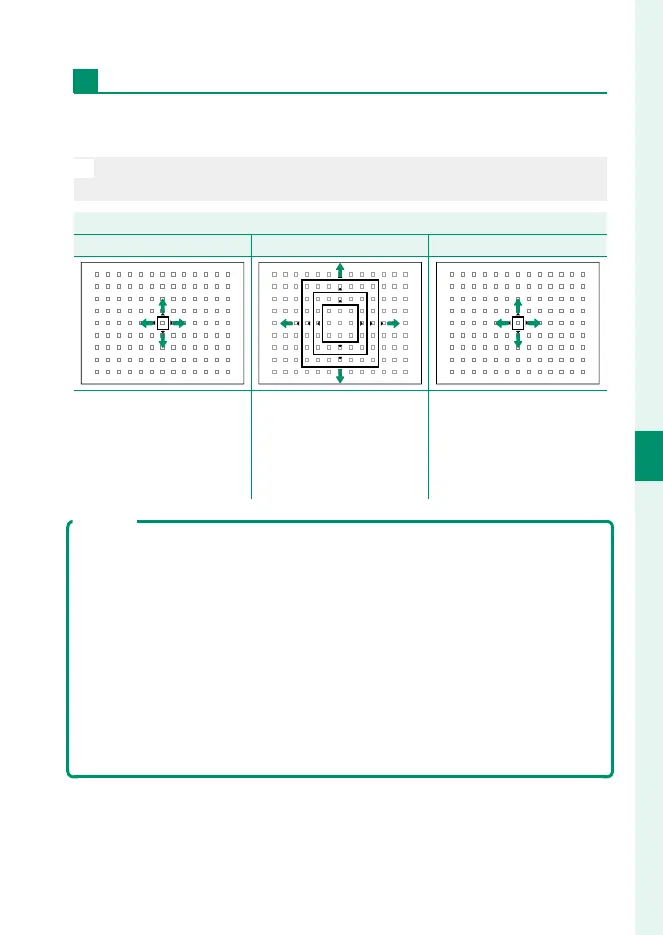
The focus-point display varies with the option selected for AF
mode.
N
Focus frames are shown by small squares (), focus zones by the large
squares.
AF mode
r
SINGLE POINT
y
ZONE
z
WIDE/TRACKING
Number of points avail-
able can be selected using
G
AF/MF SETTING>
NUMBER OF FOCUS
POINTS.
Choose from zones with
7 × 7, 5 × 5, or 3 × 3 focus
points.
Position focus frame over
subject you want to track.
Autofocus
Although the camera boasts a high-precision autofocus system, it may be
unable to focus on the subjects listed below.
•
Very shiny subjects such as mirrors or car bodies.
•
Subjects photographed through a window or other re ective object.
•
Dark subjects and subjects that absorb rather than re ect light, such as
hair or fur.
•
Insubstantial subjects, such as smoke or ame.
•
Subjects that show little contrast with the background.
•
Subjects positioned in front of or behind a high-contrast object that is
also in the focus frame (for example, a subject photographed against a
backdrop of highly contrasting elements).



 To Next Page