Ports and operating element s
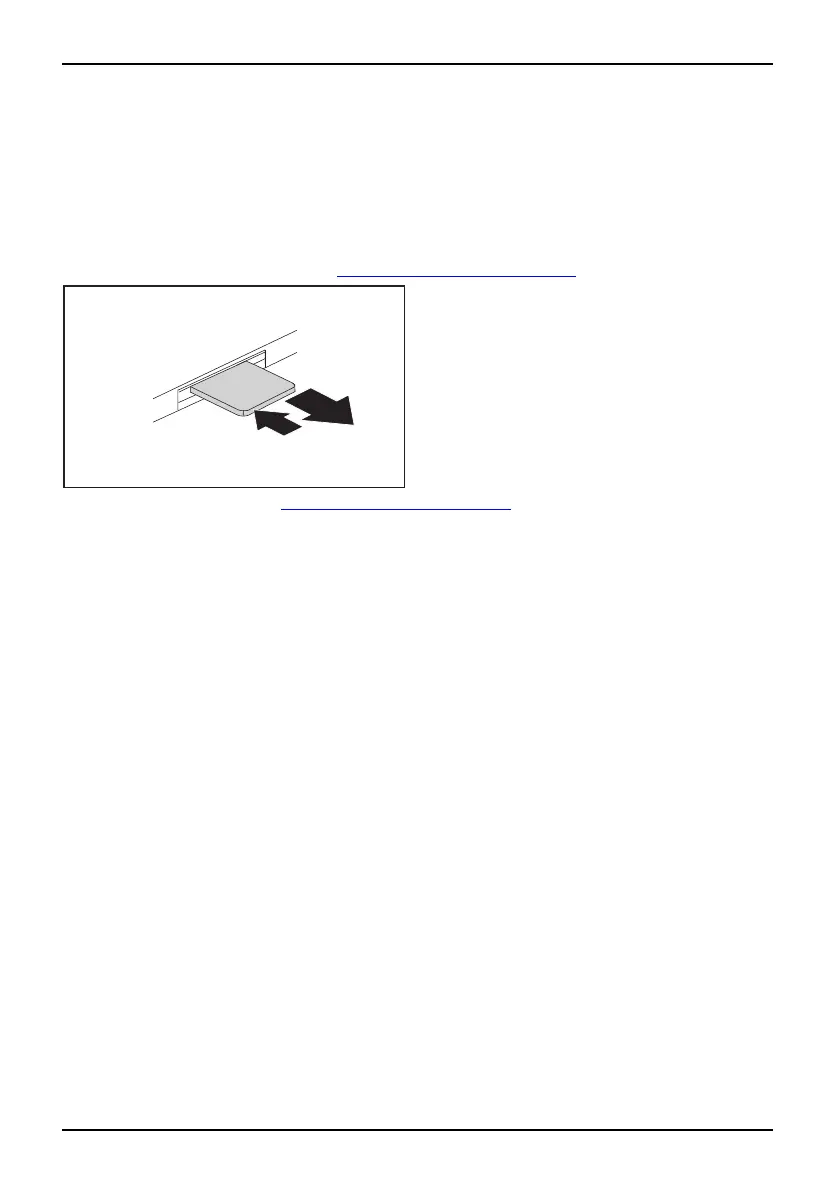
Removing a SIM card
► Switch the notebook off and pull the power plug out of the mains socket.
► Close the LCD screen so that it locks into place.
► Disconnect all cables connected to the noteboo k.
► Turn your notebo ok over and place it on a stable, flat and clean surface. If necessary, lay
an anti-slip cloth on this su rface to prevent the notebook from being scratched.
► Remove the battery (see Section "
Removing the battery", Page 15).
2
1
► Push the SIM card inwards slightly to
ejectitfromtheslot(1).
► Pull the SIM card out of the slot in the
direction of the arrow (2).
► Reinstall the battery (see "
Insertin g the battery", Page 16 ).
► Turn the notebook the right way up and place it on a flat surface.
► Reconnect the cables that you d isconnected previously.
18 A26391-K225-Z120-1-7619, edition 1


 To Next Page