Ports and operating element s
Status indicator p anel
Statusindicator panel
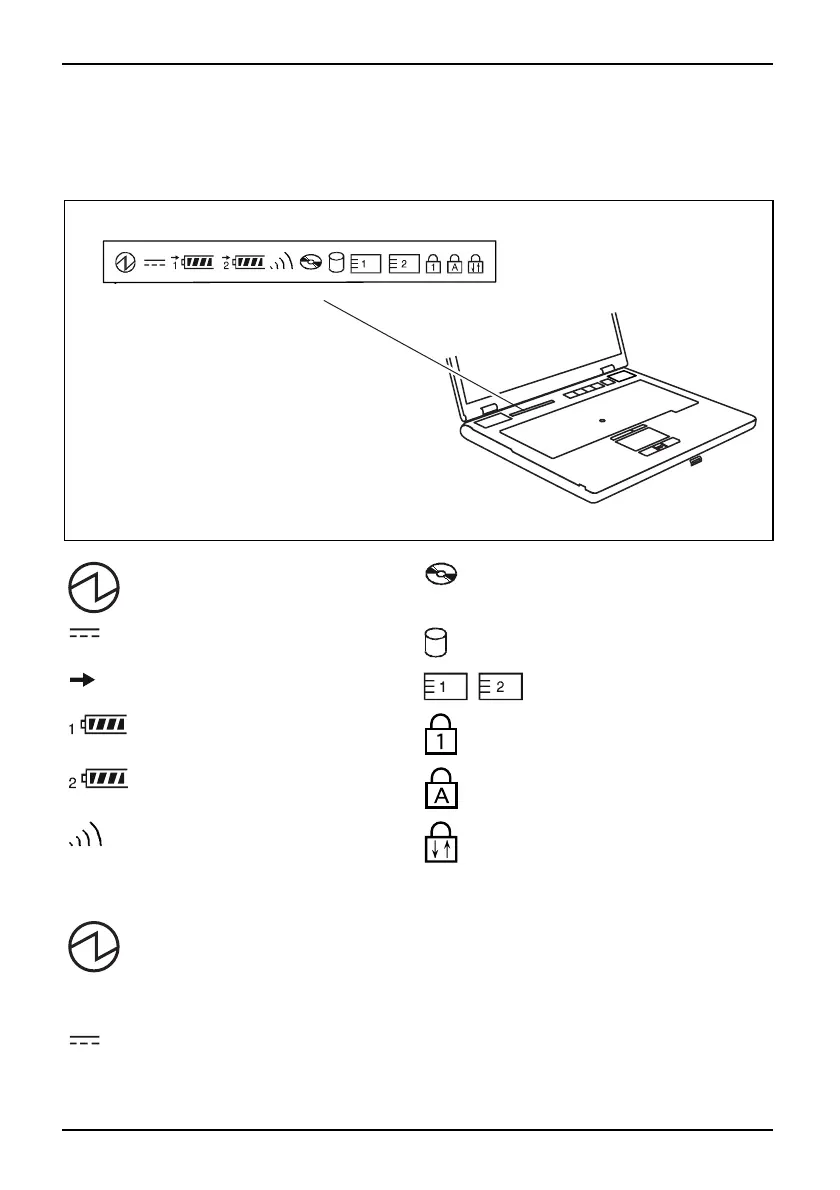
The status indicator panel is a small LCD panel on which various symbols a ppear. These symbols
provide information about the status of the power supply, the drives, and the keyboard functions.
Power-on indicator
CD/DVD indicator
Power indicator Hard disk indicator
Battery charging indicator
PC card/ExpressCard
indicators
First ba ttery indicator Num Lock indicator
Second battery indicator Caps Lock indicator
Radio components indicator
Scroll Lock indicator
The meanings of t he symbols are as follows:
Power-on indicator
Power
-onindicator
Indic
ator
• Indicator lights up: The notebook is switched on.
• The indicator flashes (1 second on/ 1 second off). The notebook is in suspend
mode
• The indicator does not light up: The notebook is switched off.
Power ind icat or
Pow
erindicator
Ind
icator
Indicator lights u p: T he ma ins adapter is supplying power to the notebook.
10 A26391-K225-Z120-1-7619, edition 1


 To Next Page