Removing and installing comp onents
during servicing
Installing the hard disk
1
1
1
1
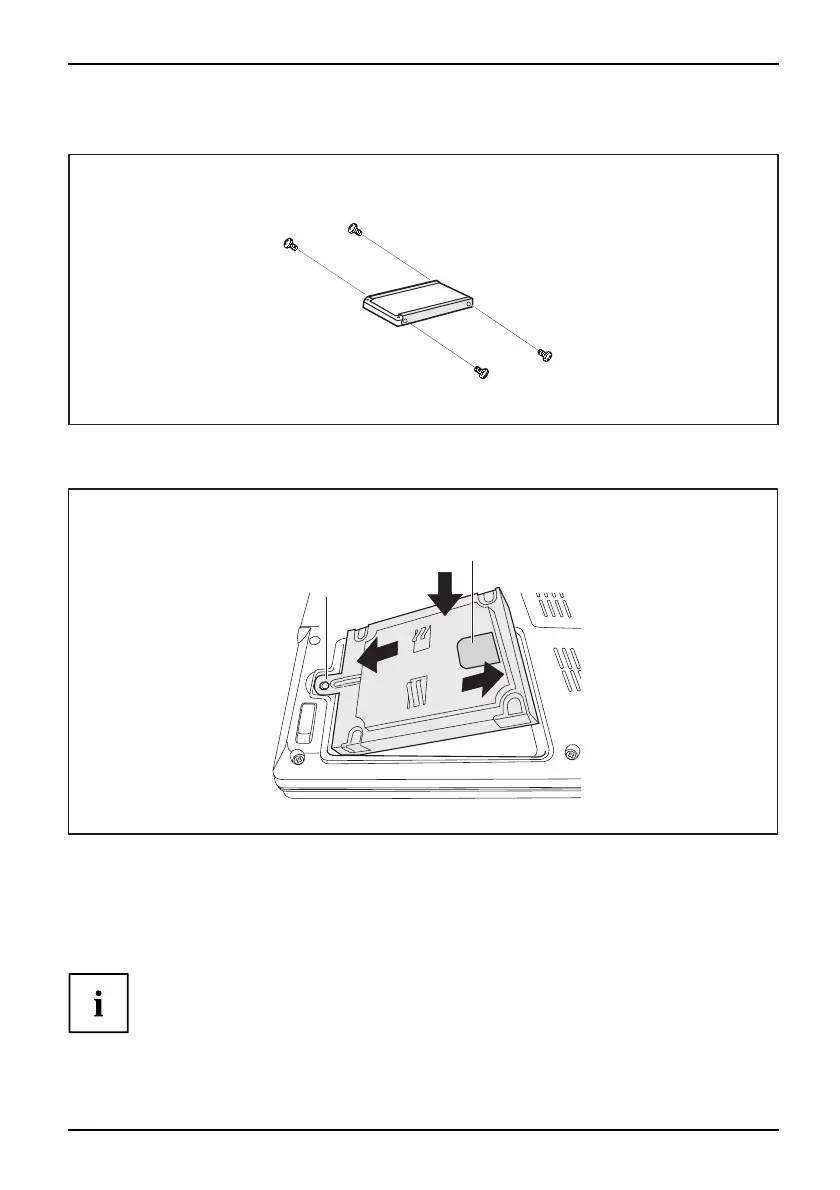
► Insert the hard disk i
nto the hard disk carrier.
► Fasten the hard disk carrier with the screws (1).
3
b
a
1
2
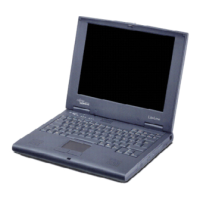
► Insert the hard disk at an angle into the hard disk compartment (1). Ensure that the eye let
(a) on the hard disk holder is inserted correctly into the existing opening.
► Place the har
d disk in the hard disk compartment (2).
► Pull the hard disk by the pulling aid (b) in the direction indicated by the arrow (3) until
the hard disk can be felt to latch into the ha rd disk connector.
If the pulling aid (b) sticks out too far from the hard disk, it will not be
possible to fasten the hard disk c over correctly.
► Lay the pull
ing aid (b) down flat on the hard disk.
A26391-K225-Z120-1-7619 , edition 1 23


 To Next Page