Removing and installing comp onents
during servicing
Hard disk
The hard disk is the most important storage medium of your notebook. You can work considerably
faster and more efficiently if you copy applications and files fro m CDs to your hard disk.
When the hard disk is accessed, the hard disk indicator lights up in the status
indicator panel, see "
Status indicator panel", Page 10.
Removing the hard disk
► Switch off your notebook and disconnect the power plug from the mains.
Harddisk
► Close the LCD screen so that it locks into place.
► Disconnect all cables connected to the notebook.
► Turn your notebook over and place it on a stable, flat and clean surf ace. If necessary, lay
a non-slip cloth on this surface to prevent the notebook from being scratched.
► Remove the battery (see "
Removing the battery", Page 15).
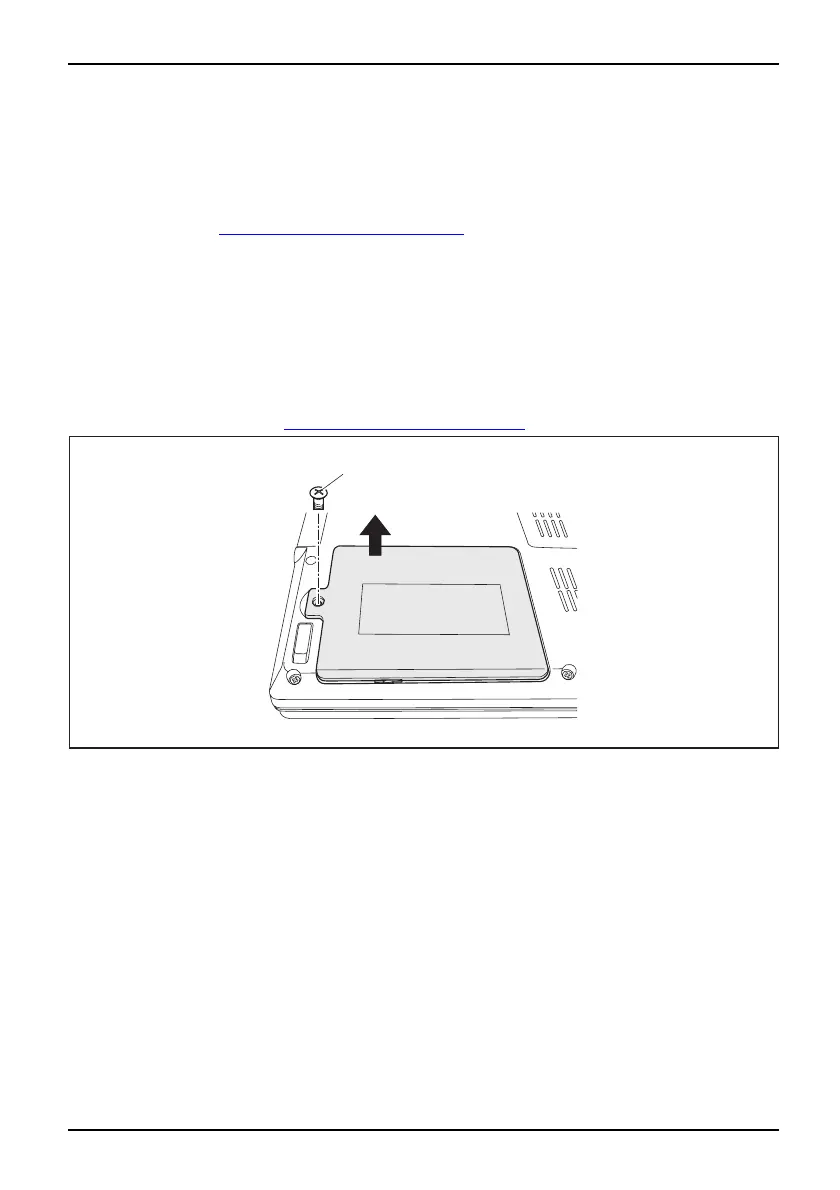
1
2
► Remove the scr ew (1).
► Lift the cover off the notebook (2).
A26391-K225-Z120-1-7619 , edition 1 21


 To Next Page