- 48 -
DUCT TYPE
ARGA30-60F
11-3. Function settings on wired remote controller
By using some components on the wired remote controller, you can change the function settings
related on the remote controller.
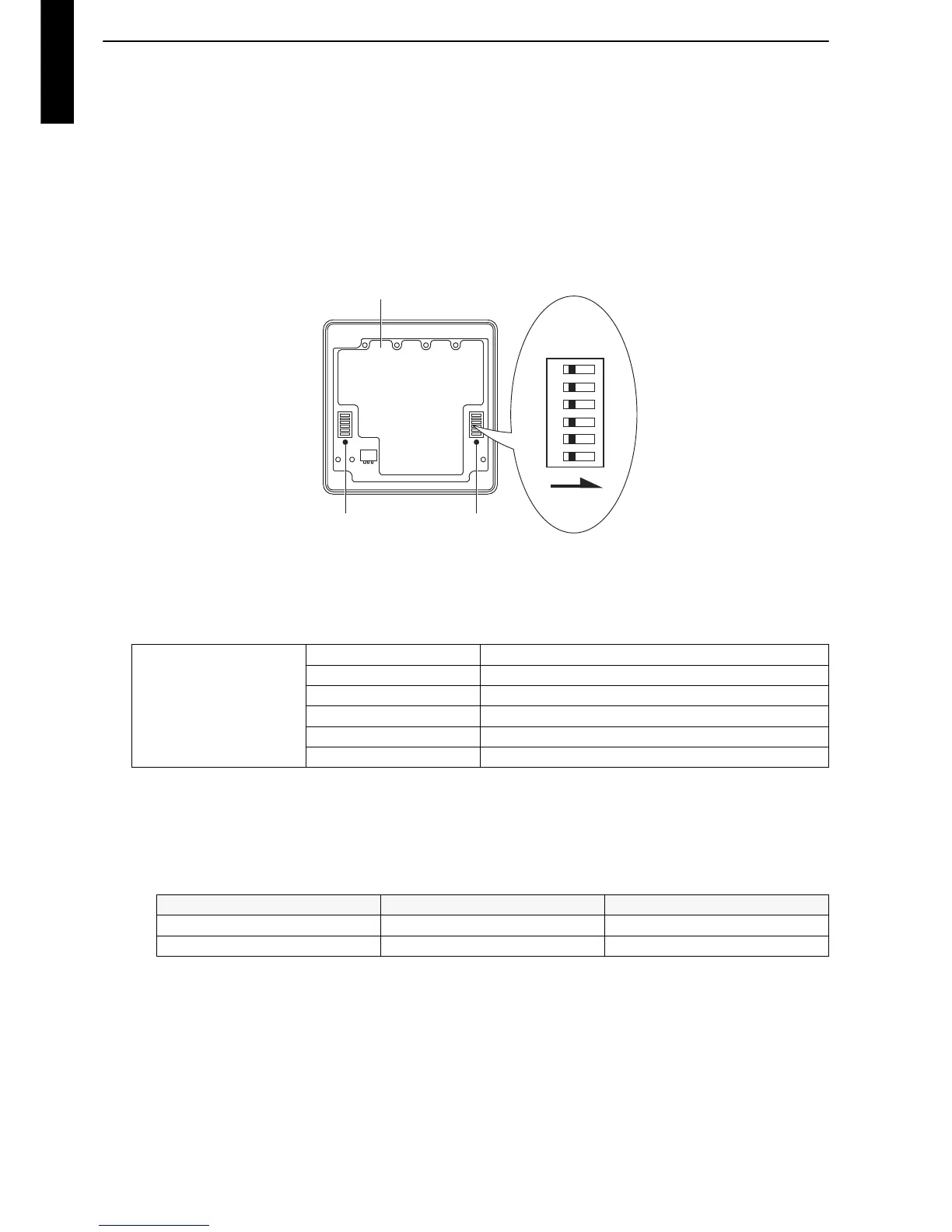
Component location
Components on the wired remote controller used for the function settings are located as shown
in the following figure.
NOTE: Do not use DIP switch 2.
DIP switch setting
By switching each slide switch on the DIP switch 1, you can change the function settings for the
remote controller.
*: Switches are fixed at OFF initially.
• SW6: Memory backup setting
Set to ON to use the batteries for memory backup. If the batteries are not used, all of the settings
stored in the memory will be deleted if there is power failure.
NOTE: In case of simple remote controller, do not turn it on.
DIP switch 1
SW1 Setting change prohibited*
SW2 Setting change prohibited*
SW3 Setting change prohibited*
SW4 Setting change prohibited*
SW5 Setting change prohibited*
SW6 Memory backup setting
SW6 Memory backup Factory setting
OFF Disabled ♦
ON Enabled



 To Next Page