- (01 - 26) -
DUCT TYPE
ARGA18-25FMTA
DUCT TYPE
ARGA18-25FMTA
INDOOR UNIT (Setting by remote controller)11-2.
The function settings of the control of the indoor unit can be changed by this procedure according •
to the installation conditions. Incorrect settings can cause the indoor unit to malfunction.
After the power is turned on, perform the Function Setting according to the installation conditions •
using the remote controller.
The settings may be selected between the following two: Function Number or Setting Number.
•
Settings will not be changed if disable numbers or setting values are selected.
•
PREPARATION
Turn on the power. •
* Before turning on the power of the indoor units, make sure the piping air-tight test and vacuuming
have been conducted.
* Also check again to make sure no wiring mistakes were made before turning on the power.
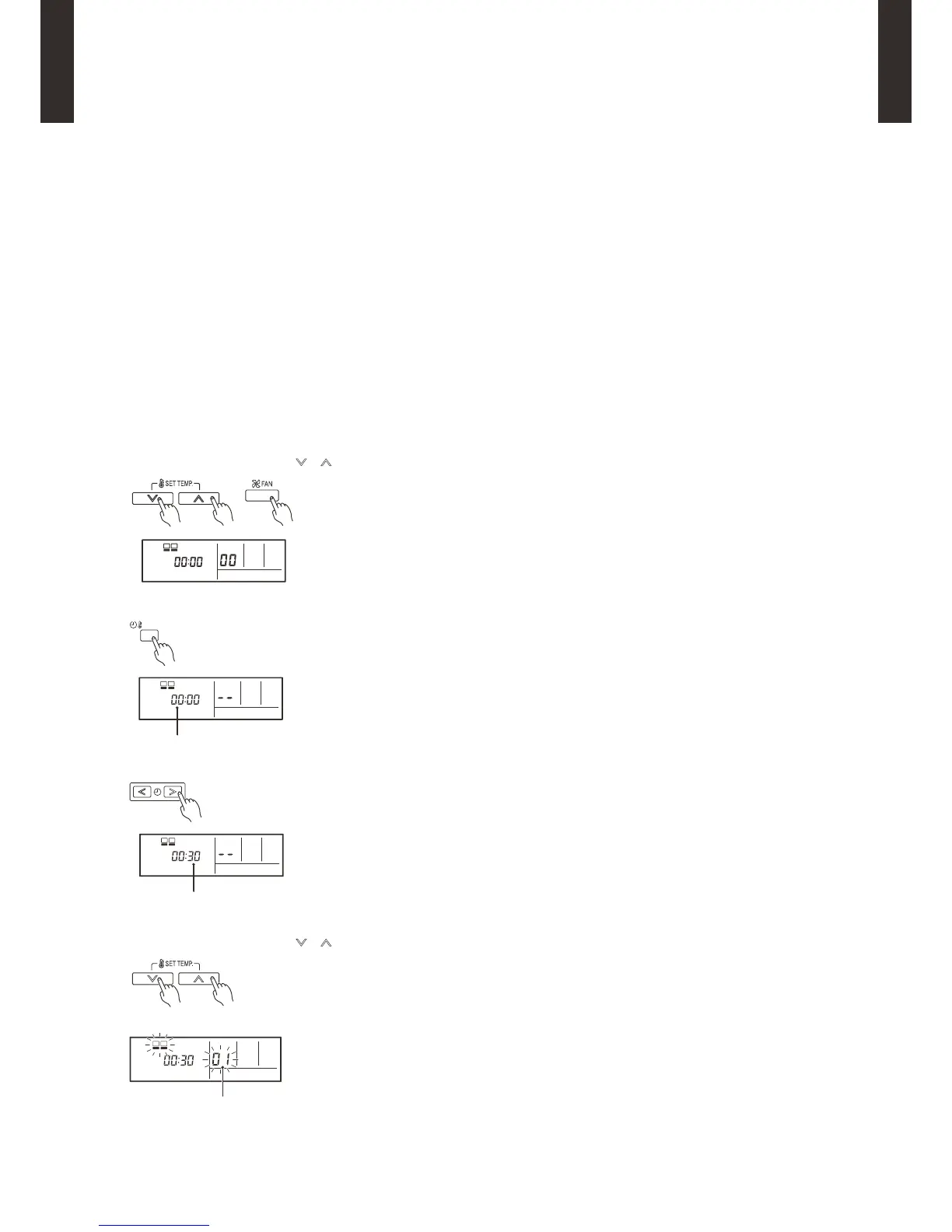
FUNCTION SETTING METHOD (for Wired remote controller)
Setting method
z
(1) Press the SET TEMP. buttons ( ) ( ) and FAN button simultaneously for more than 5 seconds to enter the function setting mode.



 To Next Page