1
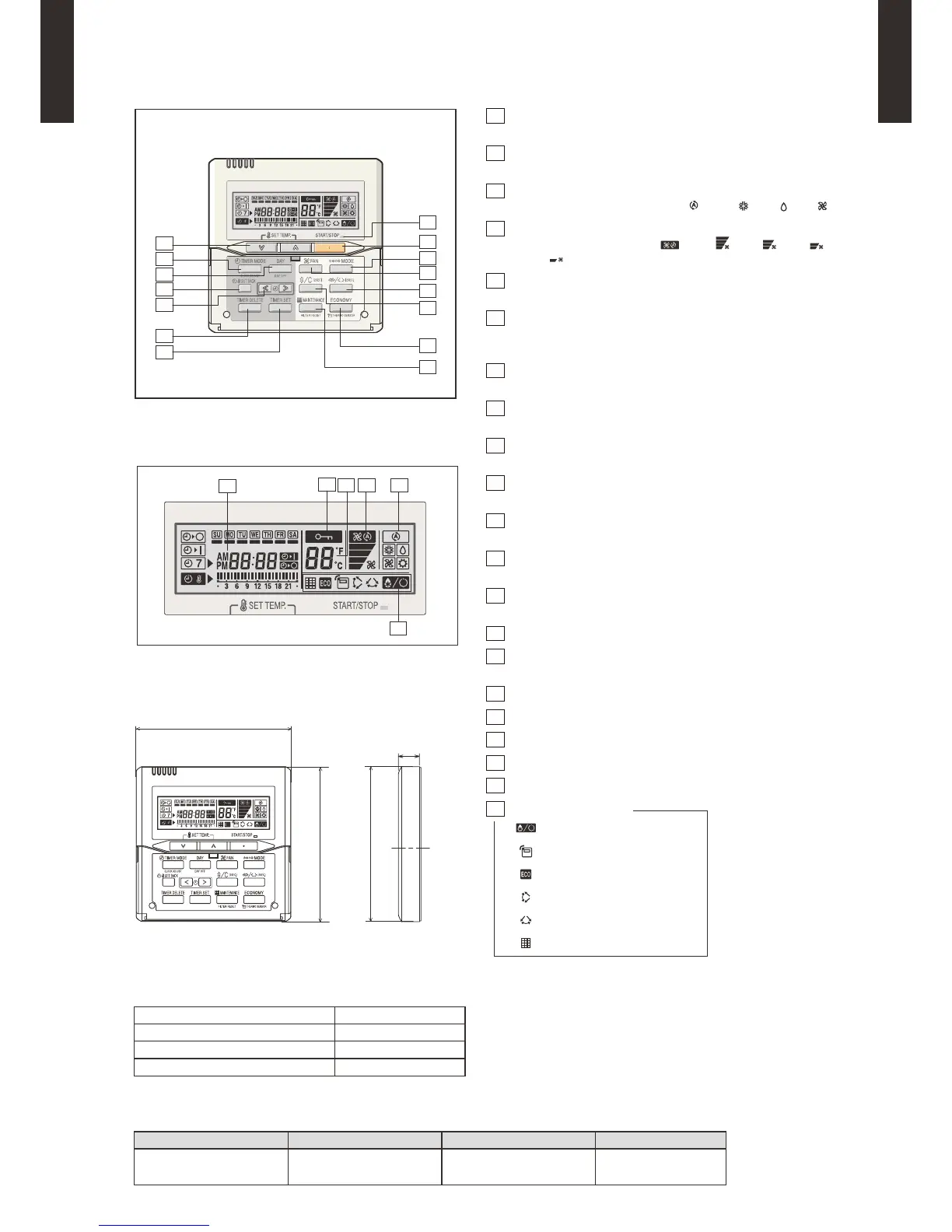
START/STOP button
Pressed to start and stop operation.
2
SET TEMP. button
Selects the setting temperature.
3
MODE button
Selects the operating mode (AUTO , COOL , DRY , FAN ).
4
FAN button
Selects the fan speed (AUTO , HIGH , MED , LOW ,
QUIET
).
5
ECONOMY button
Turns the economy efcient mode on and off.
6
TIMER MODE (CLOCK ADJUST) button
Selects the timer mode (OFF TIMER, ON TIMER, WEEKLY
TIMER). Set the current time.
7
DAY (DAY OFF) button
Temporarily cancels of one day timer.
8
SET BACK button
Pressed to select the set back timer.
9
Set time button
Pressed to set time.
10
TIMER DELETE button
The schedule of a weekly timer is deleted.
11
TIMER SET button
Sets the date, hour, minute and on-off time.
12
Verticalairowdirectionandswingbutton
Push for two seconds to change the swing mode.
13
Horizontalairowdirectionandswingbutton
Push for two seconds to change the swing mode.
14
FILTER RESET button
15
Operation lamp
Lights during operation and when the timer is on.
16
Timer and clock indicator
17
Operation mode indicator
18
Fan speed indicator
19
Operation lock indicator
20
Temperature indicator
21
Function indicator
Defrost indicator
Thermo sensor indicator
Economy indicator
Vertical swing indicator
Horizontal swing indicator
Filter indicator
NOTE:
Functions will be different due to type of indoor unit.
For details please see operation manual.
[ Unit: mm ]



 To Next Page