Fulton Heating Solutions, Inc. -- PHW Manual -- 2010-0713
Page 78
5. Troubleshooting – Fault Code Diagnosis
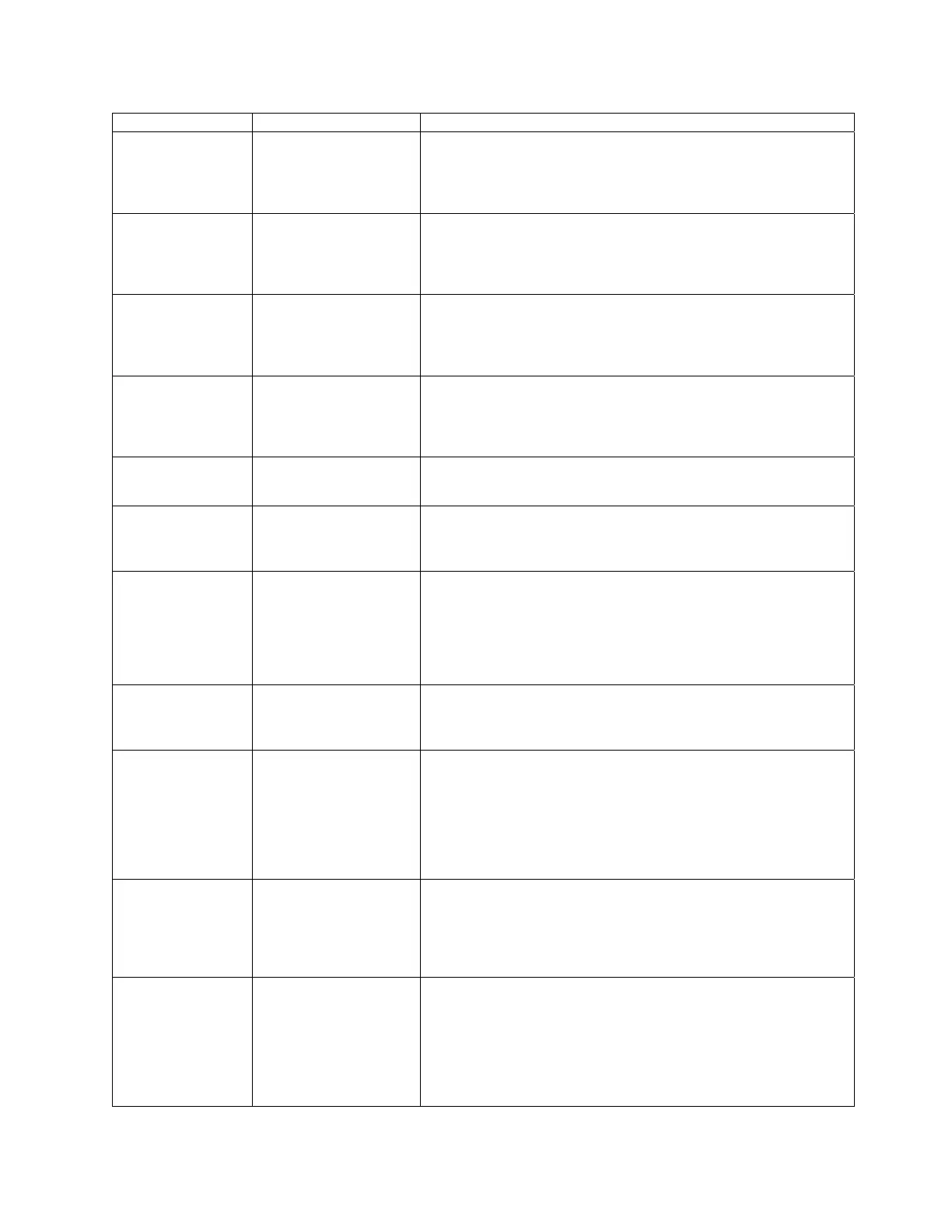
Fault Code System Failure Recommended Troubleshooting
Fault 02
“AC Frequen/Noise*
Excess noise or device
running on slow AC.
1. Check the relay module and display module connections.
2. Reset and sequence the 7800.
3. Check the 7800 power supply to assure that both frequency and
voltage meet specifications.
4. Check the backup power supply as appropriate.
Fault 03
“AC Line Dropout*
AC Line dropout
detected.
1. Check the relay module and display module connections.
2. Reset and sequence the 7800.
3. Check the 7800 power supply to assure that both frequency and
voltage meet specifications.
4. Check the backup power supply as appropriate.
Fault 04
“AC Frequency*
Device running on fast
AC.
1. Check the relay module and display module connections.
2. Reset and sequence the 7800.
3. Check the 7800 power supply to assure that both frequency and
voltage meet specifications.
4. Check the backup power supply as appropriate.
Fault 05
“Low Line Voltage*
Low AC line detected.
1. Check the relay module and display module connections.
2. Reset and sequence the 7800.
3. Check the 7800 power supply to assure that both frequency and
voltage meet specifications.
4. Check the backup power supply as appropriate.
Fault 15 Flame detected.
1. Verify correct jumper is clipped.
2. Reset control.
3. If fault persists replace 7865 flame programmer.
Fault 19
Main Flame Ignition
Failure
1. Check flame rod connections.
2. Check amplifier.
3. Reset control.
4. If fault persists replace 7865 flame programmer.
Fault 32
*Airflow Switch*
Combustion airflow
interlock fault.
1. Check wiring--correct any errors.
2. Inspect the fan, assure that there is no blockage of the air intake
and that it is supplying air.
3. Assure that the Airflow Interlock switches are functioning
properly and that their contacts are free from contaminants.
4. Reset and sequence the 7800 to Prepurge. Measure the voltage
between terminal 7 and G (ground). 120 Vac should be present.
Fault 47
*Jumpers Changed*
The configuration
jumpers differ from the
sample taken at startup.
1. Inspect the jumper connections. Assure that clipped jumpers
have been completely removed.
2. Reset and sequence the 7800.
3. If fault persists, replace the relay module.
Fault 54
*Comb. Pressure*
Combustion pressure
switch fault.
1. Check wiring; correct any errors.
2. Inspect the Combustion Pressure Switch to assure that it is
functioning properly.
3. Reset and sequence the 7865.During standby or prepurge,
measure the voltage between terminal 20 and G (ground). 120 Vac
should be present. If not, the combustion pressure switch may be
defective and need replacement.
4. If fault persists, replace the relay module.
Fault 55
*Purge Fan Sw. On*
Purge fan switch is on
when it should be off.
1. Check wiring; correct any errors.
2. Inspect the Purge Fan Switch terminal 18 and connections.
Assure that the switch is functioning correctly and is not jumpered
or welded.
3. Reset and sequence the 7865.
4. If the fault persists, replace the relay module.
Fault 56 Blocked intake fault
1. Check wiring; correct any errors.
2. Inspect the Block Intake Switch and make sure it is working
properly.
3. Reset and sequence the relay module.
4. During PREPURGE, measure the voltage between terminal 7
and G (ground). 120 Vac should be present. If not, the Block
Intake Switch is defective and should be replaced.
5. If fault persists, replace the relay module.


 To Next Page