6-4 A73F0EA
he following adjustment normally are not
attempted in the field. Only when replacing the
LCD Panel then adjust as a preparation.
4. White Balance Adjustment
*This adjustment is needed when reparing T-CON
CBA.
Purpose: To mix red, green and blue beams correctly
for pure white.
Symptom of Misadjustment: White becomes bluish
or reddish.
1. Operate the unit for more than 20 minutes.
2. Input the White Purity.
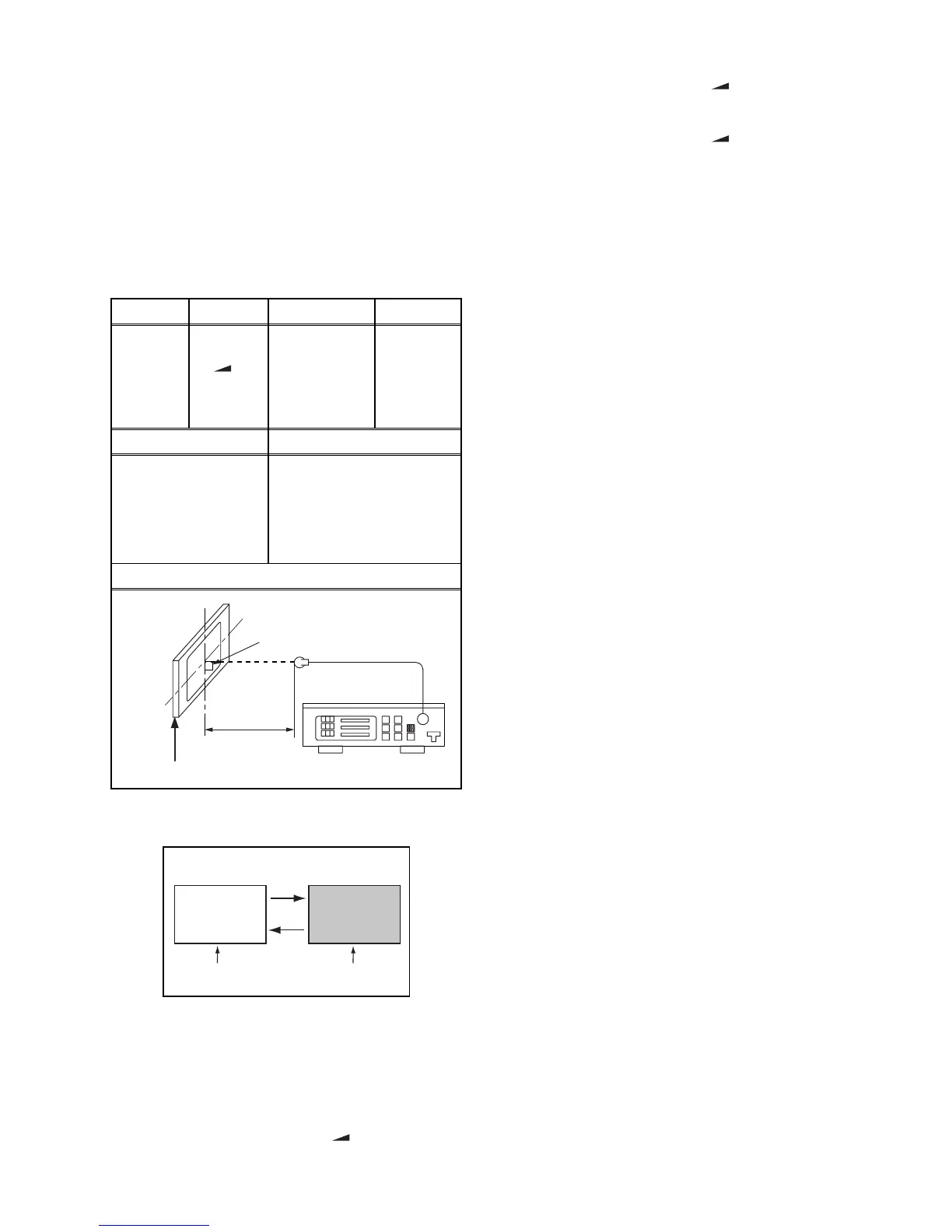
3. Set the color analyzer to the CHROMA mode and
bring the optical receptor to the center on the
LCD-Panel surface after zero point calibration as
shown above.
Note: The optical receptor must be set
perpendicularly to the LCD Panel surface.
4. [CVBS]
Enter the Service mode. Press [ -] button on the
remote control unit and select “C/D/S 1” mode.
[YUV]
Enter the Service mode. Press [ -] button on the
remote control unit and select “C/D/S 2” mode.
[RGB]
Enter the Service mode. Press [ -] button on the
remote control unit and select “C/D/S 3” mode.
5. [CVBS]----(APL 70%)
Press [6] button to select “DB 1(C/D/S 1)” for Blue
adjustment. Press [4] button to select “DR 1(C/D/S
1)” for Red adjustment. When “x” value and “y”
value are not within specification, adjust “DB 1(C/
D/S 1)” or “DR 1(C/D/S 1)”. Refer to “1. Initial
Setting.”
[CVBS]----(APL 30%)
Press [3] button to select “COB 1(C/D/S 1)” for
Blue adjustment. Press [1] button to select “COR
1(C/D/S 1)” for Red adjustment. When “x” value
and “y” value are not within specification, adjust
“COB 1(C/D/S 1)” or “COR 1(C/D/S 1)”. Refer to
“1. Initial Setting.”
After adjusting (APL 30%), verify (APL 70%) again
and adjust repeatedly until both values are within
specification.
6. [YUV]----(APL 70%)
Press [6] button to select “DB 2(C/D/S 2)” for Blue
adjustment. Press [4] button to select “DR 2(C/D/S
2)” for Red adjustment. When “x” value and “y”
value are not within specification, adjust “DB 2(C/
D/S 2)” or “DR 2(C/D/S 2)”. Refer to “1. Initial
Setting.”
[YUV]----(APL 30%)
Press [3] button to select “COB 2(C/D/S 2)” for
Blue adjustment. Press [1] button to select “COR
2(C/D/S 2)” for Red adjustment. When “x” value
and “y” value are not within specification, adjust
“ CO B 2( C /D / S 2 ) ” o r “ C OR 2 (C / D /S 2) ” .
Refer to “1. Initial Setting.”
After adjusting (APL 30%), verify (APL 70%) again
and adjust repeatedly until both values are within
specification.
7. [RGB]----(APL 70%)
Press [6] button to select “DB 3(C/D/S 3)” for Blue
adjustment. Press [4] button to select “DR 3(C/D/S
3)” for Red adjustment.When “x” value and “y”
value are not within specification, adjust “DB 3(C/
D/S 3)” or “DR 3(C/D/S 3)”. Refer to “1. Initial
Setting.”
[RGB]----(APL 30%)
Press [3] button to select “COB 3(C/D/S 3)” for
Blue adjustment. Press [1] button to select “COR
3(C/D/S 3)” for Red adjustment. When “x” value
and “y” value are not within specification, adjust
“ CO B 3( C /D / S 3 ) ” o r “ C OR 3 (C / D /S 3) ” .
Refer to “1. Initial Setting.”
After adjusting (APL 30%), verify (APL 70%) again
and adjust repeatedly until both values are within
specification.
8. Turn the power off and on again.
Test Point Adj. Point Mode Input
Screen
[ -]
button
[CVBS]
C/D/S 1
[YUV]
C/D/S 2
[RGB]
C/D/S 3
White Purity
(APL 70%)
or
(APL 30%)
M. EQ. Spec.
Pattern Generator,
Color analyzer
(APL 70%)
x=
0.272 ± 0.03
,
y=
0.278 ± 0.03
(APL 30%)
x=
0.272 ± 0.01
,
y=
0.278 ± 0.01
Figure
Color Analyzer
It carries out in a darkroom.
L = 3 cm
Perpendicularity
INPUT: WHITE 70%, 30%
30%=30IRE70%=70IRE
INPUT SIGNAL


 To Next Page