55
c: Set your outboard equipment’s input gain control to a nominal position (1 o’clock if analogue,
about 70% full if digital) and fine adjust the FF-4000’s rear panel SEND TRIM FX LOOP 1 control
so that the outboard effect unit input signal indicators read approximately -12dB below clip.
If your outboard gear only has signal present and clip input level indicators, adjust the FF-4000’s
rear panel SEND TRIM FX LOOP 1 control until the effect unit clip indicator just flashes and then
back off the send trim control by about 90° if analogue – or by about 30% if digital.
d: If your outboard gear has separate output controls, set these for an
indication of approximately -12dB below clip.
Again, if your outboard gear only has signal present and clip output level
indicators, adjust its output gain until the clip indicator just flashes and
then back off the control by about 90° if analogue – or by about
30% if digital.
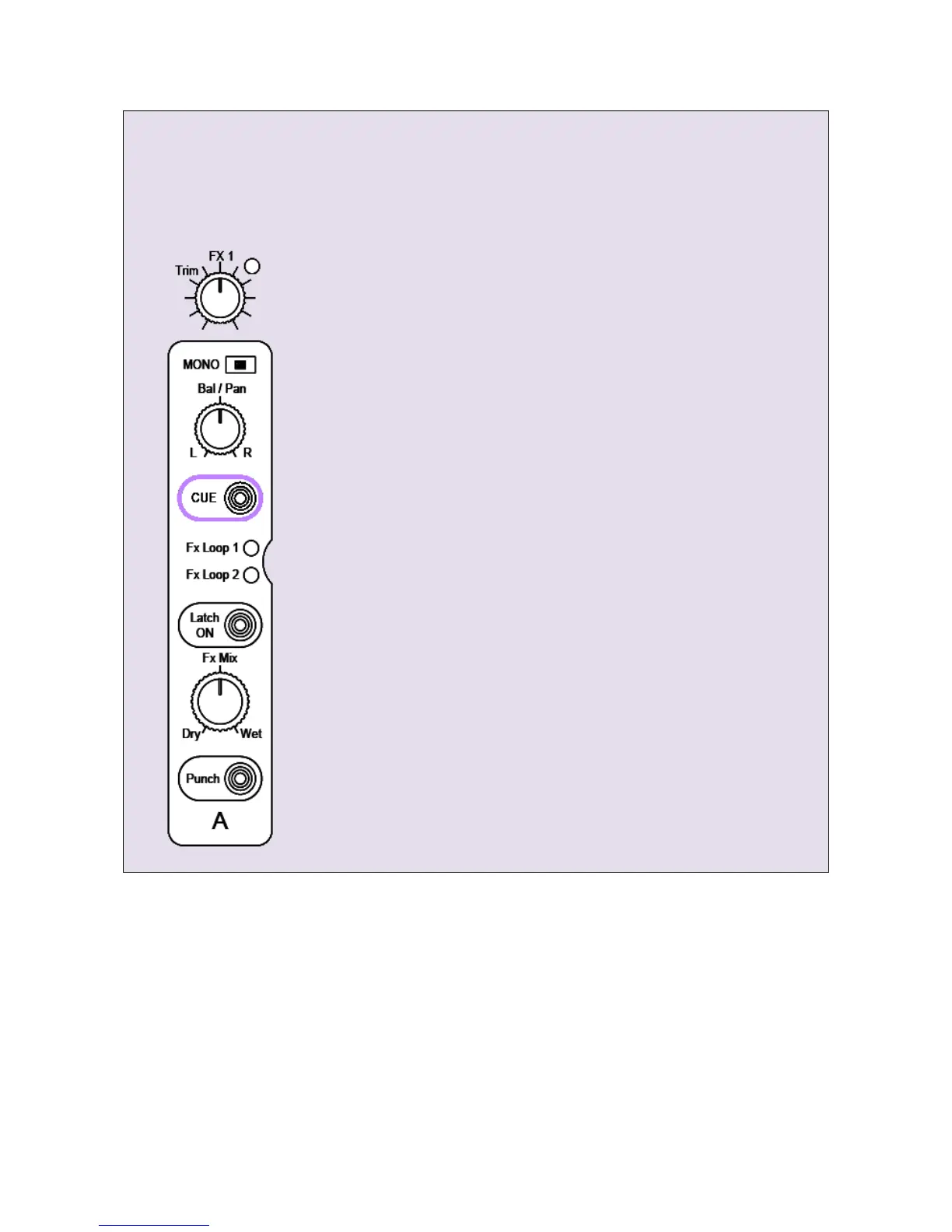
e: Set the FF-4000’s X-Fade A Bal/Pan control to L.
f: Adjust your front panel FX1 Trim (effects return level) control using the
Cue meter via the X-Fade A CUE button. Make sure the CUE BAL control
is set fully counter clockwise to CUE. Finely adjust for Cue meter levels
around 0 or +1dB
g: Set the X-Fade A Fx Mix control to Wet.
h: Now turn the MASTER LEVEL control all the way down (fully counter
clockwise) and unmute your power amplifiers.
i: Slowly increase the MASTER LEVEL and listen to the inserted effect.
If the outboard gear is too noisy or has poor quality converters, you may
have to compromise on headroom by increasing the outboard
equipment’s input gain by a few dB and decreasing its output gain by the
same amount. A little experimentation may be required.
If the outboard gear is starting to sound distorted at your likely
maximum effect you may need to reduce its input and/or output gain
slightly. Again, a little experimentation may be required.
j: If necessary, finely adjust the FF-4000’s FX1 Trim (effects return level) to
balance the Fx Mix Direct vs Wet levels whilst swapping the FX Mix
control between Dry and Wet.
www.funktion-one.com © Funktion One Research Limited 2011


 To Next Page