46
|
47
“Save (memo / note)”
This command initiates recording of a spoken note. The EGO FLASH checks if enough memory is available. The user can
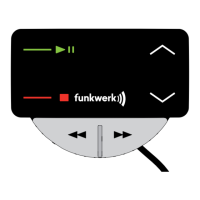
save the message and end the recording with the key. There is no command for ending the recording. Afterwards,
the following commands may be given:
→ “Yes / Save” To save the memo
→ “No / Return / Reject” To reject the memo
→ “Abort / Cancel” Ends the dialogue without carrying out a function
→ “Help” Calls up Help and an explanation of possible commands
“Listen to (memos / notes)”
With this command, it is possible to listen to the recorded memos. Only one memo is played. With the correct command,
you can listen to the next note. The following commands are available:
→ “Next / Continue” To play the next note
→ “Repeat” To replay the note
→ “Delete” To delete the note
→ “No / Return” To return to the main menu
→ “Abort / Cancel” Ends the dialogue without carrying out a function
→ “Help” Calls up Help and an explanation of possible commands
“Help”
As with “Cancel”, this command may be used at any time. If the “Help” command is selected, the EGO FLASH explains
which commands are possible for specifi c functions at the time they are called up.


 To Next Page