15-1
15. NAVIGATION TOOLS
This chapter presents the various navigation tools available with the system. With the
exception of the divider, the tools listed below are in the [Overlay/NAV Tools] box.
*
1
: Shown only when the [Echo] page is enabled at installation. Not available for B
types.
*
2
: Shown only when a EC-3000 with TCS functionality is connected to the network.
15.1 How to Access the NAV Tools in the Overlay/
NAV Tools Box
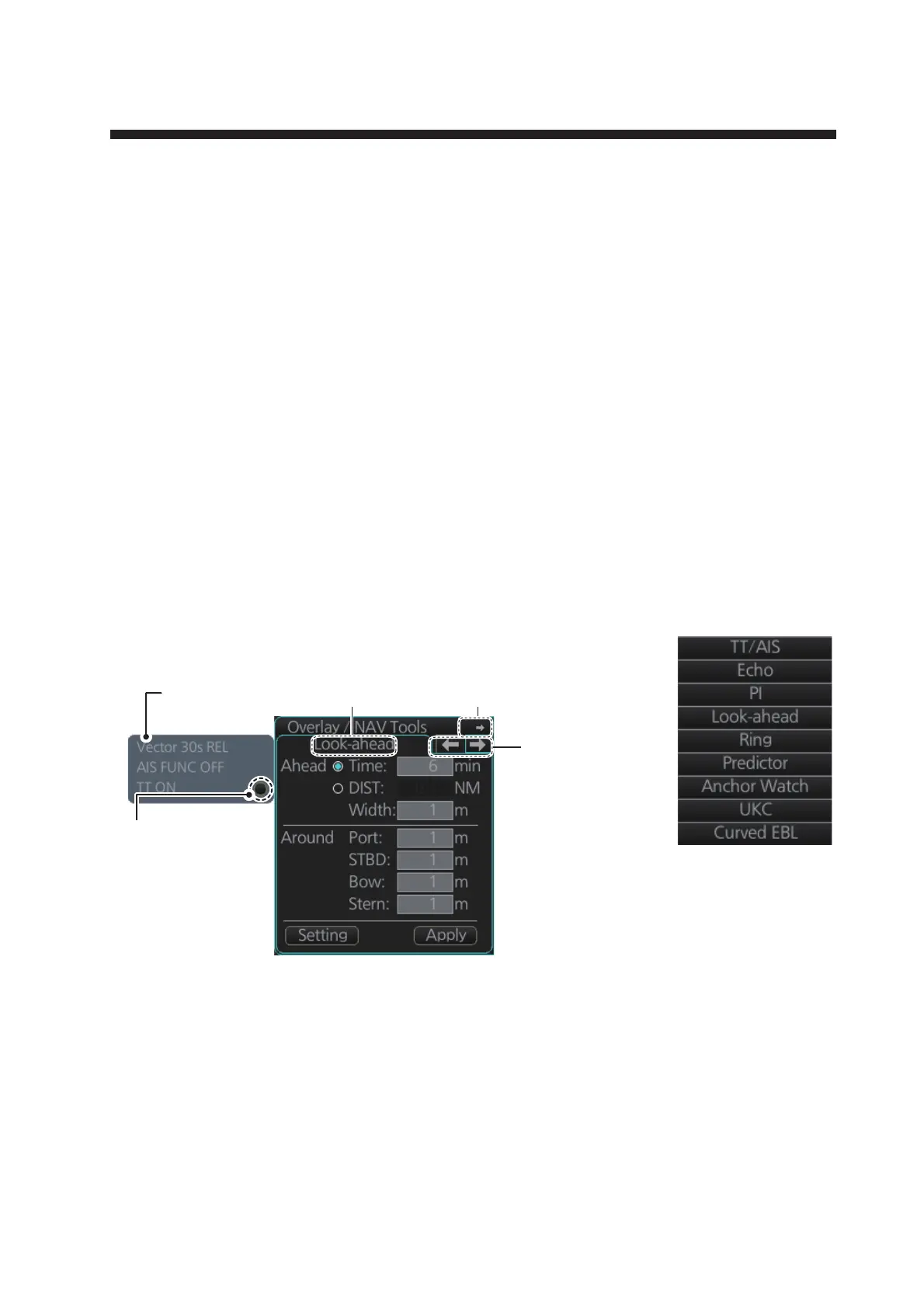
The [Overlay/NAV Tools] box is located at bottom-right position on the screen. There
are two methods to access the NAV Tools.
• Click the page selection buttons to show the desired page.
• Right-click the Overlay/NAV Tools box to show the context-
sensitive menu, then click the desired page.
• TT/AIS (see chapters 3 and 4)
• Echo*
1
• Parallel index lines
• Look-ahead
• Range rings
• Predictor
• Anchor watch
• Under keel clearance
• Curved EBL*
2
• Divider
[Overlay/NAV Tools] box ([CheckArea] page)
Page
selection
buttons
Minimize button
Page nameTT/AIS display
settings
Click this button to
open the TT/AIS
display settings
menu. For details on
TT/AIS settings, see
chapter 18.



 To Next Page